
1. Кіріспе
This instruction manual provides detailed guidance for the proper installation, usage, and maintenance of your Radtel RT-10 series walkie talkie belt clip. This accessory is designed to securely attach your compatible two-way radio to your belt or clothing, ensuring convenient access and portability.
The Radtel RT-10 series belt clip is an original, high-quality accessory, engineered for durability and a secure fit with specified Radtel and other compatible two-way radio models.
2. Үйлесімділік
The Radtel RT-10 series belt clip is compatible with the following two-way radio models:
- Radtel RT-10
- WLN KD-C1
- LT-316
- TD-M8
- RT22
- X6
- ZS-B1
- NK-U1
- R1
Ensure your radio model is listed above for optimal fit and security.
3. Пакет мазмұны
Сіздің пакетіңізде келесі элементтер болуы керек:
- 5 x Radtel RT-10 Series Belt Clips
4. Орнату
Follow these steps to properly attach the belt clip to your compatible two-way radio:
-
Prepare the Radio and Clip: Hold the belt clip and your radio. Identify the designated slot on the back of your radio where the clip will attach.

Image: The belt clip and a compatible radio shown separately, ready for attachment.
-
Align and Slide: Align the top hook of the belt clip with the corresponding slot on the upper back of the radio. Gently slide the clip downwards until it clicks into place. Ensure the clip is fully seated and secure.
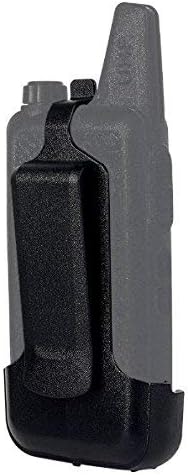
Image: The belt clip securely attached to the back of the radio.
- Қауіпсіздікті тексеру: Once attached, gently pull on the belt clip to confirm it is firmly secured to the radio and does not easily detach.
Орнату туралы бейне нұсқаулық
Video: Demonstrates the flexibility of the belt clip and its attachment to a compatible walkie talkie, followed by attaching the radio to a belt.
5. Қолдану
To use the belt clip, simply slide it over your belt, waistband, or a sturdy edge of your clothing. The clip's design ensures a firm grip, keeping your radio accessible and secure during activity.
Always ensure the radio is fully seated in the clip and the clip is securely fastened to your attire before engaging in activities that may cause the radio to dislodge.
6. Техникалық қызмет көрсету
- Тазалау: Wipe the belt clip with a soft, damp cloth to remove dust or dirt. Avoid using harsh chemicals or abrasive cleaners, as these can damage the material.
- Тексеру: Periodically inspect the clip for any signs of wear, cracks, or damage. If the clip appears damaged, replace it to ensure the secure retention of your radio.
- Сақтау орны: Store the belt clip in a cool, dry place away from direct sunlight when not in use.
7. Ақаулықтарды жою
Мәселе: The belt clip does not attach securely to the radio.
- Шешімі: Verify that your radio model is listed under the "Compatibility" section. Ensure the clip is aligned correctly with the radio's attachment slot and pushed firmly until it clicks into place.
Мәселе: The belt clip feels loose on my belt.
- Шешімі: Ensure the belt or waistband material is thick enough for the clip to grip firmly. Avoid attaching the clip to thin or delicate fabrics that may not provide adequate support.
8. Техникалық сипаттамалар
| Ерекшелік | Мәлімет |
|---|---|
| Бренд | радтел |
| Үлгі нөмірі | RT-10 (rt-10-bl) |
| Түс | Қара |
| Элемент салмағы | 0.03 фунт (шамамен 14 г) |
| Қосылған құрамдас бөліктер | 5 белдік қыстырғыш |
| Үйлесімді құрылғылар | Radtel RT-10, WLN KD-C1, LT-316/TD-M8, RT22/X6, ZS-B1, NK-U1, R1 |
9. Кепілдік және қолдау
For warranty information and customer support, please refer to the official Radtel webсайтына немесе сатушыға хабарласыңыз. Сатып алуды растау ретінде сатып алу түбіртегіңізді сақтаңыз.
You can visit the official Radtel store for more products and support: Radtel Official Store