
1. Кіріспе
This manual provides instructions for the installation, operation, and maintenance of the Nexxt Solutions Naxos800 8-Port Fast Ethernet Network Switch. The Naxos800 is an unmanaged compact desktop switch designed for small office/home office (SOHO) environments, student dormitories, and small enterprises, offering reliable network connectivity.
2. Негізгі мүмкіндіктер
- 8 Fast Ethernet Ports: Provides 8 UTP/STP 10/100Mbps ports with auto MDI/MDIX.
- Plug and Play: Simple setup requiring no software configuration.
- Басқарылмайтын қосқыш: Operates without requiring complex management interfaces.
- Store-and-Forward Technology: Ensures efficient packet transmission.
- MAC мекенжайын үйрену: Supports auto-learning and aging with a built-in 1000 MAC address table.
- Шағын дизайн: Suitable for desktop or wall mounting.
- Энергия үнемдеу: Төмен қуат тұтыну дизайны.
- Ағынды басқару: Full duplex and half duplex back pressure flow control.
- Төзімділік: Integrated lightning protection and a sturdy metal case.
- Тыныш жұмыс: Fanless design for silent performance.
3. Пакет мазмұны
Пакетте келесі элементтер бар екенін тексеріңіз:
- One (1) Nexxt Solutions Naxos800 8-Port Fast Ethernet Switch
- Бір (1) қуат адаптері

Image: The Nexxt Solutions Naxos800 switch, its power adapter, and product packaging.
4. Өнім аяқталдыview

Сурет: алдыңғы view of the Naxos800 switch, showing the Nexxt logo and eight green LED indicators for port activity.
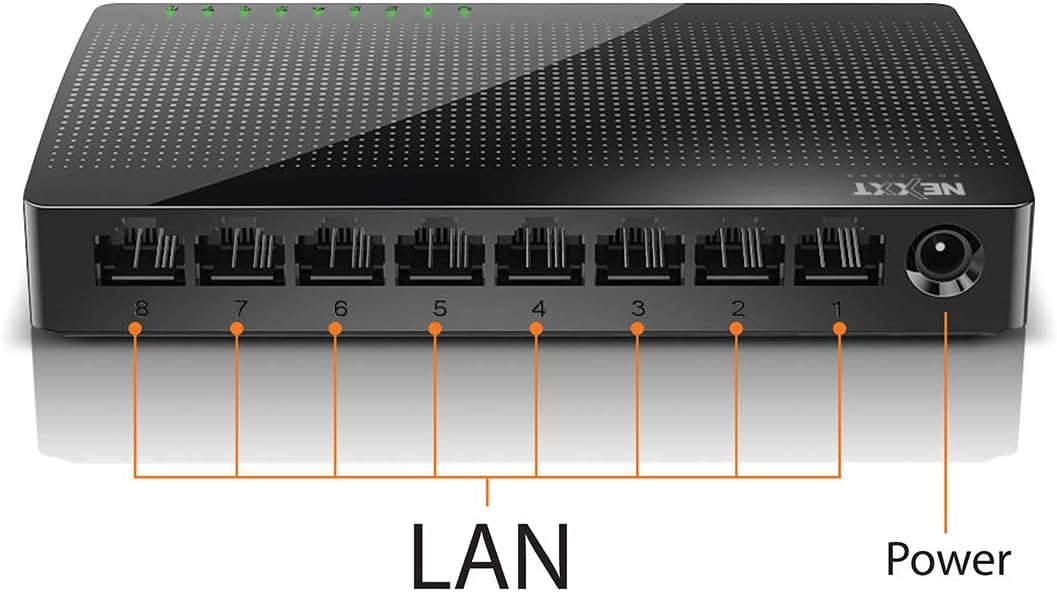
Сурет: артқы view of the Naxos800 switch, highlighting the eight LAN ports (numbered 1-8) and the power input port.
Жарықдиодты индикаторлар
The front panel features LED indicators for each port, providing visual status:
- Жасыл жарық диоды (тұтас): Indicates a stable link connection.
- Жасыл жарық диоды (жыпылықтау): Indicates data activity on the corresponding port.
- LED сөндірулі: No link or connection detected.
5. Орнату және орнату
The Naxos800 switch is designed for simple plug-and-play installation. No software or complex configuration is required.
- Орналастыру: Place the switch on a stable, flat surface or mount it on a wall using appropriate hardware (not included). Ensure adequate ventilation around the device.
- Қуатқа қосылу: Connect the provided power adapter to the power input port on the switch and then plug the adapter into a standard electrical outlet. The power LED (if present, or the port LEDs will light up) should illuminate.
- Желіге қосылу:
- Connect your router or modem to any of the 8 LAN ports on the Naxos800 switch using an Ethernet cable.
- Connect your network devices (e.g., computers, gaming consoles, IP cameras, Smart TVs, printers) to the remaining LAN ports on the Naxos800 switch using an Ethernet cable.
- Қосылымды тексеру: Once devices are connected, the corresponding LED indicators on the switch's front panel should light up green (solid for link, flashing for activity).

Image: Diagram illustrating a typical network setup. An ADSL or Cable Modem connects to a Router, which then connects to the Naxos800 switch. Various devices like laptops, media players, game consoles, IP cameras, Smart TVs, and IP phones are connected to the Naxos800 switch.
6. Коммутаторды пайдалану
The Naxos800 is an unmanaged switch, meaning it operates automatically without user intervention once connected. It functions as an internet splitter, expanding the number of wired network connections available from your router or modem.
- Automatic Speed Detection: Each port automatically detects the speed of the connected device (10Mbps or 100Mbps) and adjusts accordingly.
- Автоматты MDI/MDIX: Eliminates the need for crossover cables; the switch automatically detects and corrects for straight-through or crossover cable types.
- Деректерді тасымалдау: Data packets are forwarded between connected devices at Fast Ethernet speeds. The store-and-forward architecture ensures data integrity.
7. Техникалық қызмет көрсету
The Naxos800 switch requires minimal maintenance.
- Тазалау: Коммутатордың сыртын тазалау үшін жұмсақ, құрғақ шүберекті пайдаланыңыз. Сұйық немесе аэрозольді тазартқыштарды қолданбаңыз.
- Желдету: Қызып кетуді болдырмау үшін желдету саңылауларының бітелмегеніне көз жеткізіңіз.
- Қуат циклі: If the device experiences issues, a simple power cycle (unplugging and replugging the power adapter) can often resolve minor problems.
8. Ақаулықтарды жою
If you encounter issues with your Naxos800 switch, refer to the following common problems and solutions:
| Мәселе | Ықтимал себебі | Шешім |
|---|---|---|
| Қуат жоқ / Құрылғы қосылмайды. | Қуат адаптері қосылмаған немесе ақаулы; розетка жұмыс істемейді. | Қуат адаптерінің коммутаторға және жұмыс істейтін электр розеткасына мықтап қосылғанына көз жеткізіңіз. Басқа розеткаға кіріп көріңіз. |
| No link light for a connected device. | Ethernet cable faulty or improperly connected; device not powered on or faulty; incorrect port. |
|
| Желі жылдамдығының баяулығы. | Network congestion; faulty cable; device limitations. |
|
9. Техникалық сипаттамалар
| Атрибут | Мән |
|---|---|
| Үлгі нөмірі | ASIDT084U3 |
| Порттар | 8 x 10/100Mbps Fast Ethernet (UTP/STP) |
| Backplane өткізу қабілеттілігі | 1.6 Гбит/с |
| MAC мекенжайлар кестесі | 1000 жазба |
| Қол жеткізуді басқару | CDMA |
| Ағынды басқару | Full duplex and half duplex back pressure |
| Өлшемдері (L x W x H) | 12.4 x 5.9 x 2.3 см |
| Салмағы | 140 г |
| Қуат кірісі | Сыртқы қуат адаптері (жинаққа кіреді) |
Ескертпе: Техникалық сипаттамалар алдын ала ескертусіз өзгертілуі мүмкін.
10. Кепілдік және қолдау
The Nexxt Solutions Naxos800 8-Port Fast Ethernet Network Switch comes with a 5 жылдық шектеулі кепілдік. For warranty claims or technical support, please contact Nexxt Solutions customer service. Refer to the official Nexxt Solutions website for the most current support information and contact details.
Nexxt Solutions is a US company committed to quality and customer service.