
Кіріспе
This manual provides detailed instructions for the installation, operation, and maintenance of your XOMAX XM-DDA711 Android 6.0.1 Car Radio Naviceiver. Please read this manual thoroughly before using the device to ensure proper functionality and to prevent damage. Keep this manual for future reference.
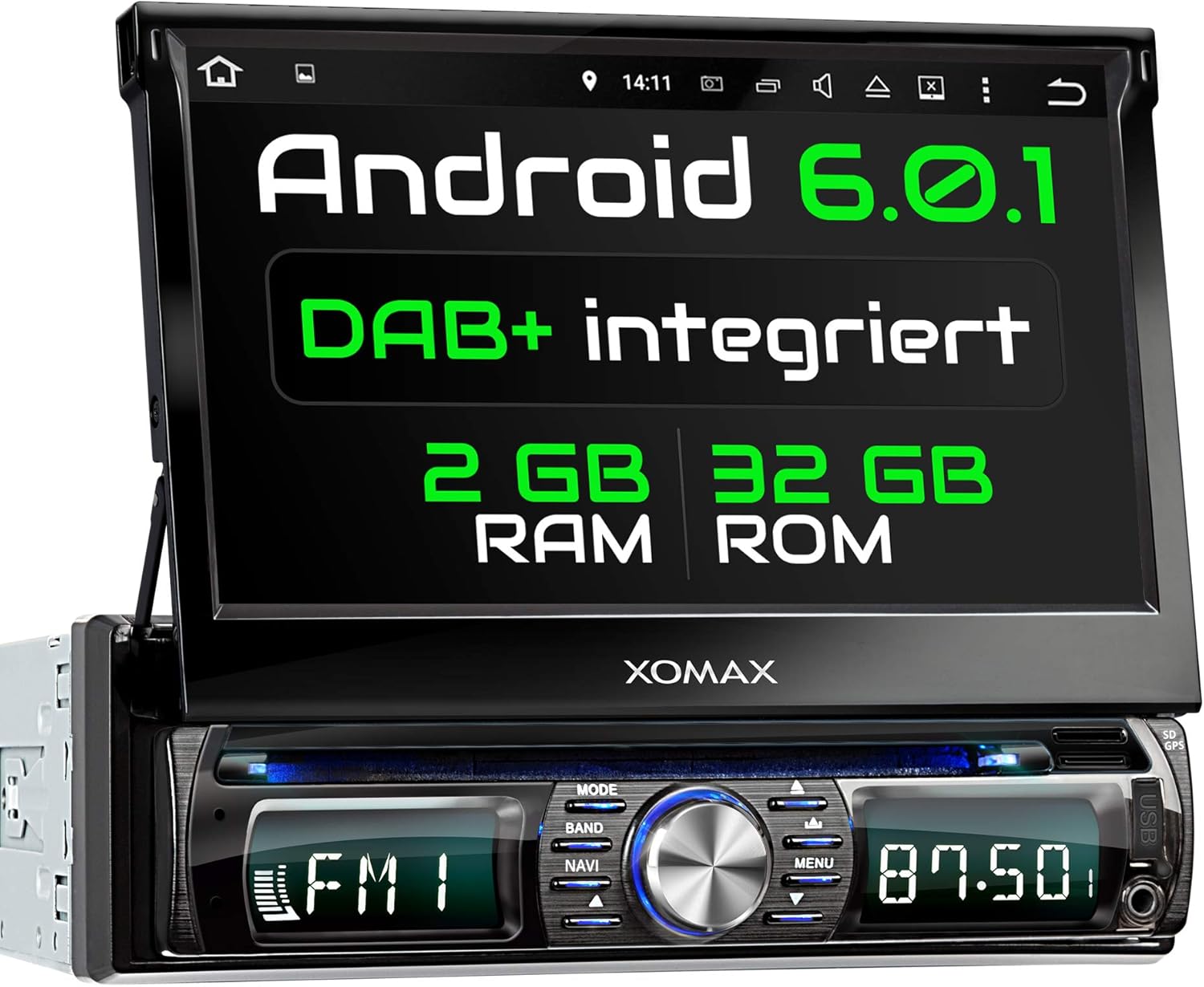
Сурет: алдыңғы view of the XOMAX XM-DDA711 Car Radio Naviceiver, showcasing its 7-inch touchscreen display and control panel.
Өнім аяқталдыview
Негізгі мүмкіндіктер
- Android 6.0.1 операциялық жүйесі
- 7-inch (18 cm) Capacitive Touchscreen Display
- Кіріктірілген GPS навигациясы
- DAB+ Digital Radio Support (DAB+ antenna included)
- Bluetooth Hands-Free қоңырау және аудио ағыны
- WiFi, 3G, and 4G Connectivity Support (external dongle may be required for 3G/4G)
- OBD2 Compatibility
- USB (up to 2TB) and SD (up to 256GB) Media Playback
- Рульді басқаруды қолдау
- Adjustable Button Illumination (7 colors)
Пакет мазмұны
The standard package for the XOMAX XM-DDA711 includes the following items:
- XOMAX XM-DDA711 Car Radio Naviceiver
- Қашықтан басқару пульті (батареяға кірмейді)
- ISO Connection Cable
- RCA (Cinch) Cable Set
- GPS антеннасы
- 1DIN Mounting Frame and Trim Plate
- Шығару пернелері
- DAB+ антеннасы
- Монтаждау нұсқаулары

Сурет: Бірден астамview of the XOMAX XM-DDA711 package contents, including the main unit, remote control, various cables, antennas, mounting accessories, and documentation.
Орнату және орнату
Қауіпсіздік шаралары
Before beginning installation, ensure the vehicle's battery is disconnected to prevent electrical shorts or damage. Consult a professional if you are unsure about any installation steps. Ensure all wiring is correctly connected and secured to avoid interference or malfunction.
Электр қосу схемасы
The rear panel of the XM-DDA711 features various connection ports. Refer to the diagram below for proper wiring:

Сурет: артқы view of the XOMAX XM-DDA711 showing numbered connection ports. These include GPS antenna input, DAB+ antenna input, radio antenna input, USB ports, ISO cable connector, audio/video inputs/outputs, and subwoofer output.
- GPS антеннасының қосылымы
- DAB+ Antenna Connection
- Радио антенна қосылымы
- USB қосылымы
- ISO Cable Connection
- Audio Inputs (2x Cinch)
- Audio Outputs (4x Cinch)
- Video Output (1x Cinch)
- Артқы камера кірісі
- Бейне енгізу
- Сабвуфер шығысы
Physical Installation and Dimensions
Install the unit into a standard 1DIN car radio slot. Use the provided mounting frame and release keys for secure installation. Ensure adequate space for the unit and its connections.
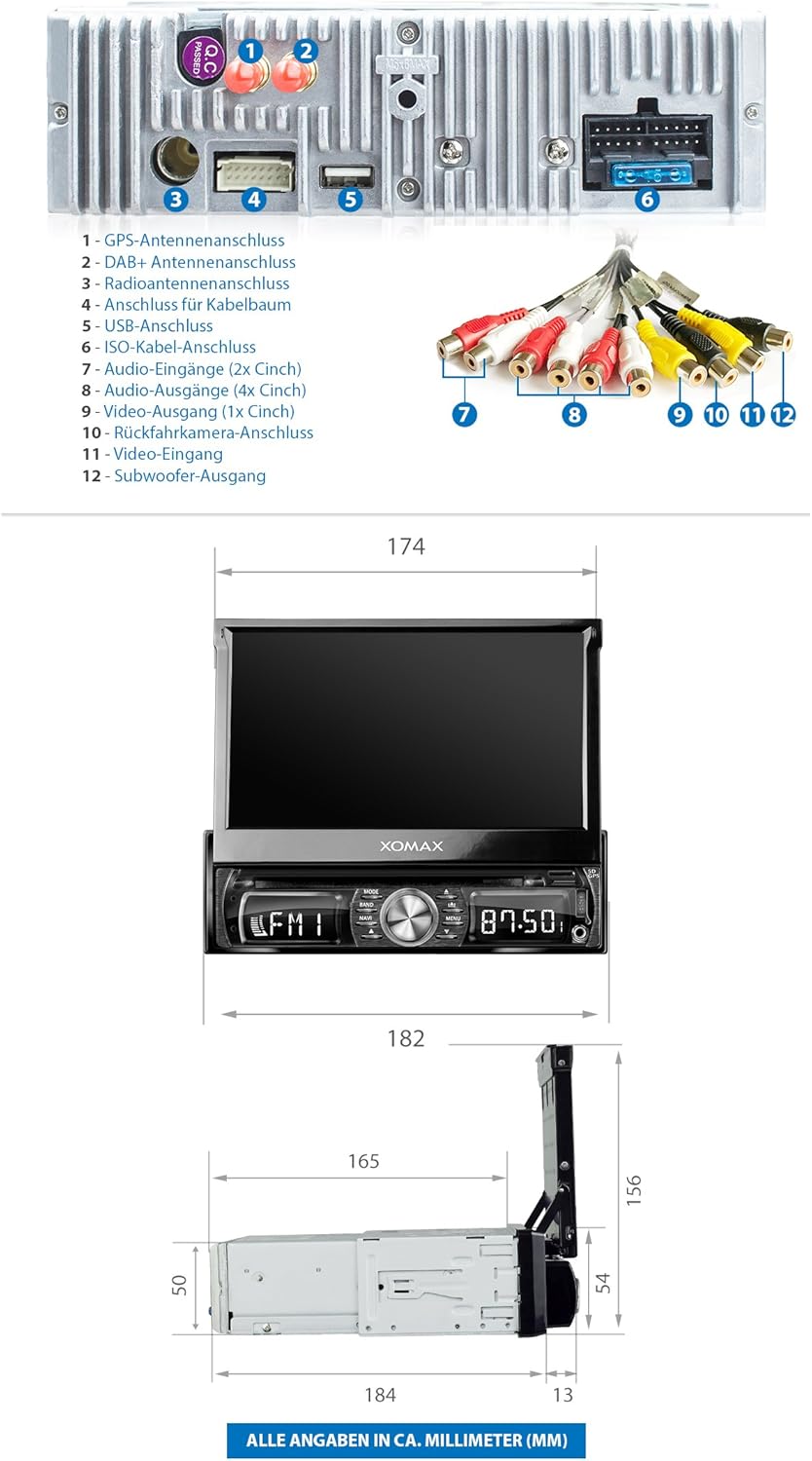
Image: Technical drawing displaying the dimensions of the XOMAX XM-DDA711 unit in millimeters, including width, height, and depth, both with the screen retracted and extended.
Refer to the included mounting instructions for detailed steps on securing the unit in your vehicle's dashboard.
Пайдалану нұсқаулары
Негізгі операция
- Қуатты қосу/өшіру: Press and hold the main rotary knob to power the unit on or off.
- Дыбыс деңгейін басқару: Дыбыс деңгейін реттеу үшін негізгі тұтқаны бұраңыз.
- Сенсорлық экран: Navigate the Android interface by tapping, swiping, and pinching on the 7-inch display.
- Бастапқы орнату: Upon first power-on, follow the on-screen prompts to select your preferred language, set the time, and configure basic system settings.
Radio Function (FM/AM/DAB+)
Access the Radio application from the main menu. You can scan for available stations, save them as presets, and switch between FM, AM, and DAB+ modes.

Image: The DAB+ digital radio interface of the XOMAX XM-DDA711, showing a list of available digital radio stations and current playback information.
Ensure the DAB+ antenna is properly connected for optimal digital radio reception.
GPS навигациясы
The unit comes with integrated GPS functionality. Access the navigation application from the main menu. You can input destinations, view maps, and receive turn-by-turn directions.
Image: The GPS navigation screen on the XOMAX XM-DDA711, displaying a map with a route and a GPS antenna icon indicating signal reception.
For updated maps or alternative navigation apps, you can download them from the Google Play Store when connected to the internet.
Bluetooth қосылымы
Pair your smartphone or other Bluetooth devices to the XM-DDA711 for hands-free calling and audio streaming.
- Жұптастыру: Go to the Bluetooth settings on the unit and your device, search for available devices, and select 'XOMAX' to pair.
- Қолсыз қоңырау шалу: Once paired, you can make and receive calls directly from the unit's touchscreen.
- Аудио ағын: Play music from your paired device through the car's speakers.

Image: The Bluetooth interface of the XOMAX XM-DDA711, showing options for hands-free calling, phonebook access, and music playback, with a smartphone connected.
Multimedia Playback (USB/SD)
The unit supports media playback from USB drives (up to 2TB) and SD cards (up to 256GB). Insert your storage device into the designated port. The system will automatically detect the media and allow you to browse and play audio, video, and image files.
Internet Connectivity (WiFi/3G/4G)
Connect the XM-DDA711 to the internet via WiFi or an optional 3G/4G dongle. This enables access to online navigation, streaming services, and the Google Play Store for app downloads.
- Сымсыз дәлдiк: Go to Settings > Wi-Fi, turn Wi-Fi on, and select your network to connect.
- 3G/4G: If using an external dongle, connect it to a USB port and configure network settings as required.
Smartphone Integration (Display Mirroring)
The unit supports display mirroring, allowing you to project your smartphone's screen onto the car radio display. This feature enables you to view and interact with your phone's apps directly on the larger screen.

Image: The XOMAX XM-DDA711 displaying a mirrored smartphone screen, showing a racing game, demonstrating the display mirroring functionality.
Руль дөңгелегін басқару
The XM-DDA711 supports connection to your vehicle's steering wheel controls. This allows you to operate basic functions like volume, track changes, and call management without taking your hands off the steering wheel.
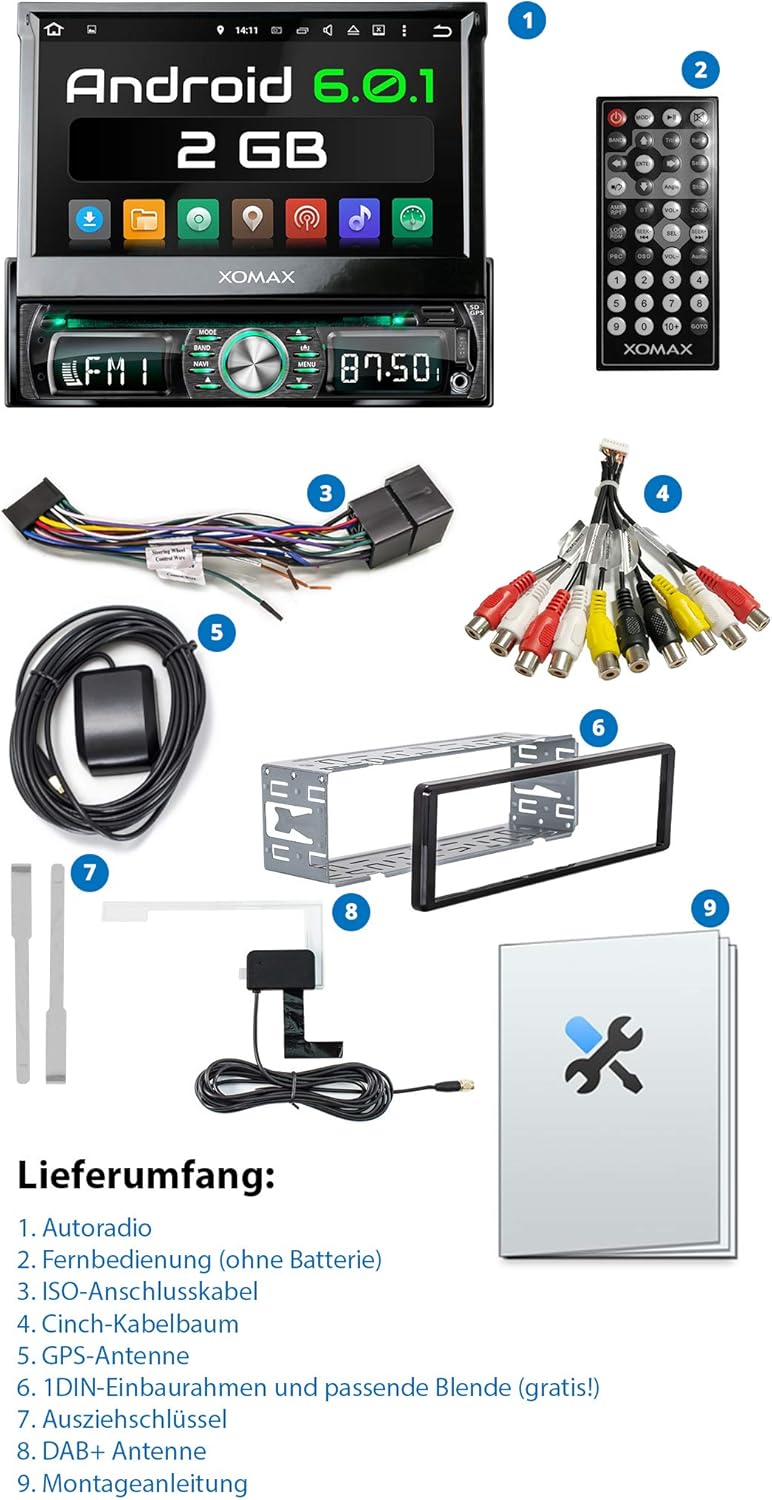
Image: The XOMAX XM-DDA711 screen showing the interface for configuring steering wheel controls, with a hand demonstrating button presses on a car's steering wheel.
Refer to the included wiring diagram and your vehicle's manual for specific connection and configuration details.
Дисплей параметрлері
Customize the unit's display to your preference, including adjustable button illumination with 7 selectable colors.

Image: The XOMAX XM-DDA711 screen displaying the illumination settings menu, allowing users to select from 7 different colors for the unit's button backlighting.
Техникалық қызмет көрсету
- Тазалау: Use a soft, dry cloth to clean the unit's screen and exterior. For stubborn marks, slightly dampшүберекке су құйыңыз. Абразивті тазартқыштардан немесе еріткіштерден аулақ болыңыз.
- Бағдарламалық құрал жаңартулары: Оңтайлы өнімділікті және жаңа мүмкіндіктерге қол жеткізуді қамтамасыз ету үшін бағдарламалық жасақтама жаңартуларын мезгіл-мезгіл тексеріп отырыңыз. Жаңартуларды әдетте өндірушінің веб-сайтынан табуға болады. website or through the unit's system settings if connected to the internet.
- Температура: Құрылғыны шамадан тыс температураға, ұзақ уақыт бойы тікелей күн сәулесіне немесе жоғары ылғалдылыққа ұшыратпаңыз.
Ақаулықтарды жою
If you encounter issues with your XM-DDA711, refer to the following common problems and solutions:
| Мәселе | Ықтимал себебі | Шешім |
|---|---|---|
| Құрылғы қосылмайды. | Сымдар дұрыс емес, сақтандырғыш жарылған, көлік батареясының ақауы. | Check power connections (ACC, B+), inspect vehicle fuses, ensure battery is charged. |
| Дыбыс жоқ. | Дыбыс деңгейі тым төмен, дыбыс өшірулі, динамик сымдары ақаулы. | Дыбыс деңгейін арттырыңыз, дыбысты өшіру күйін тексеріңіз, динамиктердің қосылуын тексеріңіз. |
| Нашар радио қабылдау. | Antenna not connected, weak signal, damaged antenna. | Ensure radio and DAB+ antennas are securely connected. Check antenna for damage. |
| GPS signal loss or inaccuracy. | GPS antenna obstructed, poor satellite visibility. | GPS антеннасының таза екеніне көз жеткізіңіз view Қажет болса, антеннаны басқа жерге ауыстырыңыз. |
| Bluetooth жұптастыру мәселелері. | Құрылғы жұптау режимінде емес, қате құпия сөз, кедергі. | Ensure both devices are in pairing mode. Restart Bluetooth on both devices. Try pairing in a different location. |
| Unit freezes or operates slowly. | Too many applications running, system overload, software issue. | Close unnecessary applications. Perform a system restart. Check for and install software updates. |
If the problem persists after attempting these solutions, please contact XOMAX customer support or your retailer for further assistance.
Техникалық сипаттамалар
| Ерекшелік | Техникалық сипаттама |
|---|---|
| Үлгі нөмірі | XM-DDA711 |
| Бренд | XOMAX |
| Операциялық жүйе | Android 6.0.1 |
| Дисплей өлшемі | 7 дюйм (18 см) |
| Дисплей түрі | Сенсорлық экран |
| Қосылу технологиясы | Bluetooth, WiFi, 3G/4G (via dongle) |
| Арнайы мүмкіндіктер | GPS, DAB+, OBD2 Support, Smartphone Mirroring, Adjustable Illumination |
| Үйлесімді құрылғылар | Смартфон |
| Шығу Wattage | 60 Вт |
| Бақылау әдісі | түртіңіз |
| Пакет өлшемдері | 27.5 x 23.5 x 9.5 см |
| Элемент салмағы | 2.76 кг |
Кепілдік және қолдау
For warranty information, please refer to the documentation provided with your purchase or contact your retailer. Technical support and service inquiries should be directed to the XOMAX customer service department or the authorized dealer from whom you purchased the product.