
Кіріспе
This manual provides detailed instructions for the installation, configuration, and operation of your Multilaser RE085 Dual Band Wireless Router. Please read this guide carefully to ensure proper setup and optimal performance of your device. The RE085 router offers dual-band connectivity (2.4GHz and 5GHz) with speeds up to 750 Mbps, featuring three external antennas and four LAN ports for reliable network access.
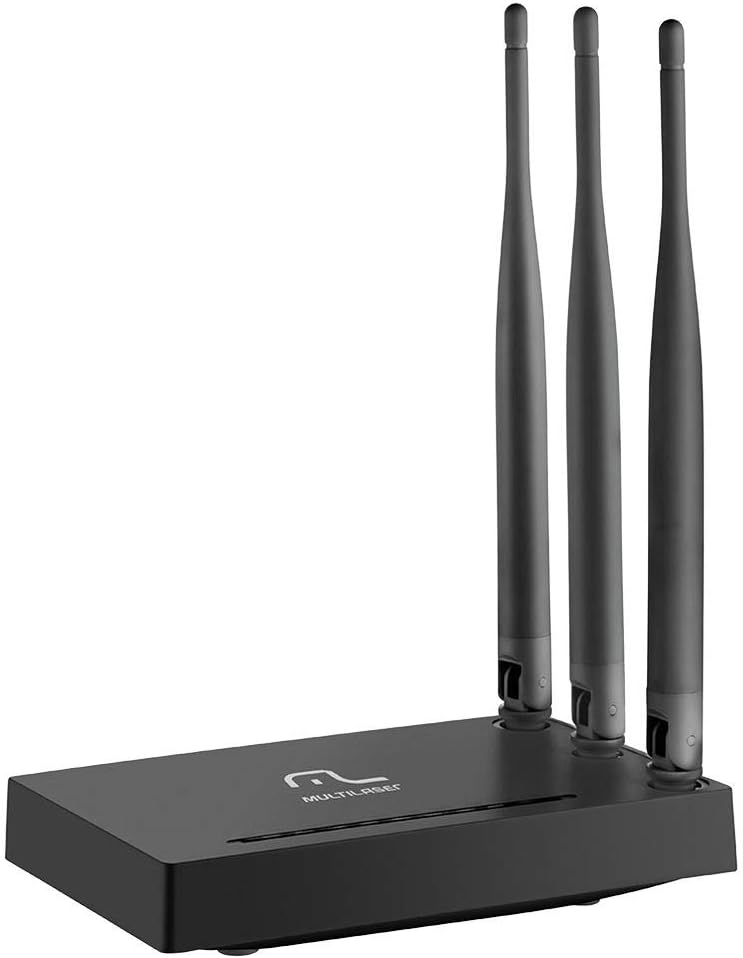
Сурет: алдыңғы view of the Multilaser RE085 router with its three external antennas in an upright position, showcasing оның ықшам дизайны.
Пакет мазмұны
Орнатуды жалғастырмас бұрын, пакетте келесі элементтер бар екеніне көз жеткізіңіз:
- Multilaser RE085 Dual Band Wireless Router
- Қуат адаптері
- Ethernet кабелі
- Quick Installation Guide (this document serves as a comprehensive guide)
Орнату және орнату
Follow these steps to set up your Multilaser RE085 router:
1. Физикалық байланыс
- Орналастыру: Маршрутизаторды үйіңіздің немесе кеңсеңіздің орталық бөлігіне, кедергілер мен кедергі келтіруі мүмкін құрылғылардан (мысалы, сымсыз телефондар, микротолқынды пештер) алыс орналастырыңыз.
- Антенналарды қосыңыз: Ensure the three external antennas are securely attached and oriented for optimal signal coverage.
- Қуатқа қосылу: Plug the power adapter into the router's power port and then into a wall outlet. The power indicator LED on the router should light up.
- Модемге қосылу: Connect one end of the provided Ethernet cable to the WAN port (often colored differently, e.g., blue) on the Multilaser RE085 router. Connect the other end to the LAN port on your modem or existing internet source.
- Құрылғыларды қосу (қосымша): For wired connections, connect one end of an Ethernet cable to any of the four LAN ports (usually yellow) on the router and the other end to your computer or other network device.

Сурет: артқы view of the Multilaser RE085 router, highlighting the WAN port (typically blue) and four yellow LAN ports for wired connections.
2. Бастапқы конфигурация (Web Интерфейс)
- Маршрутизаторға қосылу: Connect your computer to the router either via an Ethernet cable (to a LAN port) or wirelessly using the default Wi-Fi network name (SSID) printed on the router's label.
- Қол жеткізу Web Браузер: ашу а web browser (e.g., Chrome, Firefox, Edge) and type the default IP address of the router into the address bar. This is typically
192.168.0.1or192.168.1.1. Refer to the label on your router for the exact address. - Кіру: Enter the default username and password. Common defaults are
adminfor both username and password. If these do not work, check the router's label or the quick installation guide. - Орнату шеберін іске қосыңыз: Upon successful login, you will likely be prompted to run a Quick Setup Wizard. Follow the on-screen instructions to configure your internet connection type (e.g., PPPoE, Dynamic IP, Static IP). Your Internet Service Provider (ISP) can provide this information if you are unsure.
- Сымсыз байланыс параметрлерін конфигурациялау:
- SSID (желі атауы): Change the default Wi-Fi network names for both 2.4GHz and 5GHz bands to something unique and easily identifiable.
- Password (Security Key): Set a strong, secure password for each Wi-Fi network. Use a combination of uppercase and lowercase letters, numbers, and symbols.
- Қауіпсіздік түрі: WPA2-PSK (AES) is recommended for optimal security.
- Параметрлерді сақтау: After configuring, save your settings. The router may restart to apply the changes.
Пайдалану нұсқаулары
Once your Multilaser RE085 router is set up, you can connect your devices and manage your network.
Құрылғыларды қосу
- Сымсыз құрылғылар: On your smartphone, tablet, laptop, or smart TV, search for available Wi-Fi networks. Select the SSID you configured (e.g., "MyHomeNetwork_2.4GHz" or "MyHomeNetwork_5GHz") and enter the password.
- Сымды құрылғылар: Connect devices like desktop computers, gaming consoles, or smart TVs directly to the router's LAN ports using Ethernet cables for a stable and fast connection.
Dual Band Functionality
The RE085 supports both 2.4GHz and 5GHz wireless bands:
- 2.4 ГГц диапазоны: Offers wider coverage and better penetration through walls, suitable for general internet use, browsing, and devices further away from the router.
- 5 ГГц диапазоны: Provides faster speeds and lower latency, ideal for bandwidth-intensive activities like online gaming, 4K video streaming, and devices closer to the router.
You can connect different devices to the band that best suits their needs and location.
Қонақ желі
The router allows you to create up to 6 additional guest networks. This feature provides internet access to guests while isolating them from your main network, enhancing security. Access the router's web interface to configure guest networks.
Қайталау функциясы
The Multilaser RE085 can also function as a wireless repeater, extending the range of an existing Wi-Fi network. Refer to the advanced settings in the router's web interface for repeater mode configuration.
Техникалық қызмет көрсету
Тұрақты техникалық қызмет көрсету маршрутизатордың ұзақ қызмет ету мерзімін және оңтайлы өнімділігін қамтамасыз етуге көмектеседі.
- Кәдімгі қайта іске қосу: Periodically restart your router (unplug from power for 10 seconds, then plug back in) to clear its memory and refresh network connections. This can resolve minor performance issues.
- Микробағдарламаны жаңарту: Check the Multilaser official website for firmware updates. Keeping your router's firmware up-to-date can improve performance, add new features, and enhance security. Follow the instructions provided by Multilaser carefully when performing updates.
- Физикалық тазалау: Keep the router free from dust. Use a soft, dry cloth to gently clean the exterior. Ensure ventilation holes are not blocked.
- Құпия сөзді басқару: Change your Wi-Fi and router login passwords periodically for enhanced security.
Ақаулықтарды жою
If you encounter issues with your Multilaser RE085 router, try the following troubleshooting steps:
Интернет қосылымы жоқ
- Кабельдерді тексеру: Ensure all Ethernet cables (WAN, LAN) are securely connected to both the router and your modem/devices.
- Модемді тексеру: Модеміңіздің дұрыс жұмыс істеп тұрғанын және интернет байланысы белсенді екенін тексеріңіз. Модеміңізді қайта іске қосып көріңіз.
- Маршрутизатор күй шамдары: Check the LED indicators on the front of the router. The internet/WAN light should be solid or blinking, indicating an active connection.
- Маршрутизаторды қайта іске қосыңыз: Power cycle the router (unplug, wait 10 seconds, plug back in).
- ISP параметрлері: Confirm your internet connection type and settings (PPPoE, Dynamic IP, Static IP) in the router's web интерфейс провайдеріңіз ұсынған интерфейске сәйкес келеді.
Weak or Unstable Wi-Fi Signal
- Маршрутизаторды орналастыру: Маршрутизаторды қабырғалардан, үлкен металл заттардан және кедергі тудыруы мүмкін басқа электрондық құрылғылардан алысырақ орталық орынға жылжытыңыз.
- Антеннаның бағыты: Сигнал бағытын жақсарту үшін антенналарды реттеңіз.
- Диапазонды таңдау: For devices closer to the router, try connecting to the 5GHz band for faster speeds. For devices further away, the 2.4GHz band might offer better range.
- Интерференция: Identify and minimize sources of interference (e.g., microwaves, cordless phones, Bluetooth devices).
- Арна таңдауы: Маршрутизаторларда web interface, try changing the Wi-Fi channel for both 2.4GHz and 5GHz bands to a less congested one.
Forgotten Wi-Fi Password or Router Login Password
- Check Router Label: The default Wi-Fi password and router login credentials are often printed on a label on the bottom or back of the router.
- Зауыттық әдепкі параметрлерге қайтару: Егер сіз маршрутизаторға кіре алмасаңыз web interface or have forgotten your Wi-Fi password and cannot retrieve it, you may need to perform a factory reset. Locate the small reset button (often recessed) on the router. With the router powered on, use a paperclip or pin to press and hold the reset button for about 10-15 seconds until the lights flash. The router will restart with its factory default settings, including default Wi-Fi names and passwords. You will then need to reconfigure it from scratch.
Техникалық сипаттамалар
Key technical specifications for the Multilaser RE085 Dual Band Wireless Router:
| Ерекшелік | Техникалық сипаттама |
|---|---|
| Бренд | Мультилазер |
| Үлгі нөмірі | RE085 |
| Сымсыз байланыс стандарты | 802.11ac |
| Жиілік диапазонының класы | Қос жолақты (2.4 ГГц және 5 ГГц) |
| Деректерді тасымалдау жылдамдығы | Секундына 750 мегабитке дейін |
| Порттардың саны | 4 (Жергілікті желі) |
| Қосылу технологиясы | Сымсыз дәлдiк |
| Үйлесімді құрылғылар | Gaming Consoles, Tablets, Smart Televisions |
| Ұсынылатын пайдалану | Үй |
Кепілдік және қолдау
For warranty information, technical support, or further assistance, please refer to the official Multilaser webсайтына өтіңіз немесе тұтынушыларға тікелей хабарласыңыз. Сатып алу түбіртегін кепілдік талаптары үшін сатып алудың дәлелі ретінде сақтаңыз.
Multilaser Official Webсайт: www.multilaser.com.br