
Cambridge Soundworks SWOA3UBLK
OontZ Angle 3 Ultra Portable Bluetooth Speaker User Manual
Model: SWOA3UBLK
Кіріспе
Сатып алғаныңыз үшін рахметasing the OontZ Angle 3 Ultra Portable Bluetooth Speaker by Cambridge Soundworks. This manual provides essential information for setting up, operating, maintaining, and troubleshooting your speaker. Designed for superior sound quality and durability, the OontZ Angle 3 Ultra features a 14-watt output, rich bass, IPX7 waterproofing, and an impressive 30-meter Bluetooth range. Enjoy up to 20 hours of playtime on a single charge.

Image: The OontZ Angle 3 Ultra Portable Bluetooth Speaker, showcasing its sleek black, triangular design with control buttons on one end.
Орнату
1. Қосылған элементтер
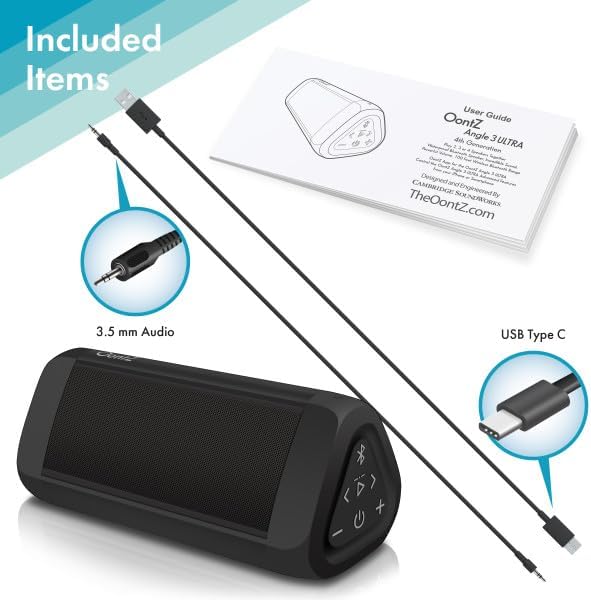
Image: The OontZ Angle 3 Ultra speaker along with its accessories: a Quick Start Guide, a 3.5mm audio cable, and a USB Type-C charging cable.
Before first use, ensure all components are present:
- OontZ Angle 3 Ultra Bluetooth Speaker
- Quick Start Guide (Full manual available online)
- 3.5 мм аудио кабель
- USB Type-C зарядтау кабелі
2. Динамикті зарядтау
The speaker comes with a built-in rechargeable Lithium-ion battery. For optimal performance, fully charge the speaker before first use.
- Locate the charging port on the side of the speaker, protected by a rubber flap.
- Connect the supplied USB Type-C charging cable to the speaker's charging port.
- Connect the other end of the USB cable to a USB wall charger (not included) or a computer USB port.
- The charging indicator light will illuminate. A full charge takes approximately 20 hours for the first charge, and subsequent charges will be faster.

Сурет: жақыннан түсірілген view of the speaker's side, showing the 3.5mm AUX input and the USB-C charging port, typically protected by a waterproof flap.
3. Bluetooth жұптастыру
Pair your OontZ Angle 3 Ultra with your Bluetooth-enabled device (smartphone, tablet, laptop).
- Қуат түймесін басып ұстап тұру арқылы динамикті қосыңыз (⏻) until the indicator light flashes blue.
- Құрылғыда Bluetooth параметрлеріне өтіп, Bluetooth қосылғанына көз жеткізіңіз.
- Look for "OontZ Angle 3 Ultra" in the list of available devices and select it.
- Once paired, the speaker will emit a confirmation tone, and the indicator light will turn solid blue.
4. AUX кірісі арқылы қосылу
You can connect non-Bluetooth devices using the 3.5mm audio cable.
- Connect one end of the 3.5mm audio cable to the AUX IN port on the speaker.
- Екінші ұшын құрылғыңыздың құлаққап ұясына немесе аудио шығысына қосыңыз.
- Динамик AUX режиміне автоматты түрде ауысады.
5. Pairing Two Speakers for Stereo Sound (OontZ Dual Wireless Stereo)
Enhance your audio experience by wirelessly connecting two OontZ Angle 3 Ultra speakers for impressive stereo separation.

Image: Two OontZ Angle 3 Ultra speakers positioned to provide stereo sound, with two individuals enjoying music in an outdoor setting.
- Ensure both OontZ Angle 3 Ultra speakers are charged and powered on.
- Екі динамикті бұрын жұптастырылған Bluetooth құрылғыларынан ажыратыңыз.
- On one speaker (this will be the Left Channel), press and hold the Bluetooth button (Ⓑ) for 3 seconds until you hear a tone.
- On the second speaker (this will be the Right Channel), press and hold the Bluetooth button (Ⓑ) for 3 seconds until you hear a tone.
- The speakers will automatically connect to each other. Once connected, you will hear a confirmation tone, and the indicator lights on both speakers will turn solid blue.
- Now, connect your audio device to the Left Channel speaker via Bluetooth as described in "Bluetooth Pairing" above.
- For video audio, connect your device or TV to the Left Channel speaker using the 3.5mm audio cable.
Пайдалану нұсқаулары
1. Басқару элементтеріview
| Түйме/Көрсеткіш | Функция |
|---|---|
| ⏻ (Қуат) | Қуатты қосу/өшіру үшін басып тұрыңыз. |
| + (Дыбыс деңгейін жоғарылату) | Дыбыс деңгейін арттыру үшін басыңыз. |
| - (Дыбыс деңгейін төмендету) | Дыбыс деңгейін төмендету үшін басыңыз. |
| ▷ (Ойнату/Кідірту) | Музыканы ойнату/кідірту үшін басыңыз. |
| < (Previous Track) | Алдыңғы жолға өту үшін басыңыз. |
| > (Next Track) | Келесі жолға өту үшін басыңыз. |
| Ⓑ (Блютуз) | Press to disconnect current Bluetooth device and enter pairing mode. Press and hold for 3 seconds to initiate OontZ Dual Wireless Stereo pairing. |
| Индикатор шамы | Flashes blue for pairing, solid blue for connected, red for charging. |
2. Қолсыз қоңырау шалу
The OontZ Angle 3 Ultra has a built-in microphone for hands-free calls.
- When a call comes in, the music will pause. Press the ▷ қоңырауға жауап беру үшін түймесін басыңыз.
- Қоңырауды аяқтау үшін түймесін басыңыз ▷ түймесін қайтадан басыңыз.
- Қоңырауды қабылдамау үшін, пернесін басып тұрыңыз ▷ түймесін 2 секундқа басыңыз.
- To activate Siri or Google Assistant, press and hold the ▷ button for 2 seconds when not on a call.
3. Waterproof Features (IPX7)
The OontZ Angle 3 Ultra is IPX7 certified, meaning it is fully waterproof and can be immersed in water up to 1 meter (3.3 feet) for up to 30 minutes.
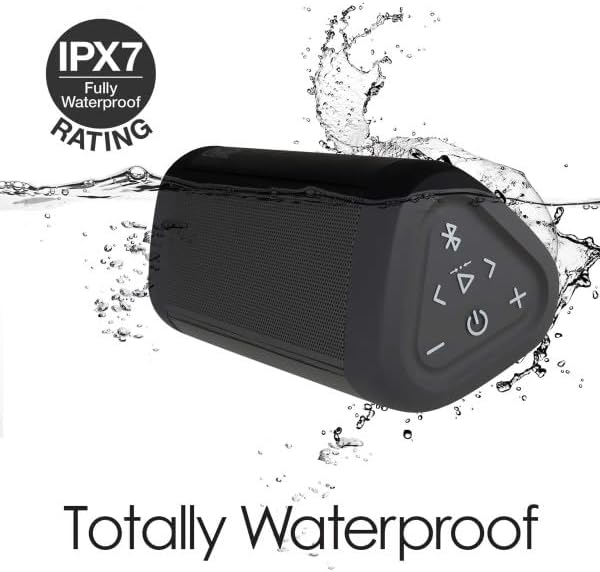
Image: The OontZ Angle 3 Ultra speaker shown partially submerged in water, illustrating its IPX7 waterproof capability.
- Динамикті суға түсірмес бұрын, зарядтау және AUX порттарын жауып тұратын резеңке қақпақтың мықтап жабылғанына көз жеткізіңіз.
- Ideal for use by the pool, at the beach, or in the shower.
- Do not expose to salt water or chemicals. Rinse with fresh water after exposure to chlorinated water.
Техникалық қызмет көрсету
1. Тазалау
Динамикті тазалау үшін жұмсақ, damp мата. Абразивті тазартқыштарды немесе еріткіштерді қолданбаңыз.
2. Сақтау
Динамикті салқын, құрғақ жерде, тікелей күн сәулесі мен төтенше температурадан алыс жерде сақтаңыз.
3. Батареяны күту
Батареяның қызмет ету мерзімін ұзарту үшін:
- Батареяны жиі толық зарядсыздандырудан аулақ болыңыз.
- Батареяның денсаулығын сақтау үшін динамикті пайдаланбасаңыз да, жүйелі түрде зарядтаңыз.
- Do not expose the speaker to temperatures above 60°C (140°F).
Ақаулықтарды жою
| Мәселе | Шешім |
|---|---|
| Динамик қосылмайды. | Батарея зарядталғанына көз жеткізіңіз. Динамикті USB-C кабелі арқылы қуат көзіне қосыңыз. |
| Дыбыс жоқ немесе төмен дыбыс. | Check the volume level on both the speaker and your connected device. Ensure the speaker is properly paired via Bluetooth or connected via AUX. |
| Bluetooth арқылы жұптау мүмкін емес. | Ensure the speaker is in pairing mode (flashing blue light). Turn off and on Bluetooth on your device. Move the speaker closer to your device. Disconnect from other Bluetooth devices. |
| Жоғары дыбыс деңгейінде дыбыстың бұрмалануы. | Reduce the volume on the speaker or your connected device. Ensure the audio source is not distorted. |
| OontZ Dual Wireless Stereo not connecting. | Ensure both speakers are disconnected from other Bluetooth devices. Follow the pairing steps carefully, ensuring both speakers are in pairing mode for stereo connection. |
Техникалық сипаттамалар
Key technical specifications for the OontZ Angle 3 Ultra Portable Bluetooth Speaker:
- Модель нөмірі: SWOA3UBLK
- Өлшемдері (L x W x H): 16.26 x 7.11 x 7.11 см (6.4 x 2.8 x 2.8 дюйм)
- Салмағы: 480 грамм (1.06 фунт)
- Динамиктің шығыс қуаты: 14 Вт
- Bluetooth нұсқасы: 4.2
- Сымсыз диапазон: Up to 30 meters (100 feet) unobstructed
- Батареяның қызмет ету мерзімі: 20 сағатқа дейін (2/3 көлемде)
- Су өткізбейтін рейтингі: IPX7 (30 минут ішінде 1 метрге дейін суға батырылады)
- Қосылу мүмкіндігі: Bluetooth, 3.5mm AUX Input, USB-C Charging
- Құрамдас бөліктер: Speaker, 3.5mm Audio Cable, USB-C Charging Cable, Quick Start Guide

Image: Diagram showing the dimensions of the OontZ Angle 3 Ultra speaker: 6.5 inches in length, 3 inches in width, and 2.75 inches in height.
Кепілдік және қолдау
For detailed warranty information and customer support, please visit the official OontZ website. The full localized manual is also available there.
Ресми Webсайт: www.theoontz.com
Cambridge Soundworks is committed to providing high-quality audio products and customer satisfaction.
Ask a question about this manual
Ask about setup, troubleshooting, compatibility, parts, safety, or missing instructions. Manuals+ will review the question and use this page’s manual context to help answer it.