
1. Кіріспе
This manual provides comprehensive instructions for the safe and effective use of the PCE Instruments PCE-170 A Light Meter. This device is designed for measuring illuminance (lux or foot-candles) in various environments, such as offices, factories, and outdoor settings. It features a wide measurement range, fast response time, and a compact design for ease of use.
Құрылғыны пайдаланбас бұрын осы нұсқаулықты мұқият оқып шығыңыз және оны болашақта анықтама үшін сақтап қойыңыз.
2. Қауіпсіздік туралы ақпарат
Observe the following safety precautions to prevent injury and avoid damage to the device:
- Құрылғыны шектен тыс температураға, ылғалдылыққа немесе тікелей күн сәулесінің әсеріне ұшыратпаңыз.
- Қатты тербелістерден немесе соққылардан аулақ болыңыз.
- Құрылғыны ашуға немесе өзгертуге әрекет жасамаңыз. Барлық қызмет көрсетуді білікті мамандарға тапсырыңыз.
- Keep the light sensor clean and free from obstructions to ensure accurate readings.
- Құрылғының ағып кетуін болдырмау үшін ұзақ уақыт бойы пайдаланылмаса, батареяны шығарып алыңыз.
- Батареялар мен құрылғыны жергілікті ережелерге сәйкес тастаңыз.
3. Өнім аяқталдыview
The PCE-170 A Light Meter consists of a main unit with a display and control buttons, and an integrated light sensor.

1-сурет: Алдыңғы view of the PCE-170 A Light Meter, showing the display, control buttons, and light sensor at the top.
3.1 Құрамдас бөліктер
- Жарық сенсоры: Located at the top of the device, protected by a white dome. This silicon photodiode measures incident light.
- СКД дисплей: A 5-digit display showing measurement values, units (lux/fc), and function indicators (e.g., AUTO RANGE, HOLD, MIN, MAX).
- Қуат түймесі (қосу/өшіру): Құрылғыны қосады немесе өшіреді.
- CAL түймесі: Used for zero adjustment.
- HOLD түймесі: Дисплейдегі ағымдағы көрсеткішті тоқтатады.
- fc/lx Button: Toggles between foot-candle (fc) and lux (lx) measurement units.
- RANGE түймесі: Manually selects measurement ranges or activates auto-ranging.
- Батарея бөлімі: Located at the rear, houses the 9V battery.

2-сурет: Ірі план view of the LCD display, showing a reading of "534 lx" and "AUTO RANGE 4 000".
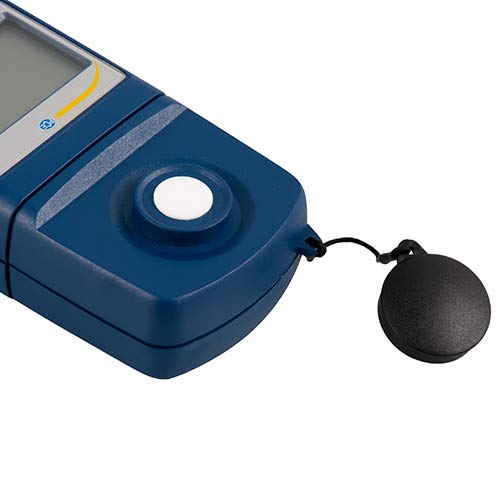
3-сурет: Егжей-тегжейлі view of the light sensor at the top of the device, with its protective cap removed.
4. Орнату
4.1 Батареяны орнату
- Құрылғының артқы жағындағы батарея бөлігінің қақпағын табыңыз.
- Slide the cover open or unscrew it, depending on the model.
- Insert one 9V battery, observing the correct polarity (+/-).
- Батарея бөлігінің қақпағын мықтап орнына салыңыз.
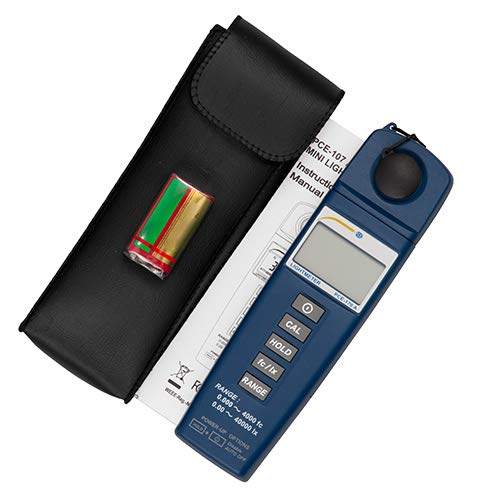
4-сурет: The PCE-170 A Light Meter shown with its carrying case and the included 9V battery, ready for installation.
4.2 Бастапқы қосу
түймесін басыңыз Қуат button to turn on the device. The display will illuminate and show a reading. If the battery symbol appears, replace the battery.
5. Пайдалану нұсқаулары
5.1 Өлшеу
- көмегімен құрылғыны қосыңыз Қуат түймесі.
- Жарық сенсорының таза және кедергісіз екеніне көз жеткізіңіз.
- Position the light sensor at the location where illuminance is to be measured. Ensure the sensor is facing the light source directly for accurate readings.
- The current illuminance value will be displayed on the LCD.

5-сурет: A user measuring light levels in an office environment with the PCE-170 A Light Meter.
5.2 Changing Measurement Units (fc/lx)
түймесін басыңыз fc/lx button to toggle between foot-candles (fc) and lux (lx) units. The selected unit will be indicated on the display.
5.3 HOLD функциясы
түймесін басыңыз ҰСТАП ТҰРУ button to freeze the current reading on the display. Press it again to release the hold and resume live measurements.
5.4 Zero Adjustment (CAL)
Нөлдік реттеуді орындау үшін:
- Place the light sensor in a completely dark environment (e.g., cover it with the protective cap or place it in a dark box).
- түймесін басыңыз КАЛ button. The display should show "0.00" or a value very close to zero.
- If the display does not show zero, repeat the process.
5.5 Ауқым таңдау
The device typically operates in auto-ranging mode. To manually select a range or cycle through available ranges, press the ӨҢДЕУ button. The display will indicate the active range. Press and hold the ӨҢДЕУ button to return to auto-ranging mode.
5.6 Min/Max Function (Power-Up Option)
The PCE-170 A supports Min/Max recording. To activate this feature, refer to the power-up options indicated on the device label (e.g., press and hold a specific button during power-on). This function records the minimum and maximum illuminance values detected during a measurement session.
6. Техникалық қызмет көрсету
6.1 Тазалау
Wipe the device with a soft, dry cloth. Do not use abrasive cleaners or solvents. Keep the light sensor clean and free of dust or smudges, as this can affect measurement accuracy.
6.2 Сақтау
When not in use, store the PCE-170 A Light Meter in its carrying case in a cool, dry place, away from direct sunlight and extreme temperatures. Remove the battery if storing for extended periods.
7. Ақаулықтарды жою
| Мәселе | Ықтимал себебі | Шешім |
|---|---|---|
| Құрылғы қосылмайды. | Өлген немесе дұрыс орнатылмаған батарея. | Check battery polarity or replace with a new 9V battery. |
| Дисплейде "OL" (Артық жүктеме) көрсетіледі. | Light intensity exceeds the current measurement range. | Switch to a higher measurement range using the ӨҢДЕУ button, or move to a less intensely lit area. |
| Дәл емес оқулар. | Dirty sensor, incorrect zero adjustment, or sensor not facing light source correctly. | Clean the sensor, perform zero adjustment in darkness, and ensure the sensor is properly oriented. |
| Дисплей бос немесе жыпылықтайды. | Батарея төмен. | 9В батареяны ауыстырыңыз. |
8. Техникалық сипаттамалар
| Параметр | Мән |
|---|---|
| Өлшем диапазондары | 0.00 ... 40,000 lux / 0.000 ... 4000 fc |
| Ажыратымдылық | 0.01 люкс / 0.001 фк |
| Дәлдік | ±3% of measurement value + 5 digits |
| Шамадан тыс жүктеме көрсеткіші | "OL" |
| Өлшеу жылдамдығы | Әр 2 секунд сайын |
| Жұмыс температурасы | 0 ... 40°C / 32 ... 104°F |
| Жарық сенсоры | Silicon photodiode, corrected cosine angle |
| Дисплей | 5 сандық СКД |
| Қуат көзі | 9 В батарея (жинаққа кіреді) |
| Өлшемдері | 33 x 54 x 196 мм / 1.3 x 2.1 x 7.7 дюйм |
| Салмағы | 180 g / <1 lb (approx. 9.17 ounces) |
8.1 Жеткізу ауқымы
The standard delivery package includes:
- 1 x PCE-170 A Lux Meter
- 1 x 9 В батарея
- 1 x Тасымалдау сөмкесі
- 1 x Пайдаланушы нұсқаулығы (осы құжат)
9. Кепілдік және қолдау
PCE Instruments provides a warranty for this product against defects in materials and workmanship. For specific warranty terms and conditions, please refer to the warranty card included with your purchase or visit the official PCE Instruments website. For technical support, service, or calibration inquiries, please contact PCE Instruments customer service.
PCE Instruments US: Дүкенге кіріңіз