
Кіріспе
The Puro Sound Labs BT2200 headphones are designed to provide a safe and high-quality listening experience for children and teens. These headphones feature volume limiting technology, ensuring audio levels do not exceed 85 dB, as recommended by health organizations to protect young ears from potential damage. They also offer significant passive noise isolation to reduce background distractions, allowing for clearer audio at safer volumes. This manual provides instructions for setting up, operating, maintaining, and troubleshooting your BT2200 headphones.
Қорапта не бар
- Puro Sound Labs BT2200 Headphones
- USB зарядтау кабелі
- Volume Limiting 3.5mm Auxiliary Audio Cable
- Тасымалдау қорабы
- User Quick Start Guide
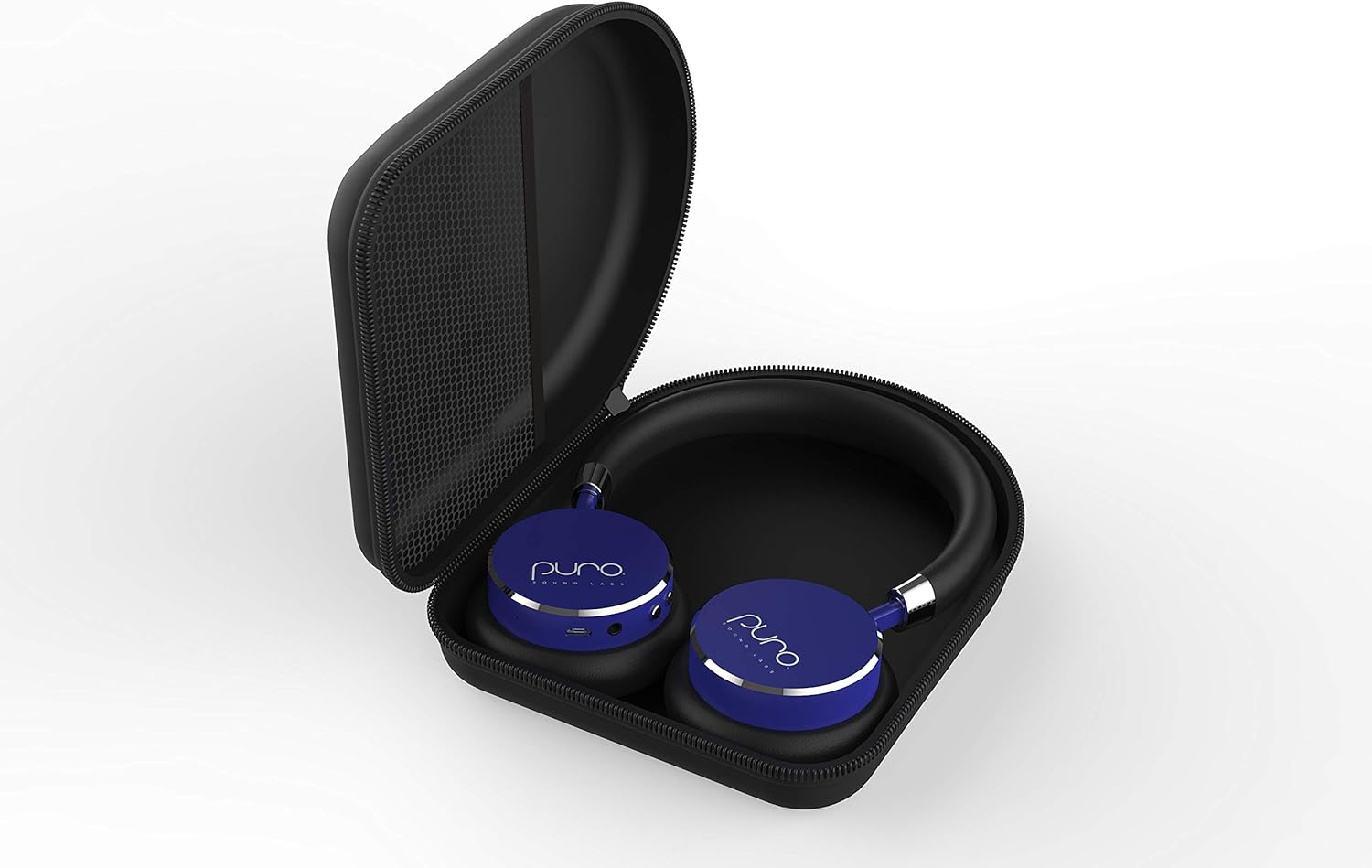
Image: The BT2200 headphones neatly stored within their included carrying case.
Өнім аяқталдыview
The BT2200 headphones are engineered with several features to enhance user experience and safety:
- Дыбыс деңгейін шектеу: Automatically limits sound to 85 dB to prevent hearing damage.
- Шуды оқшаулау: Passive design blocks approximately 82% of ambient noise at 1 KHz.
- Батареяның қызмет ету мерзімі: Up to 18 hours of music playback and 200 hours of standby time.
- Тұрақты құрылыс: Features aluminum construction for enhanced durability.
- Жайлылық: Padded earcups and headband wrapped in soft vegan leather for extended wear.
- Тасымалдау: Foldable design for easy storage in the included carry case.
- Оңай басқару элементтері: Large, accessible buttons for volume and power.

Image: A pair of blue Puro Sound Labs BT2200 headphones.

Image: Graphic illustrating the 'Healthy Ears' feature, highlighting the 85 dB volume limit for hearing protection.
Бейне: Өнімнің ресми бейне көрсетіліміasing the features of the Puro Sound Labs BT2200 Volume-Limiting Kids' Headphones, including noise isolation, durable construction, and ease of use.
Орнату
Құлаққаптарды зарядтау
Before initial use, fully charge your BT2200 headphones. Connect the provided USB charging cable to the charging port on the headphones and to a standard USB power source (e.g., computer, wall adapter). The indicator light will show charging status and turn off or change color when fully charged. A full charge provides up to 18 hours of listening time.
Bluetooth жұптастыру
- Құлақаспаптардың зарядталғанына және өшірілгеніне көз жеткізіңіз.
- Press and hold the power button on the headphones until the indicator light flashes, indicating pairing mode.
- Құрылғыда (смартфон, планшет, т.б.) Bluetooth параметрлеріне өтіңіз.
- Select "BT2200" from the list of available devices.
- Once connected, the indicator light on the headphones will stop flashing or change to a solid color.
The BT2200 headphones use Bluetooth V4.0 and offer a wireless range of up to 30 feet (approximately 9 meters).
Пайдалану нұсқаулары
Wireless Use (Bluetooth)
After successful pairing, turn on the headphones. They will automatically attempt to connect to the last paired device. Use the volume buttons (+/-) on the headphones to adjust the listening level. The volume will be limited to 85 dB for hearing protection.
Wired Use (3.5mm Auxiliary Cable)
If the headphone battery is depleted or for use with non-Bluetooth devices, connect the provided 3.5mm auxiliary audio cable. It is crucial to ensure the end of the cable with the volume limiter is plugged into the headphone jack. This ensures the 85 dB volume limiting feature remains active during wired use. Connect the other end to your audio source.
Басқару элементтері
- Қуат түймесі: Press and hold to turn on/off. Short press for play/pause (when connected via Bluetooth).
- Дыбыс деңгейін арттыру (+): Дыбыс деңгейін арттырады.
- Дыбыс деңгейін төмендету (-): Дыбыс деңгейін төмендетеді.
Техникалық қызмет көрсету
To ensure the longevity of your Puro Sound Labs BT2200 headphones:
- Store the headphones in the provided carrying case when not in use to protect them from dust and physical damage.
- Құлаққапты және бас бауды жұмсақ, құрғақ шүберекпен тазалаңыз. Қатты химиялық заттарды немесе абразивті материалдарды пайдаланбаңыз.
- Keep the headphones away from extreme temperatures and moisture.
Ақаулықтарды жою
Дыбыс жоқ
- Құлаққаптардың қосылғанына және зарядталғанына көз жеткізіңіз.
- Check that the headphones are properly paired and connected to your device via Bluetooth.
- If using the wired connection, ensure the 3.5mm cable is securely plugged into both the headphones (limiter end) and the audio source.
- Verify the volume on both the headphones and the connected device is turned up.
Bluetooth арқылы жұптау мүмкін емес
- Make sure the headphones are in pairing mode (flashing indicator light).
- Құрылғыда Bluetooth қосылғанына көз жеткізіңіз.
- Құлаққапты құрылғыға жақындатыңыз.
- Try turning off and on both the headphones and your device.
- Егер бұрын жұптастырылған болса, Bluetooth параметрлерінде құрылғыны «ұмытып», қайта жұптастырыңыз.
Техникалық сипаттамалар
| Бренд | Puro Sound Labs |
| Үлгі нөмірі | BT2200 |
| Құлақтың орналасуы | Құлақта |
| Шуды бақылау | Sound Isolation (82% ambient noise reduction) |
| Қосылу технологиясы | Bluetooth V4.0, 3.5 mm Jack |
| Bluetooth диапазоны | 30 фут (шамамен 9 метр) |
| Батареяның орташа қызмет ету мерзімі | 18 Hours (music playback) |
| Элемент салмағы | 6 унция (шамамен 170 грамм) |
| Аудио драйвер өлшемі | 40 миллиметр |
| Қоршау материалы | Теріні Алмастыратын |
Кепілдік және қолдау
Кепілдік туралы ақпарат
The Puro Sound Labs BT2200 headphones come with a 1-year limited warranty from the date of purchase. This warranty covers manufacturing defects. Additionally, Puro Sound Labs offers a 30-day money-back guarantee.
Тұтынушыларды қолдау
For technical assistance, warranty claims, or further inquiries, please visit the official Puro Sound Labs website or contact their customer support directly. Refer to the packaging or the quick start guide for specific contact details.