
1. Кіріспе
The Amkette Trubeats S50 is a versatile smart wireless Bluetooth speaker designed to enhance your audio experience. It features multiple connectivity options including Bluetooth, USB, Micro SD card, and AUX input, along with an integrated FM radio. The speaker also includes a digital clock with alarm functions and can be controlled via a dedicated smartphone application. Additionally, it can function as a power bank to charge your mobile devices.
2. Пакет мазмұны
Келесі элементтер үшін құсбелгіні қойыңыз:
- Amkette Trubeats S50 Smart Wireless Bluetooth Speaker
- USB зарядтау кабелі
- AUX кабелі
- Пайдаланушы нұсқаулығы (бұл құжат)
3. Өнім аяқталдыview
Familiarize yourself with the various parts and controls of your Amkette Trubeats S50 speaker.
3.1 Алдыңғы View

1-сурет: Алдыңғы view of the Amkette Trubeats S50 speaker, showing the speaker grille and LED display.
3.2 Top Control Panel

Figure 2: Labeled diagram of the Amkette Trubeats S50 speaker's top control buttons: Mode, Volume Down/Previous, Play/Pause/Answer Call, Volume Up/Next, Clock, and Microphone.
- MODE түймесі: Press to switch between Bluetooth, FM, AUX, USB, and Micro SD modes.
- K-/ Button: Press to decrease volume; long press for previous track/station.
- Play/Pause/Answer Call Button: Press to play/pause audio; press to answer/end calls.
- +/N Button: Press to increase volume; long press for next track/station.
- CLOCK түймесі: Press to set time and alarms.
- Микрофон: Хэндсфри қоңырау шалу үшін.
3.3 Rear Ports and Switch

Figure 3: Labeled diagram of the Amkette Trubeats S50 speaker's rear ports: AUX, Micro SD, USB Host, USB DC, and On/Off switch.
- AUX кірісі: Connect external audio devices using the 3.5mm AUX cable.
- Micro SD картасының ұясы: Аудио ойнату үшін Micro SD картасын салыңыз.
- USB хост порты: Insert a USB drive for audio playback or use as a power bank.
- USB DC Input: Connect the USB charging cable to power the speaker.
- ҚОСУ/ӨШІРУ қосқышы: Динамикті қосыңыз немесе өшіріңіз.
4. Орнату
4.1 Динамикті зарядтау
- Connect the small end of the USB charging cable to the USB DC Input динамиктің артқы жағындағы порт.
- USB зарядтау кабелінің үлкен ұшын USB қуат адаптеріне (жинаққа кірмейді) немесе компьютердің USB портына жалғаңыз.
- Жарық диодты индикатор зарядтау күйін көрсетеді. Толық зарядтау әдетте шамамен 4 сағатты алады.
Ескерту: The speaker does not have a visible battery level indicator. It is recommended to charge fully before first use and when the battery is low.
4.2 Қуатты қосу/өшіру
- Қосу үшін түймені сырғытыңыз ҚОСУ/ӨШІРУ қосқышы on the rear of the speaker to the 'ON' position.
- Қуатты өшіру үшін түймені сырғытыңыз ҚОСУ/ӨШІРУ қосқышы «ӨШІРУЛІ» күйіне қойыңыз.
5. Пайдалану нұсқаулары
5.1 Bluetooth жұптастыру

Figure 4: Speaker in Bluetooth pairing mode, indicated by 'BT' on the display.
- Power on the speaker. It will automatically enter Bluetooth pairing mode, indicated by 'BT' flashing on the LED display.
- Смартфонда немесе басқа құрылғыда Bluetooth қосыңыз.
- Іздеу available devices and select "Amkette S50" from the list.
- Once paired, the speaker will emit a confirmation tone, and 'BT' will stop flashing.
- Енді сіз динамик арқылы құрылғыдан дыбысты ойната аласыз.
5.2 AUX кірісін пайдалану

Figure 5: Speaker connected to a smartphone via AUX cable for wired audio playback.
- 3.5 мм AUX кабелінің бір ұшын қосыңыз AUX енгізу динамиктің артқы жағындағы порт.
- Connect the other end of the AUX cable to the audio output jack of your external device (e.g., smartphone, MP3 player, laptop).
- түймесін басыңыз MODE түймесі repeatedly until the speaker enters AUX mode.
- Қосылған құрылғыдан дыбысты ойнату.
5.3 Using USB/Micro SD Card
- Insert a USB drive into the USB хост порты немесе Micro SD картасын Micro SD картасы ұясы динамиктің артқы жағында.
- Дыбысыңызды қамтамасыз етіңіз files (MP3 format recommended) are stored on the drive/card.
- түймесін басыңыз MODE түймесі repeatedly until the speaker enters USB or Micro SD mode. Playback will begin automatically.
- пайдаланыңыз K-/ және +/N жолды шарлау және дыбыс деңгейін басқару түймелері.
5.4 FM радиосының жұмысы

Figure 6: Speaker displaying FM frequency, with app control for station selection.
- түймесін басыңыз MODE түймесі repeatedly until the speaker enters FM radio mode.
- Автоматты сканерлеу: In FM mode, long press the Ойнату/Үзіліс button to initiate an automatic scan for available FM stations. The speaker will save detected stations.
- Қолмен баптау: пайдаланыңыз K-/ және +/N сақталған станциялар бойынша шарлау түймелері.
- For precise tuning and station management, use the Amkette Trubeats Smart Speaker App (see section 5.7).
5.5 Digital Clock and Alarm Setup

Figure 7: Speaker displaying the current time on its LED screen.
- Орнату уақыты: түймесін басып тұрыңыз CLOCK түймесі. The hour display will flash. Use the K-/ және +/N сағатты реттеу үшін түймелерді басыңыз. CLOCK түймесі again to set minutes, and adjust with K-/ және +/N. түймесін басыңыз CLOCK түймесі once more to confirm.
- Дабылдарды орнату: түймесін қысқаша басыңыз CLOCK түймесі to cycle through Alarm 1 and Alarm 2 settings. When an alarm time is displayed, long press the CLOCK түймесі to enter alarm setting mode. Adjust hour and minute using K-/ және +/N, confirming each with a short press of the CLOCK түймесі. You can also set the alarm source (FM/SD Card/USB) via the app.
5.6 Power Bank ретінде пайдалану
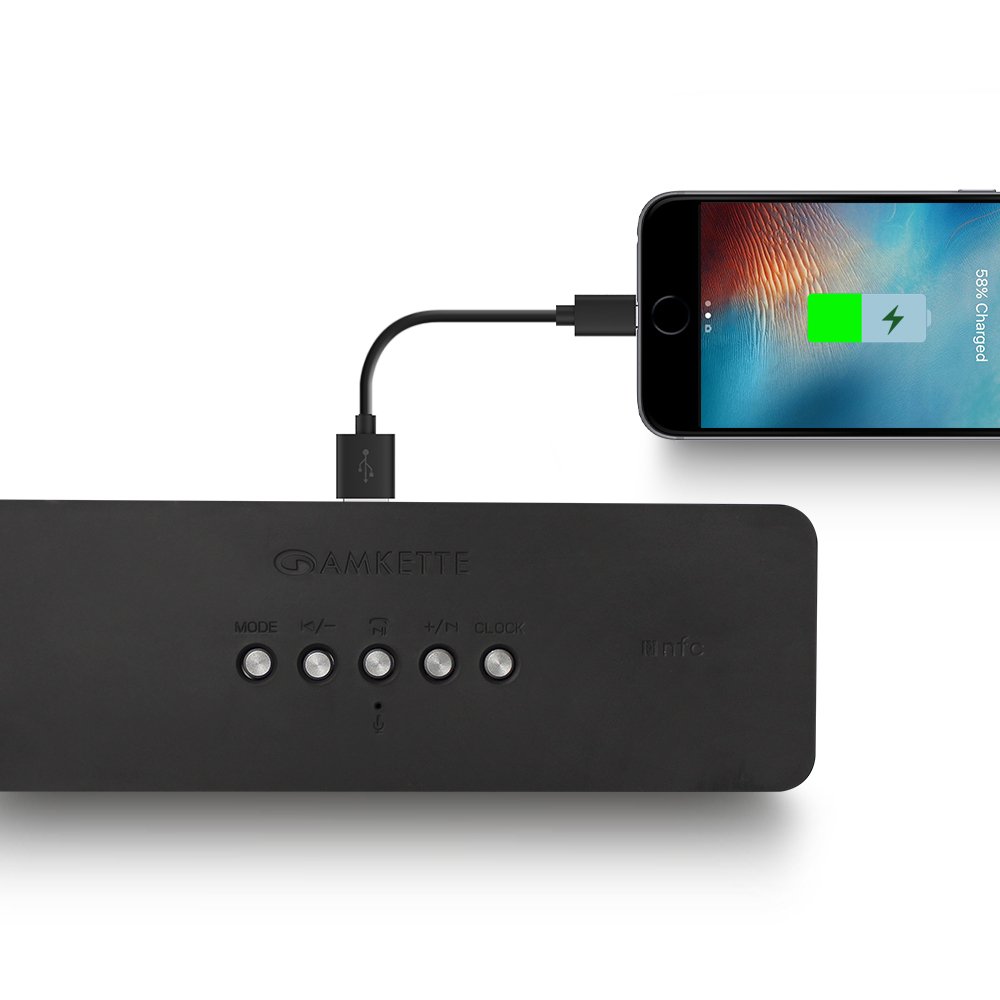
Figure 8: Speaker providing power to a smartphone through its USB Host port.
The Amkette Trubeats S50 can charge your smartphone or other USB-powered devices. Connect your device's charging cable to the USB хост порты on the rear of the speaker. The speaker's internal battery will then supply power to your device.
5.7 App Control (Android Only)

Figure 9: Smartphone displaying the Amkette Trubeats Smart Speaker App interface.
For enhanced control, download the Amkette Trubeats Smart Speaker App from the Google Play Store (for Android phones). The app allows you to:
- Switch between different audio modes.
- Control volume and track playback.
- Manage FM radio stations and perform precise tuning.
- Set and customize alarms, including alarm source.
Ensure your speaker is connected via Bluetooth to your smartphone for app functionality.
5.8 Қоңырауларды өңдеу
When connected via Bluetooth to a smartphone, the speaker can be used for hands-free calling:
- Қоңырауға жауап беру: түймесін басыңыз Play/Pause/Answer Call Button бір рет.
- Қоңырауды аяқтау: түймесін басыңыз Play/Pause/Answer Call Button қоңырау кезінде бір рет.
- Қоңырауды қабылдамау: түймесін ұзақ басыңыз Play/Pause/Answer Call Button.
6. Техникалық қызмет көрсету
- Динамикті жоғары температурадан, тікелей күн сәулесінен және ылғалдан алыс ұстаңыз.
- Динамикті жұмсақ, құрғақ шүберекпен тазалаңыз. Абразивті тазартқыштарды немесе еріткіштерді қолданбаңыз.
- Динамикті түсіріп алмаңыз немесе қатты соққыларға ұшыратпаңыз.
- Ұзақ уақыт бойы пайдаланылмаған кезде, динамикті салқын, құрғақ жерде сақтаңыз және батареяның қызмет ету мерзімін сақтау үшін оны мезгіл-мезгіл зарядтап отырыңыз.
7. Ақаулықтарды жою
| Мәселе | Ықтимал себебі | Шешім |
|---|---|---|
| Динамик қосылмайды. | Батарея таусылды. | Динамикті толығымен зарядтаңыз. |
| Динамиктен дыбыс жоқ. | Дыбыс деңгейі тым төмен; дұрыс емес режим таңдалған; құрылғы дұрыс қосылмаған. | Increase speaker and source device volume. Ensure correct mode (Bluetooth, AUX, etc.) is selected. Reconnect the device. |
| Bluetooth жұптастыру сәтсіз аяқталды. | Динамик жұптастыру режимінде емес; құрылғы тым алыс; кедергі. | Ensure speaker is in pairing mode ('BT' flashing). Move device closer to speaker. Turn off other Bluetooth devices. |
| FM радиосының қабылдауы нашар. | әлсіз сигнал; қоршаған ортаның кедергісі. | Relocate the speaker to an area with better reception. Perform an auto-scan again. |
| Қолданба динамикке қосылмайды. | Bluetooth not connected; app issue. | Ensure speaker is paired via Bluetooth to your phone. Restart the app and try again. |
8. Техникалық сипаттамалар
- Үлгі: S50
- Бренд: Амкет
- Динамик түрі: Portable Bluetooth Speaker (Outdoor)
- Қосылу мүмкіндігі: Bluetooth, USB, Micro SD, AUX, FM радиосы
- Сымсыз байланыс технологиясы: Блютез
- Бақылау әдісі: Buttons, App (Android)
- Аудио шығыс режимі: Стерео
- Аудио Wattage: 10 Вт
- Қуат көзі: Батареядан қуат алады
- Батареяның қызмет ету мерзімі: 12 сағатқа дейін (орташа)
- Зарядтау уақыты: Шамамен 4 сағат
- Үйлесімді құрылғылар: Laptop, Mobile, Tablet
- Өлшемдері (LxWxH): 26.7 x 10.9 x 7.9 см
- Элемент салмағы: 703 грамм
- Су өткізбейтін: Иә
- Монтаждау түрі: Үстелге орнату
9. Кепілдік және қолдау
The Amkette Trubeats S50 Smart Wireless Bluetooth Speaker comes with a 1 жылдық кепілдік сатып алған күннен бастап. Бұл кепілдік қалыпты пайдалану кезіндегі өндірістік ақауларды қамтиды.
For warranty claims, technical assistance, or any other support inquiries, please contact Amkette customer support through their official webсайт немесе сатып алу құжаттамасымен бірге берілген байланыс ақпараты.
Сатып алу түбіртегін кепілдік мақсаттары үшін сатып алудың дәлелі ретінде сақтаңыз.