
Кіріспе
This manual provides comprehensive instructions for the setup, operation, and maintenance of your GPX Digital AM/FM Clock Radio, model C224B. Please read this manual thoroughly before using the device to ensure proper functionality and to maximize your user experience. Keep this manual for future reference.
Өнім аяқталдыview
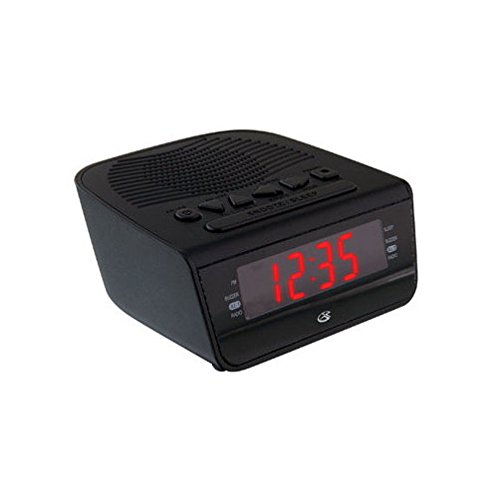
1-сурет: Алдыңғы view of the GPX Digital AM/FM Clock Radio. This image shows the compact black unit with its digital display and control buttons.
The GPX Digital AM/FM Clock Radio (C224B) is designed for reliable timekeeping and audio entertainment. Key features include a clear multi-display clock, AM/FM radio tuner, dual alarm functionality, and a battery backup option to ensure continuous operation during power interruptions. Its compact and modern design makes it suitable for various indoor settings.
Орнату
1. Қаптаманы ашу
Carefully remove the clock radio from its packaging. Ensure all components are present: the clock radio unit and the power adapter.
2. Қуат қосылымы
- Plug the power adapter into the DC input jack located on the back of the clock radio.
- Plug the other end of the power adapter into a standard wall outlet (AC 120V, 60Hz).
- The display will illuminate, indicating the unit is receiving power.
3. Батареяның сақтық көшірмесін орнату (қосымша)
Ол кезінде резервтік қуат үшінtages, install batteries (not included).
- Құрылғының төменгі жағындағы батарея бөлімін табыңыз.
- Батарея бөлігінің қақпағын ашыңыз.
- Insert the required batteries (e.g., 2 x AAA, check unit for specific type) according to the polarity markings (+ and -).
- Батарея бөлігінің қақпағын мықтап жабыңыз.
Ескерту: Batteries are for backup only and will not power the display or radio functions continuously. They preserve time and alarm settings during a power interruption.
Пайдалану нұсқаулары
1. Уақытты орнату
- түймесін басып тұрыңыз УАҚЫТ ОРНАТЫЛДЫ түймесін дисплей жыпылықтағанша басыңыз.
- пайдаланыңыз САҒАТ және МИНУТ уақытты реттеу үшін түймелер.
- түймесін басыңыз УАҚЫТ ОРНАТЫЛДЫ растау және уақытты орнату режимінен шығу үшін қайтадан басыңыз.
2. Setting Alarms (Alarm 1 and Alarm 2)
This unit features dual alarms, allowing you to set two independent wake-up times.
- түймесін басып тұрыңыз ДАБЫЛ 1 ЖИНАҚ (немесе ДАБЫЛ 2 ЖИНАҚ) түймесін дабыл уақыты жыпылықтағанша басыңыз.
- пайдаланыңыз САҒАТ және МИНУТ buttons to adjust the desired alarm time.
- түймесін басыңыз ДАБЫЛ 1 ЖИНАҚ (немесе ДАБЫЛ 2 ЖИНАҚ) again to confirm the time.
- Immediately after confirming the time, use the Сигнал режимі button to select the alarm source: БУЗЗЕР or РАДИО.
- The alarm icon (e.g., AL1 or AL2) will appear on the display, indicating the alarm is active.
To turn off an alarm, press the corresponding ALARM 1 ҚОСУ/ӨШІРУ (немесе ALARM 2 ҚОСУ/ӨШІРУ) button. The alarm icon will disappear.
3. AM/FM радиосының жұмысы
- түймесін басыңыз РАДИО ҚОСУ/ӨШІРУ радионы қосу үшін түймені басыңыз.
- түймесін басыңыз БАНД AM және FM диапазондары арасында ауысу үшін түймесін басыңыз.
- пайдаланыңыз TUNE + or ТУНЕ - қалаған станцияға қолмен реттеу үшін түймелер.
- To automatically scan for the next available station, press and hold TUNE + or ТУНЕ - бірнеше секундқа.
- Дыбыс деңгейін реттеңіз ДЫБЫС + or DOLUM - түймелері.
- Радионы өшіру үшін түймесін басыңыз РАДИО ҚОСУ/ӨШІРУ түймесін қайтадан басыңыз.
4. Кейінге қалдыру функциясы
Дабыл естілгенде түймесін басыңыз ҰЙЫҚТАУ түймесін шамамен 9 минутқа дабылды уақытша өшіру үшін басыңыз. Дабыл кейінге қалдыру кезеңінен кейін қайтадан естіледі.
5. Ұйқы функциясы
The sleep function allows the radio to play for a set duration before automatically turning off.
- Радио ойнап жатқанда түймесін басыңыз ҰЙҚЫ қол жетімді ұйқы уақыттары (мысалы, 90, 60, 30, 15 минут, ӨШІРУЛІ) арасында айналдыру үшін түймесін қайталап басыңыз.
- Таңдалған уақыттан кейін радио автоматты түрде өшеді.
Техникалық қызмет көрсету
1. Тазалау
To clean the unit, wipe the exterior with a soft, slightly damp cloth. Do not use abrasive cleaners or solvents, as these may damage the finish. Ensure the unit is unplugged before cleaning.
2. Батареяны ауыстыру
If the battery backup function is not working, or if the unit loses time during a power outage, the backup batteries may need replacement. Follow the "Battery Backup Installation" steps in the Setup section to replace them.
Ақаулықтарды жою
| Мәселе | Ықтимал себебі | Шешім |
|---|---|---|
| Құрылғы қосылмайды. | Қуат адаптері қосылмаған немесе ақаулы розетка. | Қуат адаптерінің құрылғыға және жұмыс істеп тұрған қабырға розеткасына мықтап жалғанғанына көз жеткізіңіз. Басқа розетканы қолданып көріңіз. |
| Дабыл естілмейді. | Дабыл орнатылмаған, дабыл дыбысы тым төмен немесе дабыл өшірілген. | Verify alarm time and source (buzzer/radio) are set correctly. Ensure alarm is activated (icon visible). Increase radio volume if alarm source is radio. |
| Нашар радио қабылдау. | Әлсіз сигнал немесе кедергі. | Adjust the position of the unit or the antenna (if external). Move away from other electronic devices that may cause interference. |
| Қуаттан кейін жоғалған уақыт/параметрлерtage. | Сақтық көшірме батареялары таусылған немесе орнатылмаған. | Install fresh backup batteries or replace existing ones. |
Техникалық сипаттамалар
- Үлгі: C224B
- Қуат көзі: AC 120V, 60Hz (main); Battery Powered (backup)
- Дисплей түрі: Жарықдиодты сандық дисплей
- Радио диапазондары: AM/FM
- Өлшемдері (шамамен): 5.12" ені x 5.12" ж
- Салмақ (шамамен): 3 фунт
- Түсі: Қара
- Материал: Пластмасса
Кепілдік және қолдау
Кепілдік туралы ақпарат немесе техникалық қолдау алу үшін өніммен бірге берілген кепілдік картасын қараңыз немесе ресми GPX дүкеніне кіріңіз. website. Do not attempt to repair this unit yourself, as this may void your warranty.
GPX Official Webсайт: www.gpx.com