
1. Кіріспе
Thank you for choosing the OSD Audio PRE-1 High Definition Preamplifier. This unit is designed to enhance your audio experience by providing versatile source selection and precise audio control. The PRE-1 acts as a central hub for various audio components, including turntables, CD/DVD players, and tape decks, delivering a clean and powerful signal to your main ampқұтқарушы.
This manual provides detailed instructions for the proper setup, operation, and maintenance of your PRE-1 preamplifier. Please read this manual thoroughly before operating the unit to ensure optimal performance and longevity.
2. Қауіпсіздік туралы маңызды ақпарат
- Қуат көзі: Құрылғыны тек таңбалау жапсырмасында көрсетілген қуат көзінің түріне қосыңыз.
- Желдету: Ensure adequate ventilation. Do not block any ventilation openings. Install in accordance with the manufacturer’s instructions.
- Су және ылғал: Бұл құрылғыны судың жанында пайдаланбаңыз немесе оған су тамшылатпаңыз немесе шашырамаңыз.
- Жылу: Радиаторлар, жылу регистрлері, пештер немесе басқа құрылғылар (соның ішінде) сияқты жылу көздерінің жанына орнатпаңыз ampжылу шығаратын көтергіштер).
- Тазалау: Тек құрғақ шүберекпен тазалаңыз.
- Қызмет көрсету: Бұл өнімге өзіңіз қызмет көрсетуге тырыспаңыз. Барлық қызмет көрсетуді білікті қызмет көрсетуші қызметкерлерге тапсырыңыз.
- Жерге қосу: Бұл құрылғы дұрыс жерге тұйықталуы керек.
3. Пакет мазмұны
Пакетте келесі заттардың бар-жоғын тексеріңіз:
- OSD Audio PRE-1 High Definition Preampқұтқарушы
- Қуат кабелі
- Пайдаланушы нұсқаулығы (бұл құжат)
4. Өнім аяқталдыview
4.1. Алдыңғы панель
The front panel provides access to all primary controls and a microphone input for convenient use.

This image displays the front panel of the OSD Audio PRE-1 Preamplifier, including its physical dimensions for installation planning.

Егжей-тегжейлі view of the left side of the PRE-1's front panel, highlighting the Microphone Level, Bass, Midrange, and Treble adjustment knobs.

Егжей-тегжейлі view of the right side of the PRE-1's front panel, showing the Loudness, Balance, and Volume controls, along with input selection and function buttons.
- Қуат түймесі: Құрылғыны қосады немесе өшіреді.
- Микрофон енгізу: Микрофонды қосуға арналған 1/4 дюймдік ұяшық.
- Микрофон деңгейі: Микрофон кірісінің дыбыс деңгейін реттейді.
- Бассты басқару: Төмен жиілікті шығысты реттейді.
- Орташа бақылау: Adjusts the mid-range frequency output.
- Жоғары жиілікті басқару: Жоғары жиілікті шығысты реттейді.
- Даңқ: Engages or disengages a loudness contour for enhanced bass and treble at low volumes.
- Баланс: Сол/оң арна балансын реттейді.
- Көлемі: Master volume control for all outputs.
- Енгізуді таңдау: Rotary knob to choose between Phono, AUX1, AUX2, and CD/DVD inputs.
- Tape Button: Activates the Tape Monitor loop.
- Моно түйме: Combines stereo signals into a monaural output.
- Төменгі сүзгі: Engages a low-frequency cut-off filter.
- Дыбысты өшіру: Silences all audio output.
4.2. Артқы панель
The rear panel houses all the necessary input and output connections for your audio system.
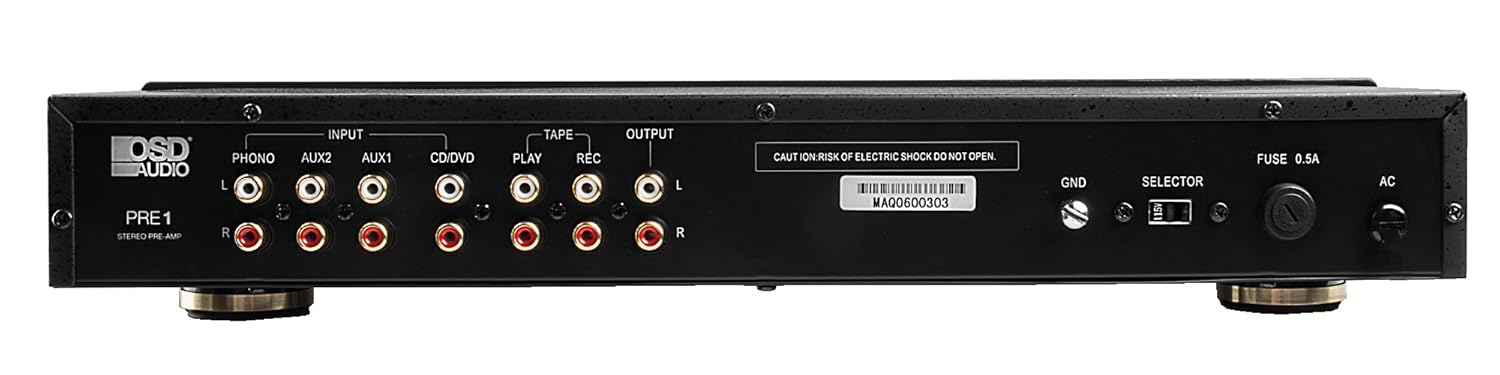
The rear panel of the PRE-1 Preamplifier, showing all input and output connections for various audio devices.
- Phono Input (L/R): RCA inputs for connecting a turntable. Includes a ground terminal.
- AUX1 Input (L/R): RCA inputs for general auxiliary devices.
- AUX2 Input (L/R): RCA inputs for a second auxiliary device.
- CD/DVD Input (L/R): RCA inputs for CD or DVD players.
- Tape Play (L/R): RCA inputs for the playback output of a tape deck or other recording device.
- Tape Rec (L/R): RCA outputs for connecting to the recording input of a tape deck or other recording device.
- Output (L/R): RCA outputs to connect to your main power ampқұтқарушы.
- Ground Terminal (GND): Connects to the ground wire of your turntable to reduce hum.
- Таңдаушы қосқыш: For internal configuration (typically left in default position unless specified).
- Сақтандырғыш: Тек көрсетілген сақтандырғыш түрімен және номиналымен ауыстырыңыз.
- Айнымалы ток кірісі: Connects to the supplied power cable.
5. Орнату және қосылымдар
Follow these steps to properly set up your OSD Audio PRE-1 Preampөмір сүруші:
- Орналастыру: Place the PRE-1 on a stable, flat surface, ensuring adequate ventilation around the unit. Avoid placing it near heat sources or in direct sunlight.
- Қуат көзін өшіру: Ensure all audio components, including the PRE-1 and your main amplifier, are turned off before making any connections.
- Қосылу көздері:
- Бұрылмалы үстел: Connect the RCA cables from your turntable to the Phono Input (L/R) on the PRE-1. Connect the turntable's ground wire to the GND terminal on the PRE-1.
- CD/DVD ойнатқышы: Connect the RCA cables from your CD/DVD player to the CD/DVD Input (L/R).
- Other Devices (e.g., Streamer, Tuner): Connect RCA cables from these devices to the AUX1 Input (L/R) or AUX2 Input (L/R).
- Таспа палубасы: Connect the playback outputs of your tape deck to the Tape Play (L/R) inputs. Connect the recording inputs of your tape deck to the Tape Rec (L/R) шығыстар.
- Қосылу Ampөмір сүруші: қосыңыз Output (L/R) RCA jacks on the PRE-1 to the input jacks of your main power ampқұтқарушы.
- Қуат қосылымы: Берілген қуат кабелін желіге қосыңыз Айнымалы ток қуаты on the rear panel of the PRE-1, then plug it into a suitable wall outlet.
- Бастапқы қуат қосулы: Turn on your main power amplifier first, then turn on the PRE-1. When powering off, turn off the PRE-1 first, then your main ampқұтқарушы.
6. Пайдалану нұсқаулары
Once your PRE-1 is connected, follow these steps for basic operation:
- Енгізуді таңдаңыз: пайдаланыңыз Кірісті таңдаңыз rotary knob on the front panel to choose the desired audio source (Phono, AUX1, AUX2, CD/DVD).
- Дыбыс деңгейін реттеу: -ден бастаңыз Көлемі knob at its minimum setting. Begin playing your selected audio source and slowly increase the volume to a comfortable listening level.
- Тонды басқару элементтері: пайдаланыңыз Бас, Ортасы, және Үш еселік knobs to adjust the tonal characteristics of your audio. Turn clockwise to increase, counter-clockwise to decrease.
- Баланс бақылауы: реттеңіз Баланс knob to fine-tune the left and right channel output for optimal stereo imaging.
- Даңқ: түймесін басыңыз Қаттылық button to activate a contour that boosts bass and treble frequencies, which can be beneficial at lower listening volumes. Press again to deactivate.
- Төменгі сүзгі: түймесін басыңыз Төмен сүзгі button to engage a filter that reduces very low frequencies. This can help eliminate rumble from turntables or other unwanted low-frequency noise. Press again to deactivate.
- Моно: түймесін басыңыз Моно button to combine the left and right stereo channels into a single monaural signal. This is useful for playing mono recordings. Press again for stereo.
- Дыбысты өшіру: түймесін басыңыз Дыбысты өшіру button to instantly silence the audio output. Press again to restore sound.
- Микрофонды пайдалану: Plug a microphone into the Микрофон кірісі. Adjust the microphone's volume using the Микрофон деңгейі тұтқа.
- Tape Monitoring/Recording: If you have a tape deck connected, select the appropriate input for playback. To record, ensure your tape deck is set to record and the PRE-1 is passing the desired source through the Tape Rec outputs.
7. Техникалық қызмет көрсету
Proper care and maintenance will ensure the longevity and optimal performance of your PRE-1 Preampқұтқарушы.
- Тазалау: Use a soft, dry cloth to clean the exterior of the unit. Do not use liquid cleaners, aerosols, or harsh chemicals, as they may damage the finish or internal components.
- Желдету: Periodically check that the ventilation openings are free from dust and obstructions.
- Қосылымдар: Occasionally check all cable connections to ensure they are secure. Loose connections can lead to signal loss or interference.
- Сақтау орны: If storing the unit for an extended period, disconnect it from the power outlet and store it in a cool, dry place, away from direct sunlight and extreme temperatures.
8. Ақаулықтарды жою
If you experience issues with your OSD Audio PRE-1, refer to the following common problems and solutions:
| Мәселе | Ықтимал себебі | Шешім |
|---|---|---|
| Қуат жоқ | Power cable not connected; Power outlet not active; Blown fuse | Ensure power cable is securely connected. Test the outlet with another device. Check and replace the fuse if necessary (refer to specifications for fuse type). |
| Дыбыс шығуы жоқ | Incorrect input selected; Volume too low; Mute engaged; Loose audio cables; Main amplifier off or incorrect input selected | Select the correct input source. Increase the volume. Disengage Mute. Check all RCA cable connections. Ensure your main ampкөтергіш қосулы және дұрыс кіріске орнатылған. |
| Бұрмаланған дыбыс | Volume too high (clipping); Incorrect tone control settings; Faulty cables | Reduce the volume. Adjust Bass, Mid, and Treble controls to neutral or desired settings. Try replacing audio cables. |
| Гыңылдаған немесе ызылдаған шу | Ground loop; Loose ground wire (Phono); Interference from other electronics | Ensure turntable ground wire is connected to the PRE-1's GND terminal. Try moving the PRE-1 or other audio components away from power cables or other electronic devices. Use a ground loop isolator if necessary. |
| Микрофон жұмыс істемейді | Mic not connected; Mic Level too low; Faulty microphone | Ensure microphone is securely plugged into the Mic Input. Increase the Mic Level. Test with another microphone if available. |
9. Техникалық сипаттамалар
Below are the technical specifications for the OSD Audio PRE-1 Preampөмір сүруші:
| Ерекшелік | Техникалық сипаттама |
|---|---|
| Үлгі | PRE-1 |
| Бренд | OSD аудио |
| Арналар саны | 2 |
| Монтаждау түрі | Беттік орнату |
| UPC | 819603012446 |
| ASIN | B01MPYJLPX |
| Өндіруші | OSD аудио |
10. Кепілдік және қолдау
OSD Audio products are designed for reliability and performance. For specific warranty details and terms, please refer to the warranty card included with your product or visit the official OSD Audio website. If you require technical assistance or have questions not covered in this manual, please contact OSD Audio customer support.
OSD Audio Customer Support: Please visit the OSD Audio webбайланыс ақпараты мен қолдау ресурстарына арналған сайт.