
Кіріспе
Сатып алғаныңыз үшін рахметasing the QUMOX L165U 2.4GHz Wireless Gamepad. This high-quality game controller is designed for use with PC and Android devices, offering a reliable 2.4GHz wireless connection for an enhanced gaming experience. Please read this manual carefully to ensure proper setup and operation of your new gamepad.

Figure 1: QUMOX L165U Gamepad with included USB adapter and OTG connection kit.
Пакет мазмұны
Пакетте барлық элементтер бар екеніне көз жеткізіңіз:
- 1x QUMOX L165U Gamepad
- 1x 2.4GHz USB Wireless Adapter
- 1x OTG Connection Kit (Micro USB to USB-A adapter)
Орнату
1. Батареяны орнату
The QUMOX L165U Gamepad is powered by 2 AAA batteries (not included). To install the batteries:
- Геймпадтың артқы жағындағы батарея бөлімін табыңыз.
- Батарея қақпағын сырғытып ашыңыз.
- Дұрыс полярлықты (+/-) қамтамасыз етіп, 2 AAA батареясын салыңыз.
- Батарея қақпағын мықтап жабыңыз.

Figure 2: Open battery compartment for AAA battery installation.
2. Компьютерге қосылу
- Plug the 2.4GHz USB Wireless Adapter into an available USB port on your PC.
- Turn on the gamepad by pressing the 'START' button. The gamepad will automatically attempt to connect.
- The PC should recognize the gamepad and install necessary drivers automatically.
- If the gamepad does not connect, press the 'MODE' button on the gamepad to cycle through connection modes until it is recognized by your PC.
3. Connecting to an Android Device (with OTG support)
- Connect the OTG Connection Kit to your Android device's Micro USB port.
- Plug the 2.4GHz USB Wireless Adapter into the USB-A end of the OTG Connection Kit.
- Turn on the gamepad by pressing the 'START' button. The gamepad will automatically attempt to connect.
- Your Android device should recognize the gamepad.
- If the gamepad does not connect, press the 'MODE' button on the gamepad to cycle through connection modes until it is recognized by your Android device.
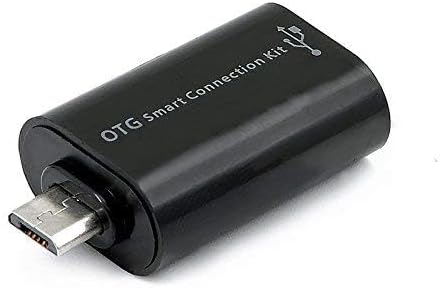
Figure 3: OTG Connection Kit for Android device connectivity.
Пайдалану нұсқаулары
Once connected, your QUMOX L165U Gamepad is ready for use. The layout is standard for most game controllers.
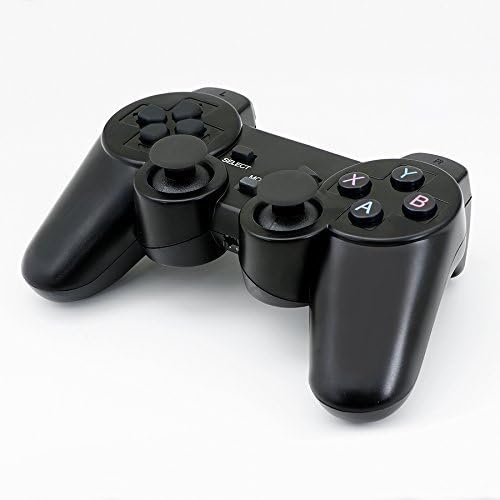
4-сурет: Жоғарғы view of the QUMOX L165U Gamepad, highlighting button layout.
- Бағыт тақтасы (D-Pad): Нақты бағытты енгізу үшін.
- Аналогтық джойстиктер: Two analog sticks for 360-degree movement and camera control.
- Әрекет түймелері (A, B, X, Y): Ойын ішіндегі командаларға арналған стандартты әрекет түймелері.
- Иық түймелері (L1, R1) және триггерлер (L2, R2): Located on the top of the gamepad for additional actions.
- SELECT/BACK Button: Typically used for menu navigation or specific in-game functions.
- БАСТАУ түймесі: Ойындарды кідірту немесе таңдауларды растау үшін қолданылады.
- MODE түймесі: Cycles through different operating modes (e.g., Android, PC) if automatic detection fails.
Бейне көрсету
Video 1: A seller-provided overview of a 2-pack wireless controller, demonstrating its features and compatibility. While showing a similar product, it illustrates general wireless controller usage and setup.
Техникалық қызмет көрсету
- Тазалау: Геймпадты тазалау үшін жұмсақ, құрғақ шүберекті пайдаланыңыз. Қатты химиялық заттарды немесе абразивті материалдарды пайдаланбаңыз.
- Сақтау орны: Геймпадты салқын, құрғақ жерде, тікелей күн сәулесі мен төтенше температурадан алыс жерде сақтаңыз.
- Батареяға күтім жасау: Геймпад ұзақ уақыт пайдаланылмаса, ағып кетудің алдын алу үшін батареяларды алып тастаңыз.
Ақаулықтарды жою
| Мәселе | Ықтимал себебі | Шешім |
|---|---|---|
| Геймпад қосылмайды. | Low batteries, incorrect mode, adapter not properly inserted. | Replace batteries. Press the 'MODE' button to cycle through modes. Ensure USB adapter is fully inserted into PC or OTG adapter. |
| Түймешіктер немесе джойстиктер жауап бермейді. | Connection issue, game incompatibility, physical damage. | Reconnect the gamepad. Check game settings for controller support. If issue persists, contact support. |
| Android device does not recognize gamepad. | Android device lacks OTG support, OTG adapter issue. | Verify your Android device supports OTG. Ensure OTG adapter is functioning correctly. |
Техникалық сипаттамалар
| Ерекшелік | Мәлімет |
|---|---|
| Үлгі нөмірі | L165U |
| Қосылу технологиясы | 2.4GHz Wireless (via USB Adapter) |
| Үйлесімді құрылғылар | PC, Android (with OTG support) |
| Қуат көзі | 2x AAA батареялары |
| Элемент салмағы | 5.3 унция |
| Пакет өлшемдері | 8.07 x 5.63 x 2.95 дюйм |
| Түс | Қара |
Кепілдік және қолдау
For warranty information or technical support, please refer to the contact details provided with your purchase or visit the official QUMOX webсайт. Кез келген кепілдік талаптары үшін сатып алуды растайтын құжатты сақтаңыз.