
1. Кіріспе
The Centralite Pearl Thermostat is designed to provide precise temperature control with an intuitive touch interface. It integrates seamlessly with various smart home platforms using ZigBee connectivity, offering efficient management of residential HVAC systems. This manual provides essential information for installation, operation, and maintenance of your Pearl Thermostat.
2. Негізгі мүмкіндіктер
- Compatible with SmartThings, Spectrum, Cox, Time Warner Cable, Vera, and ZigBee platforms.
- Supports up to 2-stage жылу және 2-сtage cool HVAC systems.
- Designed for quick installation, typically within 15 minutes.
- Features a built-in power amplifier for extended wireless range.
- Equipped with responsive touch controls for user interaction.
3. Пакет мазмұны
Пакетте барлық элементтердің бар екенін тексеріңіз:
- Pearl Thermostat
- Орнату бұрандалары (4)
- AA батареялары (4)
- Жылдам бастау нұсқаулығы
- Сымды жапсырмалар
4. Орнату
Орнатуды бастамас бұрын, электр тогының соғуын болдырмау үшін HVAC жүйесіндегі қуат автоматты ажыратқышта өшірілгеніне көз жеткізіңіз.
4.1 Mounting the Backplate
- Carefully remove your old thermostat from the wall. Note the wiring connections before disconnecting.
- Mount the Pearl Thermostat backplate to the wall using the provided mounting screws. Ensure it is level.
4.2 Электр желілері
The Pearl Thermostat features quick-connect terminals for tool-free wiring. Match the wires from your HVAC system to the corresponding terminals on the thermostat backplate. Use the included wiring labels for identification.

1-сурет: Артқы view of the Pearl Thermostat backplate, illustrating battery compartments and quick-connect wiring terminals for HVAC system connection.
Common wiring configurations include:
- R/Rc/Rh: 24V AC power (usually red wire)
- C: Common wire (for continuous 24V power, often blue or black)
- W/W1: Heat (usually white wire)
- Y/Y1: Cool (usually yellow wire)
- G: Fan (usually green wire)
- O / B: Reversing valve for heat pumps
Insert each stripped wire end into its corresponding terminal until it is securely held.
4.3 Батареяны орнату
Insert the four AA batteries into the designated compartments on the back of the thermostat unit. Ensure correct polarity.
4.4 Attaching the Thermostat
Align the thermostat unit with the mounted backplate and gently push until it clicks into place. Restore power to your HVAC system at the circuit breaker.
5. Пайдалану нұсқаулары
The Pearl Thermostat features a clear LCD display and intuitive touch controls for easy operation.

2-сурет: Алдыңғы view of the Pearl Thermostat, highlighting the digital display and touch-sensitive buttons for Mode, Hold, and Fan functions.
5.1 Температураны реттеу
пайдаланыңыз + және - touch areas on the right side of the thermostat to increase or decrease the desired temperature set point.
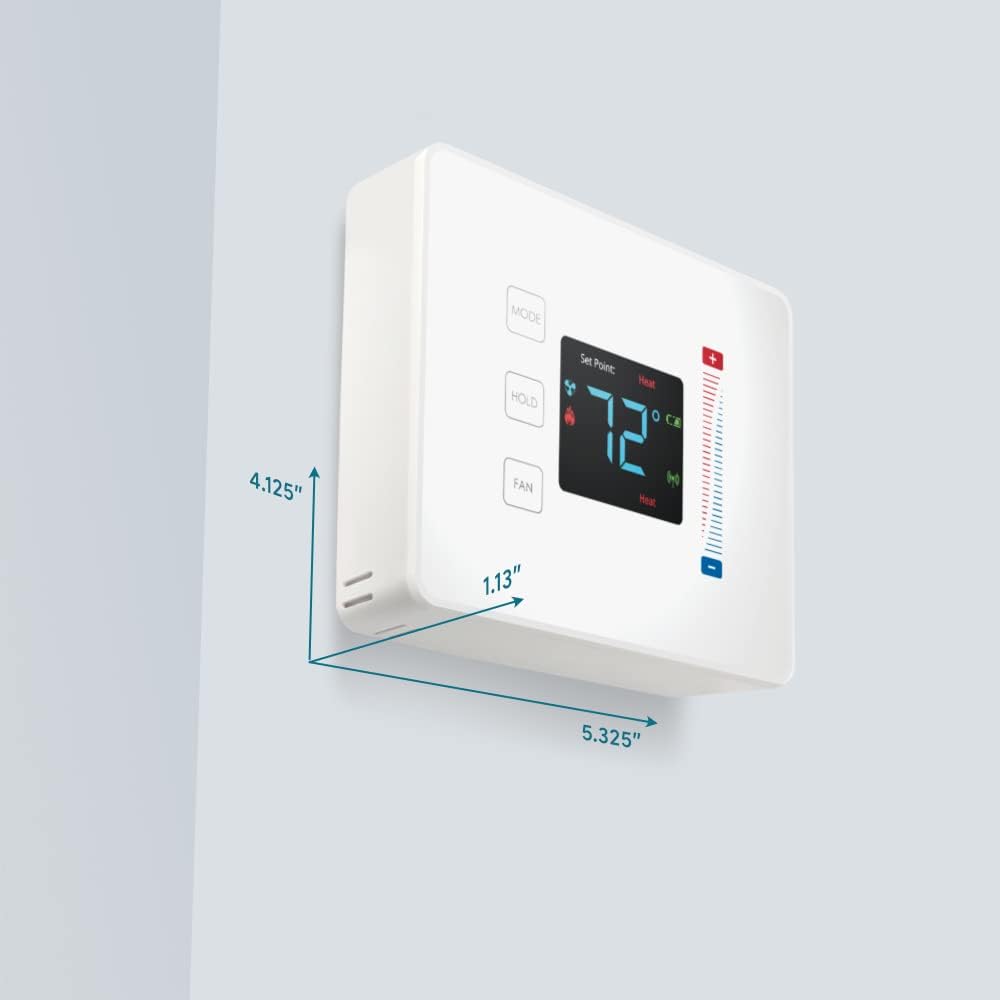
Figure 3: User interaction with the Pearl Thermostat's touch screen to modify temperature settings.
5.2 Режимді таңдау
түймесін басыңыз РЕЖИМ button to cycle through available operating modes: Heat, Cool, Auto, Off.
5.3 Ұстау функциясы
түймесін басыңыз ҰСТАП ТҰРУ button to maintain the current temperature setting indefinitely, overriding any programmed schedules. Press again to release the hold and resume the schedule.
5.4 Желдеткішті басқару
түймесін басыңыз FAN button to cycle through fan settings: Auto (fan runs only when heating or cooling) or On (fan runs continuously).
6. Техникалық қызмет көрсету
6.1 Батареяны ауыстыру
The Pearl Thermostat is powered by four AA batteries. When the battery level is low, a low battery indicator will appear on the display. To replace batteries:
- Gently pull the thermostat unit off its backplate.
- Remove the old AA batteries and dispose of them properly.
- Дұрыс полярлықты қамтамасыз етіп, төрт жаңа AA сілтілі батареясын салыңыз.
- Reattach the thermostat unit to the backplate.
Regular battery replacement ensures uninterrupted operation and maintains ZigBee connectivity.
6.2 Тазалау
Термостаттың бетін жұмсақ, d шүберекпен сүртіңізamp cloth. Avoid using abrasive cleaners or solvents, as these can damage the display and finish.
7. Ақаулықтарды жою
If you encounter issues with your Pearl Thermostat, refer to the following common troubleshooting steps:
- Дисплей/қуат жоқ: Check if the AA batteries are correctly installed and fully charged. Ensure power to the HVAC system is on at the circuit breaker.
- HVAC System Not Responding: Verify that the wiring connections to the backplate are secure. Confirm the thermostat is in the correct operating mode (Heat/Cool/Auto).
- Connectivity Issues (ZigBee): Ensure your smart home hub is powered on and within range. Refer to your smart home hub's instructions for device pairing. You may need to initiate a re-pairing process.
- Дұрыс емес температура көрсеткіштері: Термостатқа оның ішкі сенсорына әсер ететін тікелей күн сәулесі, сызбалар немесе жылу көздері әсер етпейтініне көз жеткізіңіз.
- Thermostat Not Responding to Touch: Gently clean the screen surface. If the issue persists, try removing the thermostat from its backplate, waiting 30 seconds, and reattaching it to perform a soft reset.
8. Техникалық сипаттамалар

Figure 4: Dimensions of the Centralite Pearl Thermostat.
| Техникалық сипаттама | Мәлімет |
|---|---|
| Бренд | Орталық |
| Модель атауы | Centralite Pearl Thermostat |
| Үлгі нөмірі | 3000-wC |
| Контроллер түрі | Ақылды заттар, Вера |
| Түс | Ақ |
| Температураны бақылау түрі | Бағдарламаланатын, сандық |
| Қосылу технологиясы | ZigBee |
| Қуат көзі | Батареямен жұмыс істейді (4 AA батареясы, қоса берілген) |
| Элемент салмағы | 0.97 фунт (шамамен 15.5 унция) |
| Тtage | 230 Volts (HVAC system) |
| Материал | Інжу |
| Дисплей түрі | СКД |
| Аяқтау түрі | Сатин |
| Басқару түрі | Сенсорлық тақтаны басқару |
| Бақылау әдісі | Қолданба |
| Монтаждау түрі | Қабырғаға аспа |
| Артқы жарық | Иә |
| Өнім өлшемдері (L x W x H) | 5.33 x 1.13 x 4.13 дюйм |
| UPC | 812489022264 |
9. Кепілдік және қолдау
For warranty information and technical support, please refer to the documentation included with your product or visit the official Centralite webсайт. Сатып алуды растау ретінде сатып алу түбіртегіңізді сақтаңыз.