
1. Кіріспе
Thank you for choosing the Sportstech F10 Treadmill. This manual provides essential information for the safe and effective use of your new fitness equipment. Please read all instructions carefully before assembly and operation. Keep this manual for future reference.
2. Қауіпсіздік нұсқаулары
- Кез келген жаңа жаттығу бағдарламасын бастамас бұрын әрқашан дәрігермен кеңесіңіз.
- Жүгіру жолының айналасында жеткілікті бос орын бар тегіс, тұрақты бетке орналастырылғанына көз жеткізіңіз.
- Бұл жүгіру жолағының пайдаланушының максималды салмағы - 120 кг. Бұл шектен асырмаңыз.
- Жұмыс кезінде балалар мен үй жануарларын жүгіру жолынан алыс ұстаңыз.
- Always use the safety key during workouts. In case of an emergency, the safety key will immediately stop the treadmill.
- Сәйкес спорттық аяқ киім мен киім киіңіз.
- Жүгіру жолы зақымдалған немесе дұрыс жұмыс істемесе, оны пайдаланбаңыз.
- The treadmill operates with a low noise level (less than 68dB), but ensure proper ventilation.
3. Пакет мазмұны
Құрастыруды бастамас бұрын барлық компоненттердің бар екенін тексеріңіз:
- Sportstech F10 Treadmill main unit
- User Manual (in ENG, DE, FR, ES, IT)
- Орнату құралдары
- Pulse Belt (included with some models)
4. Құрастыру және орнату
The Sportstech F10 treadmill is designed for quick and easy assembly. Follow these general steps:
- Қаптаманы ашу: Қаптамадан барлық компоненттерді мұқият алып тастаңыз.
- Негізгі жинақ: Attach the main frame to the base according to the diagrams in the included manual. Use the provided installation tools.
- Консоль тіркемесі: Secure the console to the uprights, ensuring all cables are properly connected.
- Қуат қосылымы: Жүгіру жолын жерге тұйықталған электр розеткасына қосыңыз.
- Қауіпсіздікті тексеру: Before first use, ensure all bolts and nuts are tightened and the safety key functions correctly.


Video: This video demonstrates the key features of the Sportstech F10 treadmill, including its easy folding mechanism, operation, and integration with fitness apps. It highlights the convenience and functionality for home use.
5. Пайдалану нұсқаулары
5.1 Консоль аяқталдыview
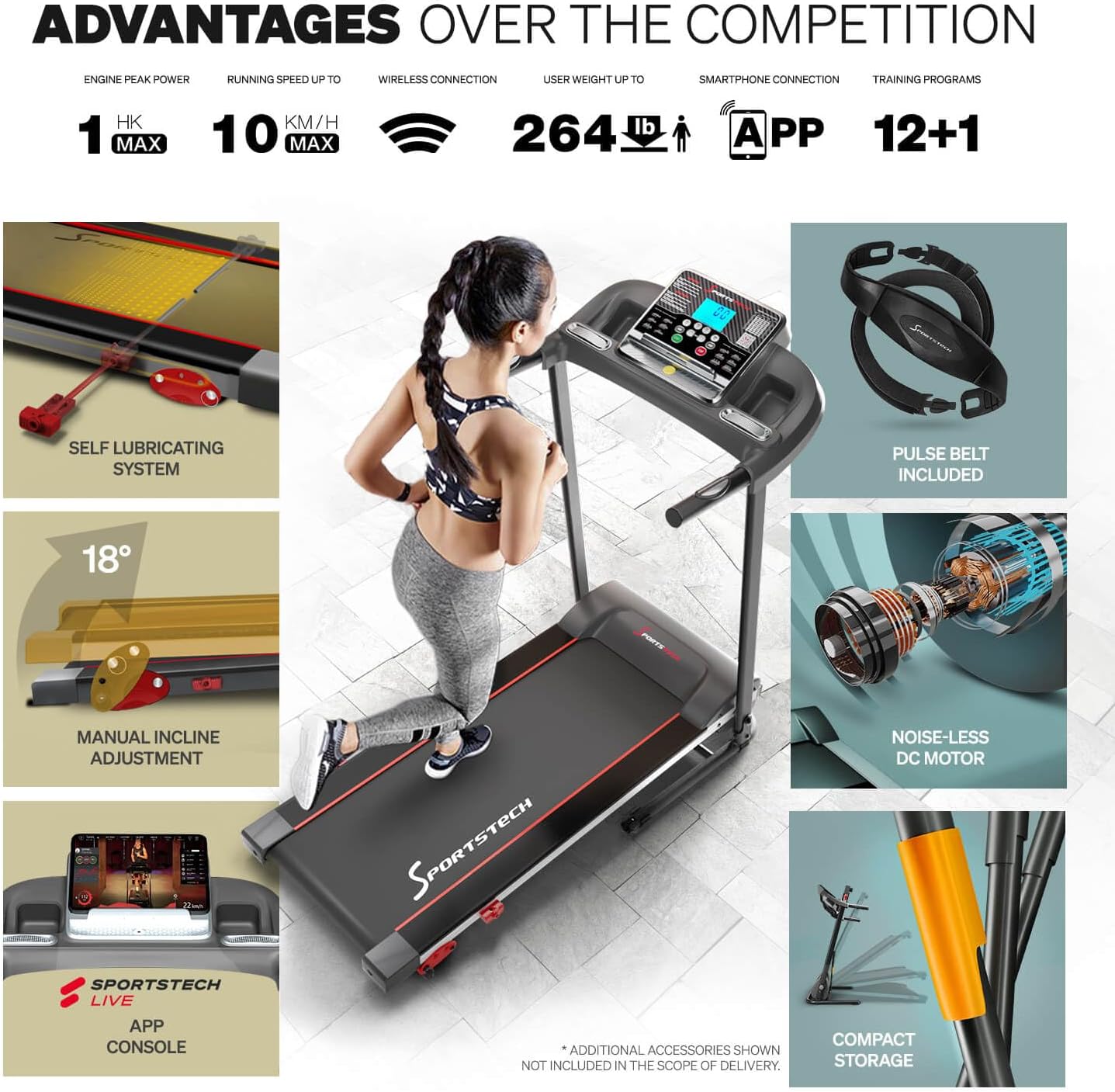
The F10 features a large LCD display with blue backlighting, showing essential training data such as speed, time, distance, calories, and pulse.
5.2 Жаттығуды бастау
- Аяқтарыңызды бүйірлік рельстерге қойып, жүгіру жолының белбеуіне шығыңыз.
- Қауіпсіздік кілтінің қысқышын киіміңізге бекітіңіз.
- Press the 'START' button on the console. The treadmill will begin at a low speed.
- Adjust the speed using the '+' and '-' buttons. The maximum speed is 10 km/h.
5.3 Programs and Incline
- The F10 offers 13 pre-set training programs to vary your workouts. Select a program using the 'PROG' button.
- The treadmill features a manual incline adjustment with 3 levels, allowing for a maximum incline of 18 degrees. Adjust the incline before starting your workout.
5.4 Қолданбаға қосылу мүмкіндігі
Enhance your training experience by connecting your device to the treadmill via the multimedia console. The F10 is compatible with KINOMAP and Sportstech Live apps, offering video events, coaching, and multiplayer modes.


5.5 Жүрек соғу жиілігін бақылау
The included pulse belt provides accurate heart rate data, allowing you to optimize your training intensity. Follow the instructions provided with the pulse belt for proper use and pairing.

6. Техникалық қызмет көрсету
6.1 Майлау
The Sportstech F10 features an innovative self-lubricating system that evenly releases silicone oil over a long period. This eliminates the need for frequent and inconvenient manual re-oiling.
6.2 Тазалау
Жүгіру жолын үнемі жарнамамен сүртіңізamp тер мен шаңды кетіруге арналған шүберек. Абразивті тазартқыштарды немесе еріткіштерді қолданбаңыз.
6.3 Сақтау
The F10 treadmill is designed with an Easy Folding System, allowing it to be folded compactly for storage. This makes it ideal for homes with limited space. Ensure the treadmill is securely locked in its folded position before moving or storing.
7. Ақаулықтарды жою
- Жүгіру жолы іске қосылмады: Check if the power cord is securely plugged in and the safety key is correctly placed.
- Ерекше шулар: Ensure all bolts are tightened. If the noise persists, contact customer support.
- Белдіктің сырғып кетуі: The running belt may need adjustment or re-tensioning. Refer to the detailed manual for instructions or contact support.
- Console not displaying: Check power connections and ensure the console cables are properly seated.
8. Техникалық сипаттамалар
| Ерекшелік | Мәлімет |
|---|---|
| Үлгі нөмірі | sp_f10_v_de |
| Өнім өлшемдері (L x W x H) | 128.5D x 62 Вт x 116.5 H см |
| Бүктелген өлшем | 1240 x 620 cm (Note: This seems to be a typo in source data, likely referring to 1240mm x 620mm or 124cm x 62cm) |
| Элемент салмағы | 20.5 келі |
| Материал | Легірленген болат |
| Максималды жылдамдық | Сағатына 10 шақырым |
| Максималды пайдаланушы салмағы | 120 келі |
| Арнайы мүмкіндіктер | Manual Incline, On Wheels |
| Максималды көлбеу пайызыtage | 30.61 (Note: This is likely a percentage value, not degrees) |
| Дисплей түрі | СКД |
| Қуат көзі | Сымды электр |
| Кіріс қуаты | 746 Вт |
| Бағдарламалар саны | 4 (Note: Product title mentions 13 programs, specifications list 4. Please refer to the actual product for clarification.) |
| Жүгіру беті (L x W) | 1010 x 345 мм (39.7 x 13.5 дюйм) |
9. Кепілдік және қолдау
For warranty information, technical support, or service inquiries, please refer to the contact details provided in the original product packaging or visit the official Sportstech webсайт. Кепілдік шағымдары үшін сатып алуды растайтын құжатты сақтаңыз.