
Кіріспе
Thank you for choosing the Divoom Onbeat 500 Portable Wireless Bluetooth Speaker. This device is designed to deliver powerful sound with convenient wireless connectivity. This manual will guide you through the setup, operation, and maintenance of your speaker to ensure optimal performance and longevity.
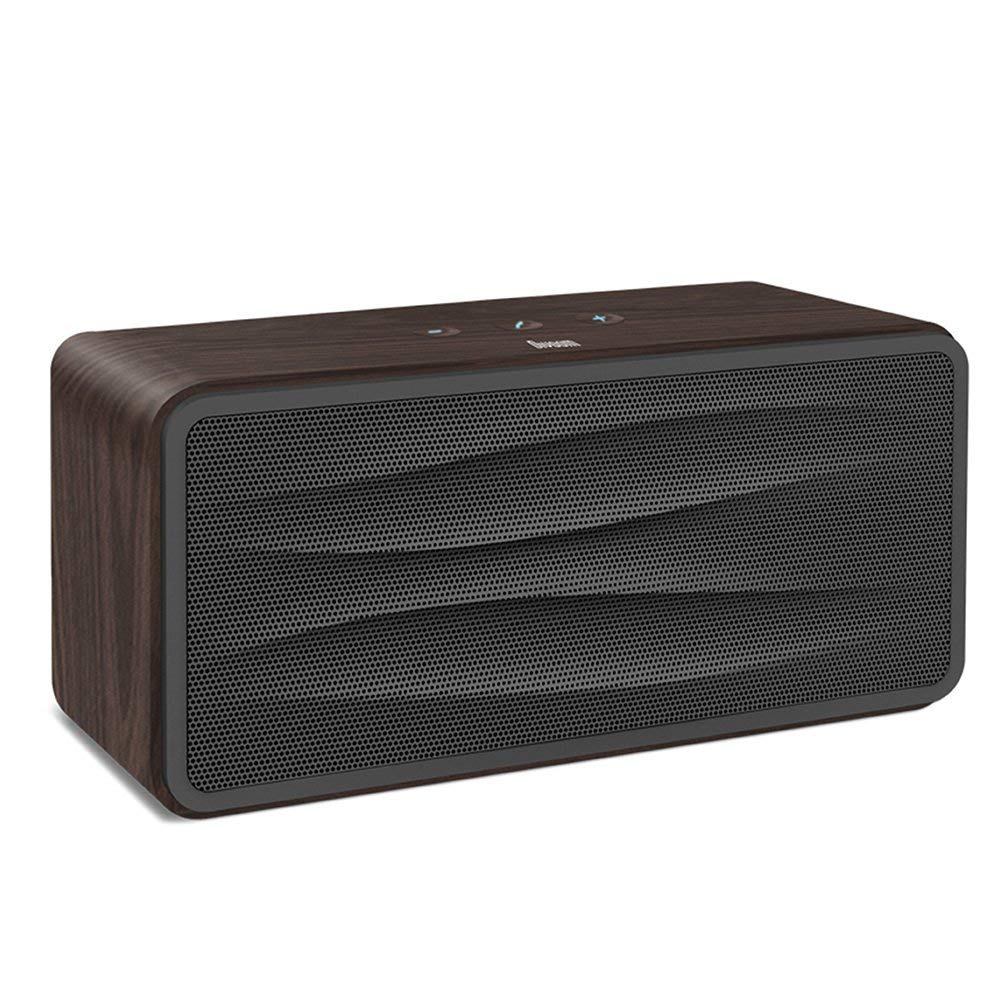
1-сурет: Алдыңғы view of the Divoom Onbeat 500 speaker. This image displays the speaker's main grille and overall design.
Пакет мазмұны
Пакетте келесі элементтердің бар-жоғын тексеріңіз:
- Divoom Onbeat 500 Speaker
- Микро USB зарядтау кабелі
- Көмекші кабель
- Пайдаланушы нұсқаулығы (бұл құжат)
- Кепілдік картасы
Өнім ерекшеліктері
The Divoom Onbeat 500 speaker offers a range of features for an enhanced audio experience:
- Күшті дыбыс: 2.1 channel design with a proprietary passive bass radiator for rich audio.
- NFC технологиясы: Tap-to-pair functionality for quick and easy Bluetooth connection.
- Bluetooth қосылымы: Wirelessly play and control music from up to 33 feet (10 meters) away.
- Кірістірілген динамик: Allows you to make and take calls directly from the speaker.
- Ұзақ жұмыс істейтін батарея: Integrated 5000mAh battery provides extended playback time.
- Көмекші кіріс: Bluetooth емес құрылғыларға сымды қосылу үшін.
Орнату
1. Динамикті зарядтау
Before initial use, fully charge your Divoom Onbeat 500 speaker. Use the provided Micro USB charging cable to connect the speaker to a USB power source (e.g., computer USB port, USB wall adapter). The charging indicator light will illuminate during charging and turn off or change color when fully charged. A full charge typically provides 8-10 hours of playback.
2. Қосу / Өшіру
- Қосу үшін: Дыбыс сигналы естілгенше немесе индикатор шамы жанғанша Қуат түймесін бірнеше секунд басып тұрыңыз.
- Қуатты өшіру үшін: Динамик өшкенше Қуат түймесін бірнеше секунд бойы қайтадан басып тұрыңыз.
3. Bluetooth жұптастыру
The Onbeat 500 offers two methods for wireless connection:
NFC (Near Field Communication) Pairing:
If your device supports NFC, you can pair quickly:
- Смартфоныңызда немесе планшетіңізде NFC қосылғанына көз жеткізіңіз.
- With the Onbeat 500 powered on, gently tap your NFC-enabled device against the NFC area on the speaker.
- Confirm the pairing request on your device. The speaker will indicate a successful connection.
Стандартты Bluetooth жұптауы:
For devices without NFC or for manual pairing:
- Power on the Divoom Onbeat 500 speaker. It will automatically enter Bluetooth pairing mode if no device is connected, or you may need to press a dedicated Bluetooth button (refer to speaker controls).
- On your audio device (smartphone, tablet, computer), go to the Bluetooth settings and enable Bluetooth.
- Іздеу available devices. You should see "Divoom Onbeat 500" in the list.
- Select "Divoom Onbeat 500" to connect. The speaker will confirm the connection with an audible prompt.
4. AUX қосылымы
To connect a device using the auxiliary cable:
- Connect one end of the provided auxiliary cable to the AUX-in port on the Divoom Onbeat 500.
- Connect the other end of the auxiliary cable to the headphone jack or audio output of your device.
- The speaker will automatically switch to AUX mode, or you may need to select it manually (refer to speaker controls).

2-сурет: Бүйір view of the Divoom Onbeat 500, illustrating the location of the charging port, AUX input, and control buttons.
Динамикті басқару
1. Музыканы ойнату
Once connected via Bluetooth or AUX, you can control music playback from your connected device. The speaker may also have integrated controls for volume adjustment, play/pause, and track skipping. Refer to the speaker's physical buttons for these functions.
2. Speakerphone Functionality
When connected to a smartphone via Bluetooth, the Divoom Onbeat 500 can be used as a speakerphone:
- Қоңырауға жауап беру: Press the Call button (often indicated by a phone icon) on the speaker.
- Қоңырауды аяқтау: Қоңырау шалу түймесін қайта басыңыз.
- Қоңырауды қабылдамау: Press and hold the Call button.

3-сурет: Артқы view of the Divoom Onbeat 500, highlighting the passive bass radiator for enhanced low-frequency sound.
Техникалық қызмет көрсету
1. Тазалау
Динамиктің сыртқы түрі мен функционалдығын сақтау үшін:
- Сыртқы бетін жұмсақ, құрғақ, талшықсыз шүберекпен сүртіңіз.
- Do not use abrasive cleaners, alcohol, benzene, or other chemical solvents, as these may damage the finish.
- Кез келген саңылауларға ылғалдың түсуін болдырмаңыз.
2. Батареяны күту
To prolong the life of the built-in lithium-ion battery:
- Батареяны жиі толық зарядсыздандырудан аулақ болыңыз.
- Ұзақ уақыт пайдаланбаған кезде динамикті салқын, құрғақ жерде сақтаңыз.
- Charge the speaker at least once every three months if stored for a long time to prevent deep discharge.
Ақаулықтарды жою
If you encounter issues with your Divoom Onbeat 500, please refer to the following common solutions:
| Мәселе | Мүмкін шешім |
|---|---|
| Динамик қосылмайды | Ensure the battery is charged. Connect the speaker to a power source using the Micro USB cable and try again. |
| Динамиктен дыбыс жоқ | Check the volume level on both the speaker and your connected device. Ensure the speaker is correctly paired via Bluetooth or connected via AUX. Try re-pairing the Bluetooth device. |
| Bluetooth жұптау сәтсіз аяқталды | Ensure the speaker is in pairing mode. Turn off and on Bluetooth on your device. Move your device closer to the speaker. Clear previous Bluetooth connections on your device and try again. |
| Дыбыс сапасы нашар | Ensure the speaker and connected device are within range (for Bluetooth). Check for interference from other wireless devices. Try a different audio source or cable. |
Техникалық сипаттамалар
Detailed technical specifications for the Divoom Onbeat 500 speaker:
- Модель атауы: Divoom Onbeat 500
- Динамик түрі: Компьютердің динамигі
- Қосылу технологиясы: Блютез
- Сымсыз байланыс технологиясы: Блютез
- Бақылау әдісі: түртіңіз
- Қуат көзі: Батареядан қуат алады
- Батарея: 1 литий-ионды батарея (5000 мАч)
- Аудио Wattage: 20 Вт
- Динамиктің максималды шығыс қуаты: 100 Вт
- Көлемді дыбыс арнасының конфигурациясы: 2.1
- Үйлесімді құрылғылар: Android, Windows, iPhone (iOS)
- Қосқыш түрі: USB (зарядтау үшін)
- Өнім өлшемдері: 22.5 x 7.49 x 10.49 см (LxWxH)
- Элемент салмағы: 1.55 кг
- Түсі: Көмір
- Арнайы мүмкіндіктер: NFC, Built-in Speakerphone, Passive Bass Radiator
Кепілдік және қолдау
Your Divoom Onbeat 500 speaker comes with a limited warranty. Please refer to the included Warranty Card for detailed terms and conditions, including warranty period and coverage.
For technical support, service inquiries, or further assistance, please visit the official Divoom website or contact their customer service department using the information provided on your Warranty Card or product packaging. Please have your model number (Onbeat 500) and purchase details ready when contacting support.