
Кіріспе
This manual provides detailed instructions for the setup, operation, and maintenance of your A4tech Bloody Light Strike B314 Gaming Keyboard. Please read this manual thoroughly before using the product to ensure optimal performance and longevity.
Негізгі мүмкіндіктер
- Bloody 4 Light Strike Mechanical Switches: Experience ultra-fast response times of 0.2ms with infrared optic switches, providing a competitive edge in gaming.
- Жетілдірілген төзімділік: Designed for intensive use, featuring A,S,D,W silicon keys with a convex shape for improved control and longevity.
- Neon Glare System LED Backlighting: Customize your gaming environment with vibrant LED backlighting, making keys easy to locate in low-light conditions.
- 9 бағдарламаланатын пернелер: Personalize your gaming experience by assigning custom functions to 9 individually programmable keys.
- Double Secure Water-Resistance: The keyboard is electronically sealed with a water drain hole, protecting it from accidental spills and extending its lifespan.
Пакет мазмұны
Барлық элементтер пакетте бар екенін тексеріңіз:
- Bloody Light Strike B314 Gaming Keyboard
- Пайдаланушы нұсқаулығы (бұл құжат)

Image: The retail packaging for the Bloody Light Strike B314 Gaming Keyboard, showing the keyboard with LED backlighting and key features highlighted.
Орнату нұсқаулығы
- Пернетақтаны қосыңыз: Пернетақтаның USB қосқышын компьютердегі қол жетімді USB портына қосыңыз.
- Драйверді орнату: The keyboard is typically plug-and-play. Your operating system should automatically detect and install the necessary drivers. If prompted, follow the on-screen instructions.
- Бағдарламалық құралды орнату (қосымша): For advanced customization, including programming keys and managing backlighting, download and install the official Bloody software from the A4tech webсайт.
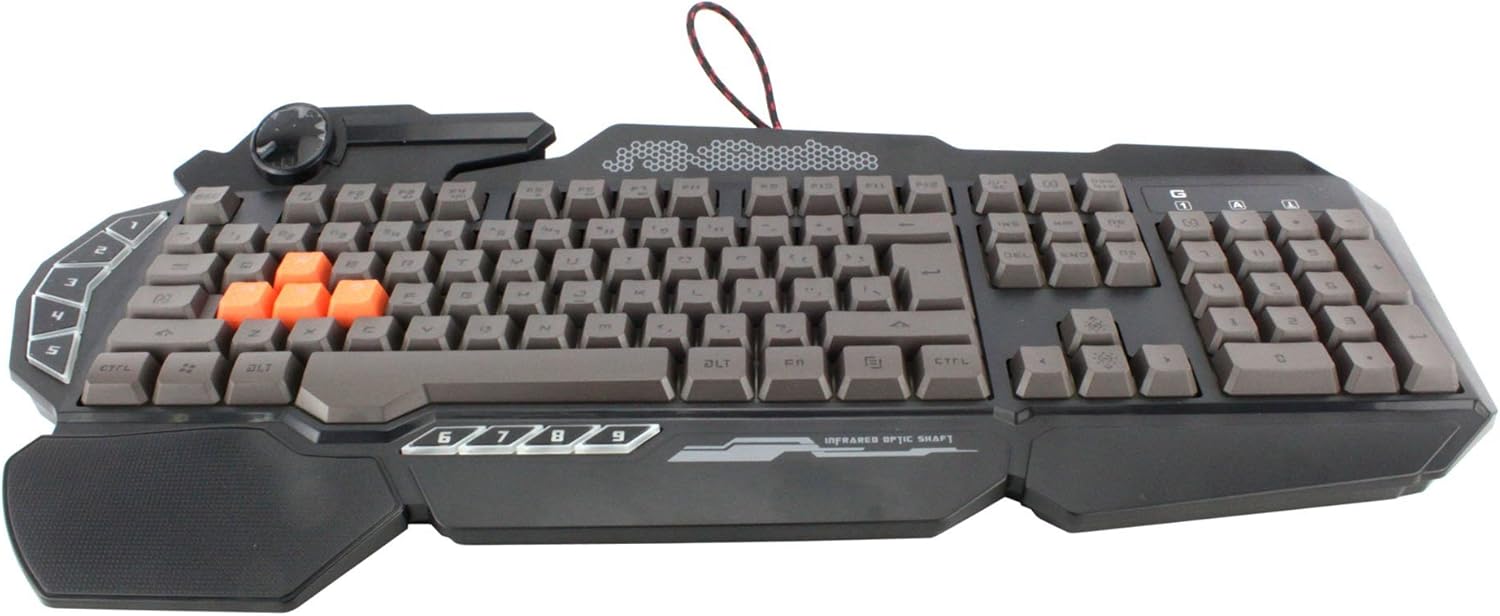
Сурет: жоғарыдан төменге view of the Bloody Light Strike B314 Gaming Keyboard, showcasing the full QWERTY layout with orange WASD keys and dedicated macro keys on the left.
Пайдалану нұсқаулары
Негізгі қолдану
The Bloody B314 functions as a standard QWERTY keyboard for everyday typing and gaming. Its infrared mechanical switches provide a fast and responsive typing experience.
Бағдарламаланатын пернелер
The keyboard features 9 programmable keys, typically located on the left side. To customize these keys:
- Install the official Bloody software from the A4tech webсайт.
- Launch the software and navigate to the key customization section.
- Select the desired programmable key (e.g., G1-G9 or similar).
- Assign macros, key functions, or multimedia controls as needed.
- Save your profile өзгертулерді қолдану үшін.
LED Backlighting Control
The Neon Glare System LED backlighting can be adjusted using function key combinations:
- Fn+F12: Cycle through different backlighting modes (e.g., static, breathing, off).
- Fn + Жоғары/Төмен көрсеткісі: Артқы жарықтың жарықтығын реттеңіз.
- Fn + Солға/Оңға көрсеткі: Adjust backlight speed or direction (if applicable to the mode).
Ойын режимі
Activate Game Mode to disable the Windows key and prevent accidental interruptions during gameplay.
- Fn+F8: Ойын режимін қосу/өшіру.

Сурет: бұрышты view of the Bloody Light Strike B314 Gaming Keyboard, highlighting the ergonomic wrist rest and the distinct orange WASD keys.
Техникалық қызмет көрсету
Тазалау
- Тазалау алдында пернетақтаны компьютерден ажыратыңыз.
- Жұмсақ пайдаланыңыз, damp cloth to wipe the surface of the keyboard. Avoid harsh chemicals or abrasive materials.
- Кілттер арасындағы шаң мен қоқыс үшін сығылған ауаны пайдаланыңыз.
- The water-resistant design helps protect against spills, but it is still recommended to clean up liquids promptly.
Сақтау
Ұзақ уақыт бойы пайдаланбаған кезде пернетақтаны тікелей күн сәулесінен және төтенше температурадан алыс салқын, құрғақ жерде сақтаңыз.
Ақаулықтарды жою
Пернетақта жауап бермейді
- USB кабелінің пернетақта мен компьютерге мықтап жалғанғанын тексеріңіз.
- Пернетақтаны басқа USB портына қосып көріңіз.
- Компьютеріңізді қайта іске қосыңыз.
- Пернетақта компьютеріңіздің Құрылғы менеджерінде (Windows) немесе Жүйе ақпаратында (macOS) танылғанын тексеріңіз.
Артқы жарық жұмыс істемейді
- Ensure the backlighting is not turned off using the Fn + F12 combination.
- Adjust brightness using Fn + Up Arrow.
- Арнаулы кәсіпті пайдалансаңызfiles, ensure the backlighting settings are correctly configured in the Bloody software.
Бағдарламаланатын пернелер жұмыс істемейді
- Verify that the Bloody software is installed and running.
- Ensure your custom profiles are loaded and active within the software.
- Check for any software updates for the Bloody keyboard utility.
Техникалық сипаттамалар
| Ерекшелік | Мәлімет |
|---|---|
| Бренд | A4tech |
| Үлгі нөмірі | A4TKLA45173 |
| Қосылу технологиясы | Инфрақызыл |
| Пернетақта сипаттамасы | Механикалық |
| Ауыстыру түрі | Mechanical (Light Strike Optic) |
| Арнайы мүмкіндік | Backlit, Programmable Keys, Water Resistant |
| Түс | Қара |
| Пернетақтаның артқы жарығы түстерін қолдау | RGB (Neon Glare System) |
| Кілттер саны | 104 |
| Бағдарламаланатын түймелер | 9 |
| Суға төзімділік деңгейі | Суға төзімді |
| Элемент салмағы | 2.9 фунт |
Кепілдік және қолдау
Кепілдік туралы ақпарат және техникалық қолдау алу үшін ресми A4tech компаниясына хабарласыңыз webсайтына өтіңіз немесе тұтынушыларға тікелей хабарласыңыз. Сатып алу түбіртегін кепілдік талаптары үшін сатып алудың дәлелі ретінде сақтаңыз.
Ресми A4tech Webсайт: www.a4tech.com