
Кіріспе
The Quad Lock Action Camera Adaptor (Model QLA-GPR) is designed to securely attach action cameras with a standard GoPro fitting to your existing Quad Lock Out Front Mount. This adaptor allows for convenient video recording during activities such as cycling, providing a stable platform for your camera.
Ескерту: The Quad Lock Out Front Mount is not included with this adaptor and must be purchased separately.
Орнату нұсқаулары
1. Attaching the Adaptor to the Out Front Mount
- Ensure your Quad Lock Out Front Mount is securely installed on your bicycle handlebars.
- Align the Quad Lock Action Camera Adaptor with the mounting points on the underside of your Out Front Mount.
- Insert the provided screws through the adaptor and into the Out Front Mount.
- Using an appropriate tool, tighten the screws until the adaptor is firmly attached. Do not overtighten.
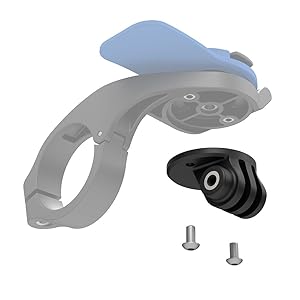
Image: Quad Lock Action Camera Adaptor components, showing the adaptor and screws.
2. Attaching an Action Camera
- Position your action camera (e.g., GoPro) onto the standard fitting of the Quad Lock Action Camera Adaptor.
- Secure the camera using its standard mounting screw and nut. Ensure the camera is stable and does not wobble.

Image: An action camera and a smartphone securely mounted on bicycle handlebars using the Quad Lock system.

Image: A cyclist's perspective showing an action camera and phone mounted on the bike, ready for recording.
Пайдалану нұсқаулары
Once the Action Camera Adaptor and your camera are securely mounted, operate your action camera according to its manufacturer's instructions. The adaptor provides a stable base for recording video while riding.
- Ensure the camera's lens is clear and unobstructed.
- Verify the camera's battery level and memory card capacity before starting your ride.
- Adjust the camera's angle as needed for optimal recording.
Техникалық қызмет көрсету
- Тазалау: Wipe the adaptor with a damp кір мен қоқысты кетіруге арналған шүберек. Қатты химиялық заттардан аулақ болыңыз.
- Тексеру: Барлық бұрандалар мен қосылымдарды мезгіл-мезгіл тексеріп, олардың мықтап тұрғанына көз жеткізіңіз. Қажет болса, қайта қатайтыңыз.
- Сақтау орны: Store the adaptor in a cool, dry place when not in use.
Ақаулықтарды жою
Camera Wobbles or is Loose
- Check Camera Screw: Ensure the action camera's mounting screw is fully tightened to the adaptor.
- Check Adaptor Screws: Verify that the screws attaching the adaptor to the Out Front Mount are secure.
- Үйлесімділік: Confirm your action camera uses a standard GoPro fitting.
Adaptor Does Not Fit Out Front Mount
- Үлгіні тексеру: Ensure you have a genuine Quad Lock Out Front Mount. This adaptor is specifically designed for Quad Lock Out Front Mounts.
- Бағыт: Double-check the orientation of the adaptor against the mount.
Техникалық сипаттамалар
| Үлгі нөмірі | QLA-GPR |
| Өнім өлшемдері | 0.79 x 2.36 x 3.94 дюйм |
| Элемент салмағы | 1.92 унция |
| Түс | Қара |
| Үйлесімді құрылғылар | Action Cameras with standard GoPro fitting |
| Монтаждау түрі | Front Mount (requires Quad Lock Out Front Mount) |
| Арнайы мүмкіндіктер | Жеңіл |
| Өндіруші | Annex Products Pty Ltd |
Өнімнің ресми бейнесі
Video: Demonstration of Quad Lock products in use. This video provides a general overview of the Quad Lock ecosystem and how various mounts and adaptors function.
Кепілдік және қолдау
For warranty information and customer support, please refer to the official Quad Lock website or contact their customer service directly. Details regarding product guarantees and assistance with any issues can be found through these channels.
Ресми Webсайт: www.quadlockcase.com