
Кіріспе
Сатып алғаныңыз үшін рахметasing the SENTRY HPXBT150 Bluetooth Flat Cord Earbuds. This manual provides detailed instructions on how to set up, operate, and maintain your new wireless earbuds. Please read this manual thoroughly before use to ensure optimal performance and longevity of your device.
Пакет мазмұны
- SENTRY HPXBT150 Bluetooth Flat Cord Earbuds
- Қорғаныс корпусы
- USB зарядтау кабелі (микро-USB)
- Removable Ear Hooks
- Пайдаланушы нұсқаулығы
Өнім аяқталдыview
The SENTRY HPXBT150 earbuds feature Bluetooth wireless technology, allowing for a cord-free listening experience. They include an in-line microphone for hands-free calls and media control buttons for easy operation. Removable ear hooks provide a secure fit, especially during physical activity.
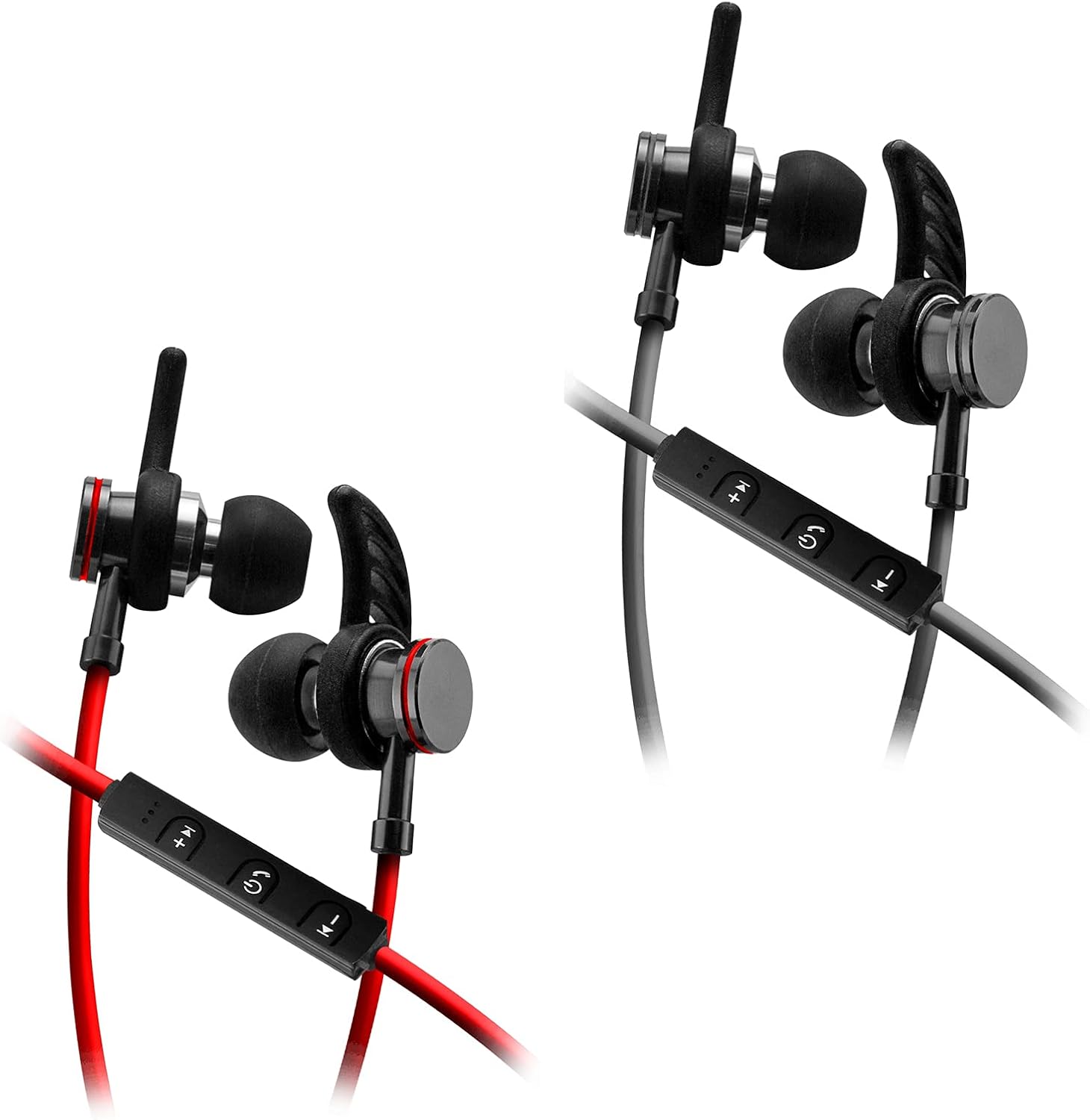
Image: SENTRY HPXBT150 Bluetooth Earbuds showing the in-line control panel and ear hooks. The control panel features volume up/next track, power/multifunction, and volume down/previous track buttons.
Орнату
1. Құлақаспаптарды зарядтау
- Locate the Micro-USB charging port on the in-line control unit.
- Connect the provided USB charging cable to the earbuds' charging port.
- USB кабелінің екінші ұшын үйлесімді USB қуат көзіне (мысалы, компьютердің USB порты, USB қабырға адаптері) қосыңыз.
- The LED indicator light will illuminate during charging. It will change color or turn off once charging is complete. A full charge typically takes approximately 1-2 hours.
2. Bluetooth жұптастыру
- Ensure the earbuds are fully charged before initial pairing.
- Press and hold the multi-function button (usually the center button on the in-line control) for approximately 5-7 seconds until the LED indicator light flashes red and blue alternately. This indicates the earbuds are in pairing mode.
- Bluetooth қосылған құрылғыңызда (смартфон, планшет, компьютер) Bluetooth параметрлері мәзіріне өтіңіз.
- Bluetooth қосыңыз және қолжетімді құрылғыларды іздеңіз.
- Select "HPXBT150" or a similar name from the list of found devices.
- Once successfully paired, the LED indicator on the earbuds will typically flash blue slowly or turn off, and you will hear an audible confirmation.
- Құпия сөз сұралса, «0000» енгізіңіз.
Пайдалану нұсқаулары
Қуатты қосу/өшіру
- Қуат қосулы: Press and hold the multi-function button for approximately 3 seconds until the LED indicator flashes blue and you hear a power-on tone.
- Қуат көзін өшіру: Press and hold the multi-function button for approximately 3-5 seconds until the LED indicator flashes red and you hear a power-off tone.
Музыканы ойнату
- Ойнату/кідірту: Көп функциялы түймені бір рет басыңыз.
- Дыбыс деңгейі: '+' түймесін басыңыз.
- Дыбыстың төмендеуі: '-' түймесін басыңыз.
- Келесі трек: '+' түймесін басып тұрыңыз.
- Алдыңғы трек: '-' түймесін басып тұрыңыз.
Қоңырауларды басқару
- Қоңырауға жауап беру/аяқтау: Көп функциялы түймені бір рет басыңыз.
- Қоңырауды қабылдамау: Көп функциялы түймені шамамен 2 секунд басып тұрыңыз.
- Соңғы нөмірді қайта теру: Көп функциялы түймені екі рет басыңыз.
Техникалық қызмет көрсету
- Тазалау: Use a soft, dry cloth to clean the earbuds. Do not use harsh chemicals or abrasive materials.
- Сақтау орны: When not in use, store the earbuds in the provided protective case to prevent damage.
- Батареяға күтім жасау: Батареяның қызмет ету мерзімін сақтау үшін құлаққаптардың жиі толық зарядсыздануына жол бермеңіз. Ұзақ уақыт пайдаланылмаса да, оларды үнемі зарядтап отырыңыз.
- Ылғалдан аулақ болыңыз: Құлақаспаптарды судан және шамадан тыс ылғалдан аулақ ұстаңыз.
Ақаулықтарды жою
| Мәселе | Мүмкін шешім |
|---|---|
| Құлақаспаптар қосылмайды. | Ensure the earbuds are fully charged. Connect to a power source and allow time to charge. |
| Құрылғымен жұптау мүмкін емес. | Ensure earbuds are in pairing mode (flashing red/blue). Turn off and on Bluetooth on your device. Move earbuds closer to your device. Forget previous pairings on your device and try again. |
| Дыбыс жоқ немесе төмен дыбыс. | Check volume levels on both the earbuds and your connected device. Ensure earbuds are properly paired. Try re-pairing the earbuds. |
| Үзіліссіз байланыс. | Құлаққаптар мен құрылғыңыз арасында ешқандай кедергі жоқ екеніне көз жеткізіңіз. Құрылғыңызға жақындаңыз. Күшті Wi-Fi немесе басқа сымсыз кедергілер бар орталардан аулақ болыңыз. |
Техникалық сипаттамалар
- Үлгі: HPXBT150
- Қосылу технологиясы: Сымсыз (Bluetooth)
- Драйвер блогы: 10мм
- Кедергі: 32+/-3 Ohms
- Сезімталдық: 103dB +/- 3dB
- Жиілік жауабы: 20Гц - 20кГц
- Үйлесімді құрылғылар: Phones, Tablets, MP3 Players, Computers, Gaming Consoles
- Басқару түрі: БАҚ-ты басқару
- Арнайы мүмкіндіктер: Microphone Included, USB Connectivity, Removable Ear Hooks
- Элемент салмағы: 2.08 унция
Қауіпсіздік туралы ақпарат
- Do not expose the earbuds to extreme temperatures, direct sunlight, or fire.
- Do not disassemble or modify the earbuds. This may void the warranty and cause damage.
- Есту қабілетіне зақым келтірмеу үшін ұзақ уақыт бойы жоғары дыбыс деңгейінде тыңдаудан аулақ болыңыз.
- Балалар мен үй жануарларының қолы жетпейтін жерде сақтаңыз.
- Өнімді жергілікті ережелерге сәйкес жауапкершілікпен тастаңыз.
Кепілдік және қолдау
For warranty information and technical support, please refer to the documentation included with your purchase or contact SENTRY customer service directly. Keep your proof of purchase for warranty claims.