
Кіріспе
The Nyko Media Remote for Xbox One provides convenient control over your Xbox One console and various media applications. This remote simplifies navigation and playback of streaming content and physical media, offering dedicated buttons for common functions. It also features the ability to power your Xbox One on and off, and control basic functions of your television.

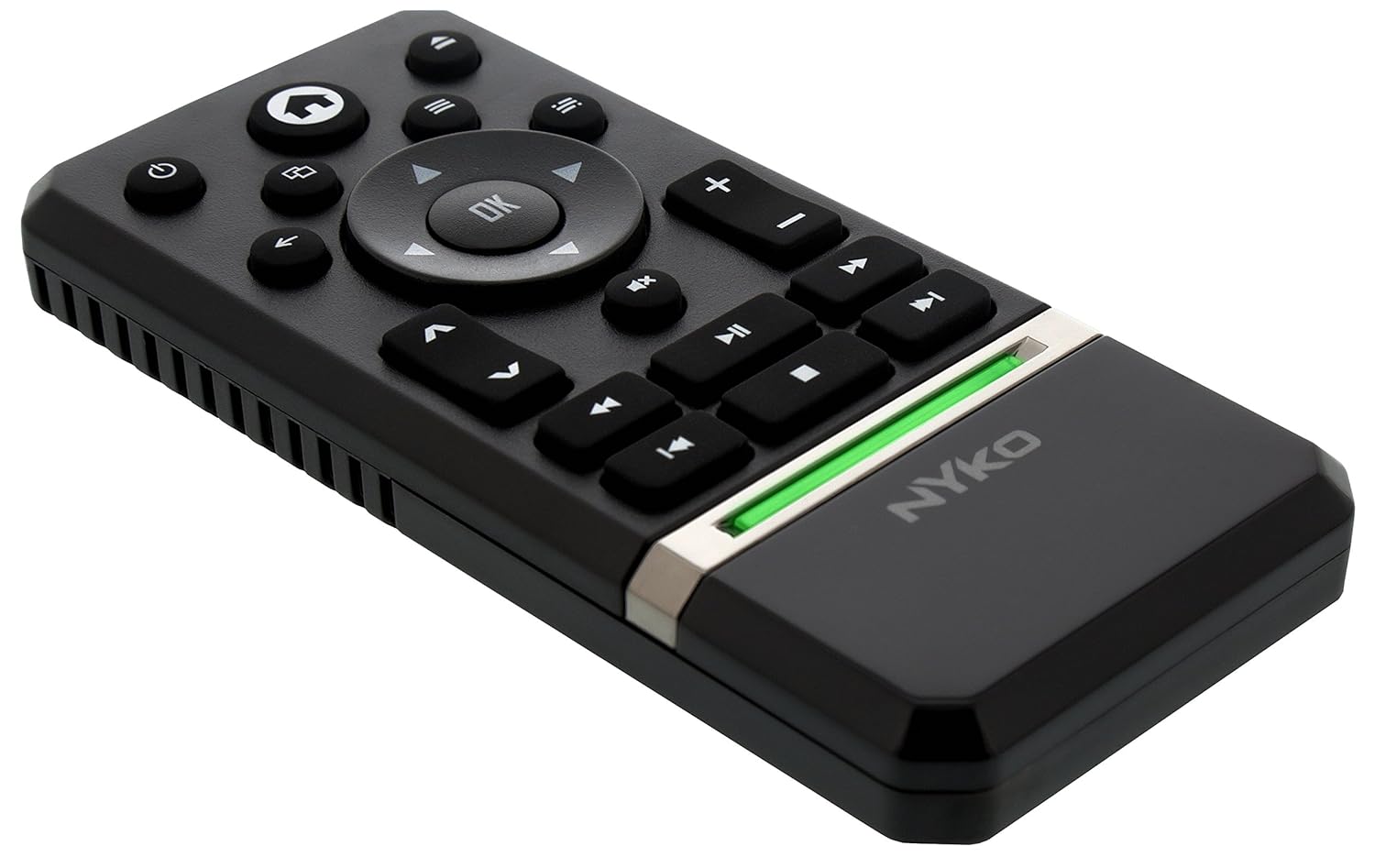
Image: Nyko Media Remote for Xbox One, front view.
Пакет мазмұны
- Nyko Media Remote for Xbox One (Model: 86116)
- Ескерту: AAA батареялары жинаққа кірмейді және оларды бөлек сатып алу керек.

Image: Nyko Media Remote for Xbox One in its retail packaging.
Орнату
1. Батареяны орнату
- Қашықтан басқару пультінің артқы жағындағы батарея бөлімін табыңыз.
- Ашу үшін батарея қақпағын төмен сырғытыңыз.
- Бөлім ішінде көрсетілгендей дұрыс полярлықты (+/-) қамтамасыз етіп, екі (2) AAA батареясын салыңыз.
- Батарея қақпағын орнына түскенше жоғары қарай сырғыту арқылы жабыңыз.
Сурет: артқы view of the remote with the battery cover removed, illustrating the AAA battery placement.
2. Бастапқы қосылым
The Nyko Media Remote uses infrared (IR) technology. No manual pairing is required for the Xbox One. Simply ensure a clear line of sight between the remote's IR emitter and the Xbox One's IR receiver.
For TV control functions (volume, channels, power), your TV must be configured to respond to the Xbox One's IR signals, typically through the Xbox One's OneGuide settings. The remote sends commands to the Xbox One, which then relays them to your TV via its IR blaster (if configured) or Kinect sensor.
Пайдалану нұсқаулары
The Nyko Media Remote provides comprehensive control for your Xbox One and various media applications. Refer to the diagram below for button identification and their primary functions.

Сурет: алдыңғы view of the Nyko Media Remote, displaying all control buttons.
Түймелердің функциялары:
| Түйме | Функция |
|---|---|
| Қуат түймесі (⏻) | Powers the Xbox One console on or off. |
| Үй түймесі (⌂) | Returns to the Xbox One Home screen. |
| View Түйме (🗀) | Accesses additional information or options within an app or game. |
| Мәзір түймесі (☰) | Opens context-sensitive menus or options. |
| Бағыт тақтасы (D-Pad) | Мәзірлер мен мазмұнды шарлайды. |
| OK түймесі | Confirms selections. Can also function as Play/Pause in some apps. |
| Артқа түймесі (←) | Алдыңғы экранға немесе мәзірге оралады. |
| OneGuide Button (📱) | Launches the Xbox OneGuide for live TV and media. |
| Дыбыс деңгейін жоғарылату/төмендету (⏸ / ⏷) | Adjusts the television volume (requires TV setup via Xbox One). |
| Дыбысты өшіру түймесі (🔇) | Mutes or unmutes television audio. |
| Арна жоғары/төмен (▲ / ▼) | Changes television channels (requires TV setup via Xbox One). |
| Жылдам оралу (⏪) | Rewinds media playback. |
| Ойнату/Үзіліс (⏯) | Мультимедианы ойнатуды ойнатады немесе кідіртеді. |
| Жылдам алға (⏩) | Fast forwards media playback. |
| Алдыңғы трек (⏮) | Ағымдағы жолдың басына немесе алдыңғы жолға өткізеді. |
| Тоқта (⏹) | Медиа ойнатуды тоқтатады. |
| Келесі трек (⏭) | Skips to the next track or chapter. |
Media and App Control:
The remote is designed for seamless control of various Xbox One applications, including:
- OneGuide
- Netflix
- Hulu Plus
- Amazon Instant Video
- Other streaming services and Blu-ray/DVD playback
Dedicated playback buttons (Play, Pause, Fast Forward, Rewind, Stop, Skip) provide intuitive control for movies, music, and other media.
Техникалық қызмет көрсету
Батареяны ауыстыру:
When the remote's performance diminishes or it stops responding, it is likely time to replace the batteries. Follow the "Battery Installation" steps in the Setup section to replace the two AAA batteries.
Тазалау:
To clean the remote, gently wipe it with a soft, dry cloth. Avoid using harsh chemicals, abrasive cleaners, or excessive moisture, as these can damage the remote's finish or internal components.
Ақаулықтарды жою
- Қашықтан басқару пульті жауап бермейді:
- Жаңа AAA батареяларының дұрыс орнатылғанына көз жеткізіңіз.
- Verify there is a clear line of sight between the remote and the Xbox One console. Obstructions can block the infrared signal.
- Move closer to the Xbox One console. The remote has a maximum effective range of approximately 9 meters (25 feet).
- TV Control (Volume, Channel, Power) Not Working:
- Confirm that your Xbox One's OneGuide settings are properly configured for your television. The remote sends commands to the Xbox One, which then controls the TV.
- Ensure any necessary IR blasters or Kinect sensors are correctly set up and positioned.
- Intermittent Response:
- This can sometimes occur due to weak batteries or environmental interference. Replace batteries and ensure a clear line of sight.
Техникалық сипаттамалар
| Ерекшелік | Мәлімет |
|---|---|
| Бренд | Нико |
| Модель атауы | Медиа қашықтан басқару құралы |
| Үлгі нөмірі | 86116 |
| Қосылу технологиясы | Инфрақызыл (ИК) |
| Үйлесімді құрылғылар | Xbox One, Television (via Xbox One IR blaster/Kinect) |
| Батарея Түрі | 2 x AAA батареялары (жинаққа кірмейді) |
| Максималды диапазон | 9 метрге дейін (25 фут) |
| Элемент салмағы | 0.1 фунт (шамамен 45 грамм) |
| Түс | Қою сұр |
| Қосымша мүмкіндіктер | Ergonomic design, dedicated media playback controls. |
Кепілдік және қолдау
Nyko products are designed for quality and reliability. For specific warranty details, please refer to the documentation included with your purchase or visit the official Nyko website. The product includes warranty information in multiple languages.
Тұтынушыларды қолдау:
- Электрондық пошта: customer.support@nyko.com
- Телефон: +1-888-400-6956
- Онлайн тіркелу: www.nyko.com
- Қосымша ақпарат: http://uqr.me/nykotechnologies/qr/83215

Сурет: артқы view of the product packaging, detailing features and customer support contact information.