
LLOYTRON B7505WH
Lloytron MIP System B7505WH-C MiP2 32 Melody Plug-in Door Chime User Manual
Model: B7505WH
1. Кіріспе
Сатып алғаныңыз үшін рахметasing the Lloytron MIP System B7505WH-C MiP2 32 Melody Plug-in Door Chime. This low-energy, portable, and wireless doorbell system is designed for ease of use and reliable performance. The system allows for wireless communication between the doorbell push button and the chime receiver, offering a range of up to 150 meters (unobstructed).
The MIP (Modular-Intelligent-Programmable) System enables the door chime to automatically learn frequencies from other MIP SYSTEM modules, supporting up to four additional doorbell transmitters and four chime receivers. With 32 selectable melodies, variable volume control, and a flashing strobe light indicator, this system provides a versatile and accessible solution for your home or office.
2. Қауіпсіздік туралы ақпарат
- Қолданар алдында барлық нұсқауларды мұқият оқып шығыңыз және болашақта анықтама алу үшін сақтап қойыңыз.
- Do not expose the chime unit to water or excessive moisture. It is designed for indoor use only.
- Ensure the doorbell push button is installed in a location protected from direct heavy rain to prolong battery life and functionality.
- Only use the specified battery type (1 x A23) for the doorbell push button.
- Ескі және жаңа батареяларды немесе батареялардың әртүрлі түрлерін араластырмаңыз.
- Пайдаланылған батареяларды жергілікті ережелерге сәйкес жауапкершілікпен тастаңыз.
- Do not attempt to open or repair the units yourself. Refer all servicing to qualified personnel.
- Балалардың қолы жетпейтін жерде сақтаңыз.
3. Пакет мазмұны
Пакетте барлық элементтердің бар екенін тексеріңіз:
- 1 x Lloytron MIP System Plug-in Chime Receiver (White)
- 1 x Lloytron MIP System Battery-Powered Doorbell Push Button (White)
- 1 x A23 Battery (for doorbell push button)
- Mounting accessories (adhesive pad, screws)
- 1 x терезе жапсырмасы
- 1 x Installation and Troubleshooting Manual (this document)
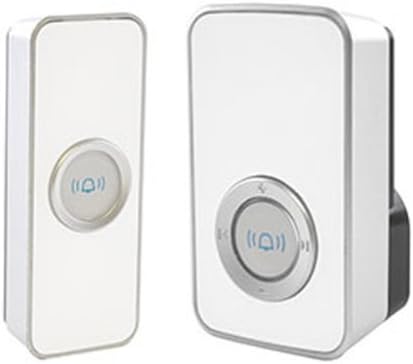
Image 1: The Lloytron MIP System B7505WH-C includes a plug-in chime receiver (right) and a battery-powered doorbell push button (left). Both units are white with silver accents.
4. Орнату
4.1 Installing the Doorbell Push Button
- Батареяны салу: Open the battery compartment of the doorbell push button. Insert the supplied A23 battery, ensuring correct polarity (+/-). Close the compartment securely.
- Орынды таңдаңыз: Select a suitable location near your door, ensuring it is protected from direct heavy rain. The surface should be clean and dry.
- Орнату опциялары:
- Жабысқақ төсем: Peel off the protective film from the adhesive pad and firmly press the doorbell push button onto the chosen surface for at least 30 seconds.
- Бұрандалар: If using screws, mark the desired drilling points, drill pilot holes, and secure the doorbell push button using the provided screws.
4.2 Setting up the Chime Receiver
- Қосылу: Plug the chime receiver into a standard electrical outlet within your home. Ensure it is within the wireless range of the doorbell push button (up to 175m unobstructed).
- Бастапқы жұптау: The system is typically pre-programmed from the factory. Press the doorbell push button once. The chime receiver should sound, indicating successful pairing.
- Қолмен жұптау (қажет болса): If the chime does not sound, refer to the "Troubleshooting" section for instructions on manual pairing.
5. Пайдалану нұсқаулары
5.1 Әуендерді ауыстыру
The chime receiver offers 32 high-quality melodies. To change the melody:
- Locate the melody selection button on the chime receiver. This is often indicated by musical notes or an arrow icon.
- Press the melody selection button repeatedly to cycle through the available tunes.
- Once you hear the desired melody, stop pressing the button. The selected melody will be saved.
- To hear the currently selected melody, press the "playback" button (if available, often indicated by a play icon).
5.2 Дыбыс деңгейін реттеу
The chime receiver features variable volume control, up to 80 dB. To adjust the volume:
- Locate the volume control button(s) on the chime receiver. These are typically marked with '+' and '-' symbols or a speaker icon.
- Press the '+' button to increase the volume or the '-' button to decrease it.
- The chime will sound at the new volume level to confirm the adjustment.
5.3 Strobe Light Indicator
The chime receiver includes a flashing strobe light indicator, which is particularly useful for individuals with hearing impairments. When the doorbell push button is pressed, the chime will sound, and the strobe light will flash simultaneously.
5.4 Expanding Your MIP System
The Lloytron MIP 2 system is expandable. You can link up to 12 different MIP accessories, such as additional doorbell push buttons, extra chime receivers, magnetic sensors, or PIR motion detectors. Refer to the specific instructions provided with each MIP accessory for pairing procedures.
6. Техникалық қызмет көрсету
6.1 Тазалау
Wipe the surfaces of both the doorbell push button and the chime receiver with a soft, dry cloth. Do not use abrasive cleaners, solvents, or harsh chemicals, as these may damage the finish or internal components.
6.2 Battery Replacement (Doorbell Push Button)
If the doorbell push button stops transmitting a signal or its range significantly decreases, the A23 battery may need replacement.
- Open the battery compartment on the back of the doorbell push button.
- Remove the old A23 battery.
- Insert a new A23 battery, observing the correct polarity (+/-).
- Батарея бөлімін мықтап жабыңыз.
- Test the doorbell to ensure it is functioning correctly.
7. Ақаулықтарды жою
| Мәселе | Ықтимал себебі | Шешім |
|---|---|---|
| Chime does not sound when button is pressed. |
|
|
| Сымсыз байланыс ауқымы азайтылды. |
|
|
| Chime sounds randomly. |
|
|
7.1 Manual Pairing / System Reset
If your units lose connection or you wish to pair new MIP accessories, follow these steps to reset and re-pair:
- Clear Memory (Chime Receiver): Unplug the chime receiver from the power outlet. While holding down the melody selection button (or the main function button), plug the chime receiver back into the outlet. Continue holding the button until you hear a short beep or see an indicator light flash, then release. This clears the memory.
- Жұптастыру режимін іске қосыңыз: Briefly press the melody selection button (or main function button) on the chime receiver. The receiver should enter pairing mode, often indicated by a flashing light.
- Таратқышты іске қосыңыз: Within 10 seconds, press the doorbell push button once. The chime receiver should sound, indicating successful pairing.
- Тест: Press the doorbell push button again to confirm the pairing.
- Бірнеше таратқыштар: Repeat steps 2-3 for any additional MIP doorbell push buttons or transmitters you wish to pair.
8. Техникалық сипаттамалар
| Ерекшелік | Мәлімет |
|---|---|
| Үлгі нөмірі | B7505WH |
| Бренд | Lloytron |
| Сымсыз Range | 175 метрге дейін (кедергісіз) |
| Әуендер | 32 таңдаулы әуен |
| Дыбыс деңгейін басқару | Variable, up to 80 dB |
| Power Source (Chime) | Plug-in (Mains powered) |
| Power Source (Doorbell) | 1 x A23 Battery (included) |
| Өлшемдер (өнім) | 20.2 x 16.3 x 3.7 см |
| Салмағы (өнім) | 231.33 грамм |
| Плагат форматы | G - 3 түйреуішті британдық |
| Арнайы мүмкіндіктер | Flashing strobe light indicator, MIP System compatibility |
9. Кепілдік және қолдау
For warranty information and customer support, please refer to the documentation provided with your purchase or visit the official Lloytron webсайт. Кез келген кепілдік талаптары үшін сатып алуды растайтын құжатты сақтаңыз.
If you encounter issues not covered in this manual, or require further assistance, please contact Lloytron customer service.
Ask a question about this manual
Ask about setup, troubleshooting, compatibility, parts, safety, or missing instructions. Manuals+ will review the question and use this page’s manual context to help answer it.