
Кіріспе
This manual provides comprehensive instructions for the setup, operation, and maintenance of your VTech CS6829-2 2-Handset Cordless Phone with Answering System. This system is designed for home use, offering features such as caller ID, a digital answering machine, backlit keypad, and a full duplex speakerphone for enhanced communication.
Қорапта не бар
Барлық элементтердің пакетке қосылғанын тексеріңіз:
- Негізгі бірлік
- 2 сымсыз телефон
- Зарядтағыш
- 2 адаптер
- 2 батарея жинағы
- Телефон сымы
- Қабырғаға бекіту кронштейні
- Жылдам бастау нұсқаулығы
Орнату
Follow these steps to set up your VTech CS6829-2 phone system:
- Негізгі құрылғыны қосыңыз:
Plug one end of the telephone line cord into the TEL LINE jack on the back of the base unit. Plug the other end into a telephone wall jack. Plug the small end of the power adapter into the POWER jack on the back of the base unit. Plug the large end of the power adapter into a wall outlet not controlled by a wall switch.
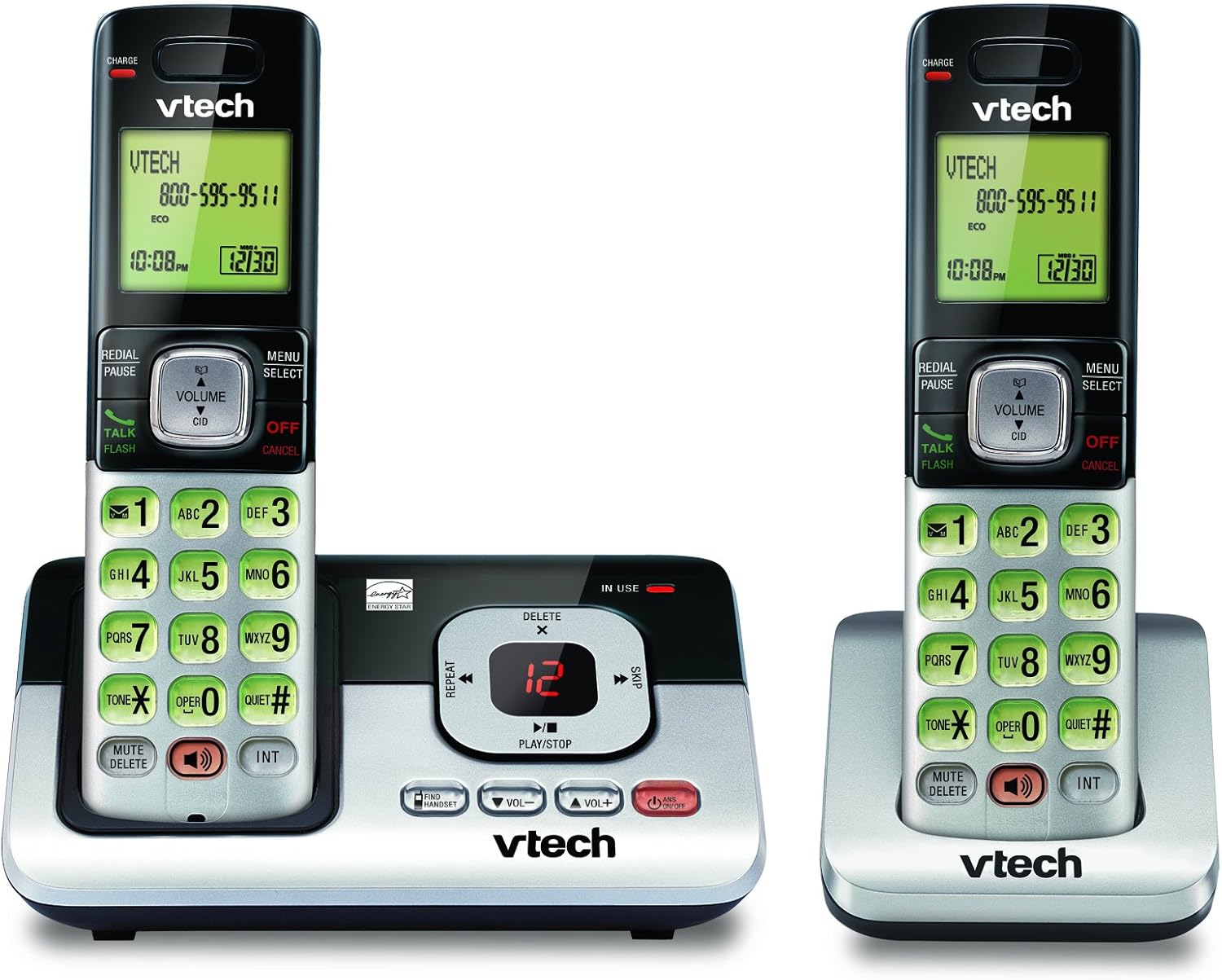
Image: The VTech CS6829-2 base unit with one handset docked, and a second handset with its charging cradle. This illustrates the main components of the phone system.
- Телефон батареяларын орнату:
Open the battery compartment cover on the back of each handset. Connect the battery pack connector securely into the jack inside the compartment. Place the battery pack with the label facing up and tuck the wires inside the compartment. Close the battery compartment cover.
- Телефон тұтқаларын зарядтау:
Place each handset in the base unit or charger with the display facing up. The CHARGE light on the handset will illuminate, indicating proper charging. Allow the handsets to charge for at least 16 hours before initial use for optimal battery performance.

Сурет: бұрышты view of the VTech CS6829-2 base unit with one handset docked, and the second handset in its separate charging cradle. This shows how the handsets are placed for charging.
- Күн мен уақытты орнату:
After the handsets are charged, follow the on-screen prompts or refer to the quick start guide to set the date and time. This is important for accurate caller ID and answering system timestamps.
Пайдалану нұсқаулары
Қоңырау шалу және жауап беру
- Қоңырау шалу үшін: түймесін басыңыз Сөйлесу / жарқыл or any dialing key to get a dial tone, then dial the phone number.
- Қоңырауға жауап беру үшін: Телефон шырылдаған кезде түймесін басыңыз Сөйлесу / жарқыл немесе кез келген теру пернесі.
- Қоңырауды аяқтау үшін: түймесін басыңыз ӨШІРУ/БОЛДЫРМАУ or place the handset back in the base unit/charger.
Сандық жауап беру жүйесі
- Хабарларды ойнату: Негізгі құрылғыда түймесін басыңыз ОЙНАТУ/ТОҚТАТУ. On a handset, press МӘЗІР/ТАҢДАУ, scroll to "Answering System", then select "Play Messages".
- Recording an Outgoing Announcement: On the base unit or handset, navigate to the answering system menu and select "Record OGM" (Outgoing Message).
- Хабарларды жою: While a message is playing, press ЖОЮ негізгі блокта немесе телефон тұтқасында.
Динамик функциясы
- To Use Speakerphone: Қоңырау кезінде түймесін басыңыз СПИКЕР button on the handset. Press it again to switch back to the handset earpiece.
Негізгі мүмкіндіктер
- Digital Answering System with LED Indicator and Volume Control: This system records up to 14 minutes of messages, announcements, and memos. An LED indicator notifies you of new messages. Volume control keys on the base allow easy adjustment of message playback volume.
- Caller ID / Call Waiting — Stores up to 50 Calls: Displays the name, number, time, and date of incoming calls, helping you identify callers before answering.
- Толық дуплексті динамик: The handset features a full duplex speakerphone, enabling natural two-way conversations where both parties can speak and be heard simultaneously.
- Артқы жарықтандырылған пернетақта және дисплей: The entire keypad and LCD screen on the handset illuminate, ensuring clear visibility and easy dialing even in low-light conditions.
- ECO Mode Power-Conserving Technology: This technology optimizes power consumption for extended battery performance and energy efficiency.
- Тыныш режим: Allows you to silence the ringer on both the handset and base unit immediately or for a set period, providing peace and quiet when needed.
Техникалық қызмет көрсету
- Тазалау: Телефонды және негізгі бөлікті жұмсақ шүберекпен тазалаңыз, damp cloth. Do not use cleaning sprays or liquid cleaners.
- Батареяға күтім жасау: Replace batteries when they no longer hold a charge. Use only the specified battery type. Dispose of old batteries responsibly according to local regulations.
- Қоршаған орта жағдайлары: Телефонды тікелей күн сәулесі түсетін жерге, жылу көздерінің жанына немесе ылғалдылығы жоғары жерлерге қоймаңыз.
Ақаулықтарды жою
If you experience issues with your phone, try the following solutions:
| Мәселе | Шешім |
|---|---|
| Теру үні жоқ. | Ensure the telephone line cord is securely plugged into both the base unit and the wall jack. Check that the power adapter is plugged into a working electrical outlet. |
| Телефон тұтқасы зарядталмай жатыр. | Ensure the handset is properly seated in the base unit or charger. Clean the charging contacts on both the handset and base/charger with a dry cloth. Verify the power adapter is connected. |
| Дыбыс сапасы нашар / Статикалық. | Move the handset closer to the base unit. Avoid placing the phone near other electronic devices (e.g., microwaves, computers) that may cause interference. Check the telephone line cord for damage. |
| Жауап беру жүйесі хабарламаларды жазбайды. | Жауап беру жүйесінің ҚОСУЛЫ екеніне көз жеткізіңіз. Жадтың толғанын тексеріңіз; қажет болса, ескі хабарларды жойыңыз. |
Техникалық сипаттамалар
| Ерекшелік | Мәлімет |
|---|---|
| Үлгі нөмірі | CS6829-2 |
| Өнім өлшемдері | 5.77 x 3.41 x 6.77 дюйм |
| Элемент салмағы | 1.41 фунт |
| Батареялар | 2 Өнімге арналған батареялар қажет (жинаққа кіреді) |
| Жауап беру жүйесінің түрі | Сандық |
| Қоңырау шалушы идентификаторының жады | Up to 50 calls |
| Жауап беру жүйесінің жазу уақыты | 14 минутқа дейін |
| Түс | Қара/Күміс |
| Телефон түрі | Сымсыз |
Кепілдік және қолдау
For warranty information and technical support, please refer to the warranty card included with your product or visit the official VTech webсайт. Сатып алу түбіртегін кепілдік талаптары үшін сатып алудың дәлелі ретінде сақтаңыз.
сайтына да баруға болады Amazon сайтындағы VTech дүкені қосымша өнім туралы ақпарат және қолдау ресурстары үшін.