
1. Кіріспе
Thank you for choosing the Fonestar AS-24U Hi-Fi USB/SD/MP3 Amplifier. This manual provides essential information for the safe and efficient operation of your device. Please read it thoroughly before use and retain it for future reference.
2. Қауіпсіздік нұсқаулары
- Нәр беруші: қамтамасыз етіңіз amplifier is connected to a power source matching the specified voltage (230В).
- Желдету: Желдету саңылауларын жаппаңыз. Қызып кетудің алдын алу үшін дұрыс ауа ағыны үшін құрылғының айналасында жеткілікті орын қалдырыңыз.
- Ылғалдылық: сақтаңыз amplifier away from water, moisture, and high humidity environments. Do not expose it to dripping or splashing.
- Жылу көздері: Құрылғыны радиаторлар, жылытқыштар, пештер немесе басқа жылу шығаратын құрылғылар сияқты жылу көздеріне жақын қоймаңыз.
- Тазалау: Disconnect the power cord before cleaning. Use a dry, soft cloth. Do not use liquid cleaners or aerosol cleaners.
- Қызмет көрсету: Бұл өнімге өзіңіз қызмет көрсетуге тырыспаңыз. Барлық қызмет көрсетуді білікті қызмет көрсетуші қызметкерлерге тапсырыңыз.
- Нысан/сұйықтық енгізу: Ешқашан кез келген заттарды бұл өнімге саңылаулар арқылы итермеңіз, себебі олар қауіпті көлемге тиюі мүмкінtagөрт немесе электр тогының соғуына әкелетін нүктелер немесе қысқа тұйықталу бөліктері.
3. Өнім аяқталдыview
3.1 Алдыңғы панель
The front panel features controls for power, input selection, volume adjustment, and USB/SD media playback. It also includes a display for media information.
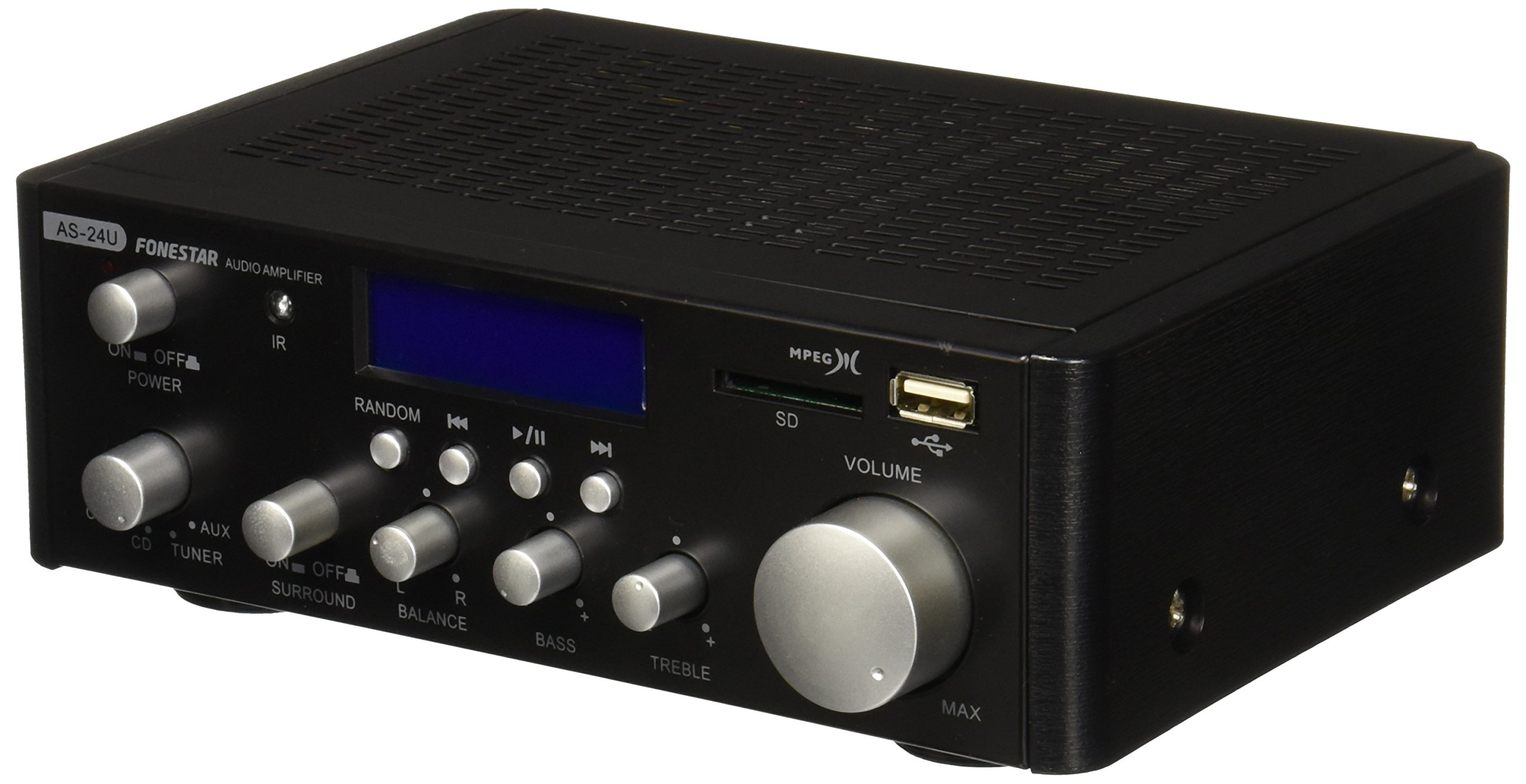
1-сурет: Алдыңғы view of the Fonestar AS-24U amplifier, showing the main controls and display.
3.2 Артқы панель
The rear panel provides all necessary connections for audio input sources, speaker outputs, and power.

2-сурет: артқы view of the Fonestar AS-24U amplifier, detailing input/output ports and power connection.
- INPUT (AUX, TUNER, CD): RCA stereo inputs for connecting external audio sources.
- SPEAKER OUT (STEREO): Spring clip terminals for connecting passive speakers (4-8 Ω).
- SPEAKER OUT (SURROUND): Additional spring clip terminals for surround speakers (8 Ω).
- ҚУАТ КІРУ: AC power input for the main power cable.
- ТTAGE SELECTOR: Switch for selecting between 115V and 230V power input. Ensure this is set correctly for your region.
3.3 Қашықтан басқару құралы
The included remote control allows for convenient operation of the amplifier's media playback functions.
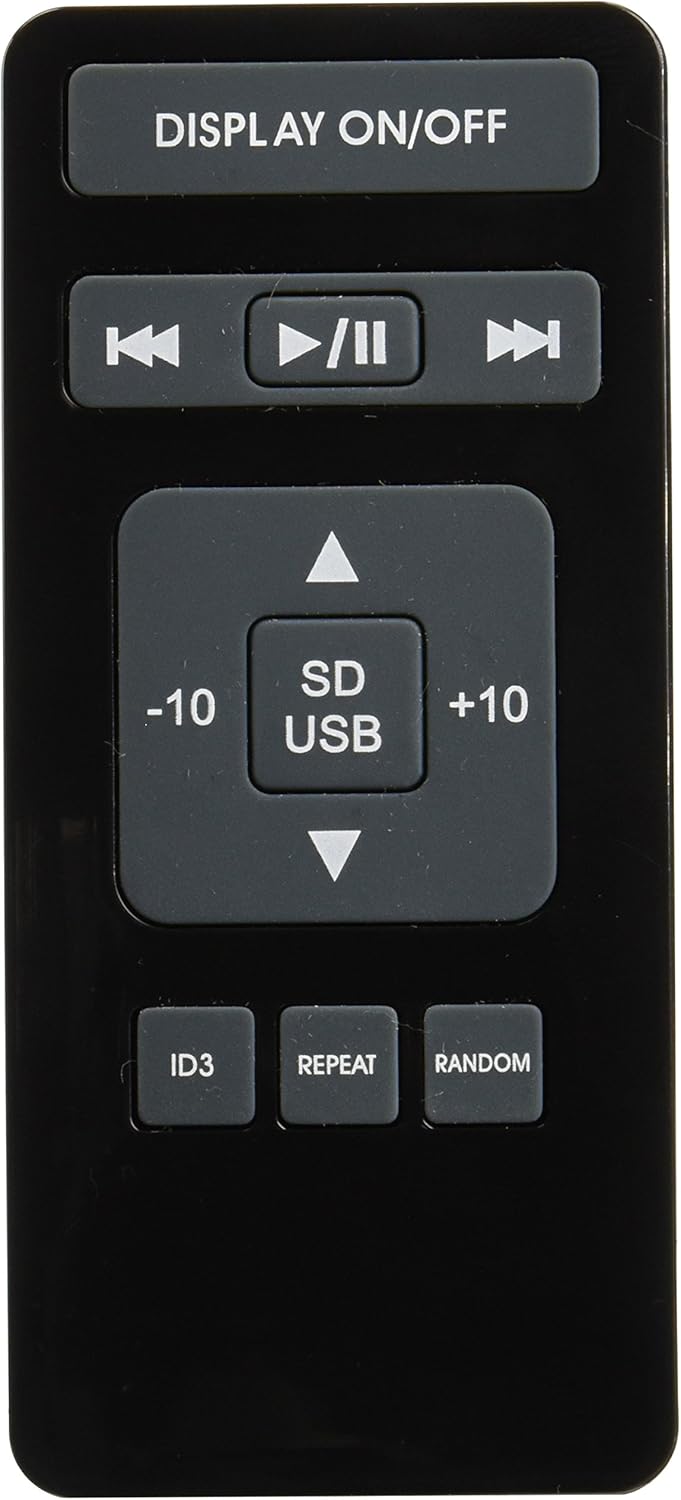
Image 3: Remote control for the Fonestar AS-24U amplifier, showing buttons for media playback and display control.
- ҚОСУ / ӨШІРУ: Алдыңғы панель дисплейін ауыстырып қосады.
- PLAY/PAUSE, PREVIOUS/NEXT: Медиа ойнатуды басқару элементтері.
- SD/USB: Selects between SD card and USB drive as the media source.
- -10/+10: Skips tracks by 10.
- ID3: Displays ID3 tag MP3 үшін ақпарат files.
- ҚАЙТАЛАУ: Toggles repeat modes (e.g., repeat one, repeat all).
- КЕЗДЕСУ: Toggles random playback.
4. Орнату
4.1 Үндеткіштерді қосу
- қамтамасыз етіңіз ampкөтергіш өшірілген және желіден ажыратылған.
- Connect your passive speakers to the SPEAKER OUT terminals on the rear panel.
- Match the positive (+) terminal on the amplifier to the positive (+) terminal on your speaker, and the negative (-) to the negative (-).
- For stereo speakers, use the 4-8 Ω terminals. For surround speakers, use the 8 Ω terminals. Ensure your speakers' impedance matches the ampкөтергіштің техникалық сипаттамалары.
4.2 Дыбыс көздерін қосу
- Connect your audio devices (e.g., CD player, tuner, auxiliary device) to the corresponding RCA INPUT jacks (CD, TUNER, AUX) on the rear panel.
- Ensure left and right channels are correctly matched (red for right, white for left).
4.3 Қуат қосылымы
- Verify the VOLTAGE SELECTOR switch on the rear panel is set to the correct voltage for your region (e.g., 230V).
- Connect the power cable to the POWER IN socket on the rear panel and then to a suitable wall outlet.
5. Пайдалану нұсқаулары
5.1 Қуатты қосу/өшіру
Press the power button on the front panel to turn the amplifier on or off. A soft start protection circuit is integrated.
5.2 Кіріс көзін таңдау
Use the input selector knob or buttons on the front panel to choose between CD, TUNER, AUX, USB, or SD inputs.
5.3 Дыбыс деңгейін реттеу
Rotate the main volume knob on the front panel to adjust the overall sound level. Start with a low volume and gradually increase it to a comfortable listening level.
5.4 USB/SD ойнату
- MP3 аудиосы бар USB флэш-дискісін немесе SD картасын салыңыз files into the respective slot on the front panel.
- Select the USB or SD input using the input selector.
- Use the playback controls (Play/Pause, Previous/Next) on the front panel or remote control to manage your music.
- The remote control allows for additional functions like skipping 10 tracks (+10/-10), displaying ID3 tags, repeating tracks, and random playback.
6. Техникалық қызмет көрсету
6.1 Тазалау
тазалау үшін amplifier, first unplug it from the power outlet. Use a soft, dry cloth to wipe down the exterior surfaces. Do not use abrasive cleaners, waxes, or solvents as they may damage the finish.
6.2 Сақтау
сақтасаңыз amplifier for an extended period, ensure it is unplugged, clean, and stored in a cool, dry place away from direct sunlight and extreme temperatures.
7. Ақаулықтарды жою
- Қуат жоқ:
- Check if the power cable is securely connected to both the ampкөтергіш және қабырға розеткасы.
- Қабырғадағы розетканың жұмыс істеп тұрғанына көз жеткізіңіз.
- Verify the VOLTAGE SELECTOR switch is set correctly.
- Дыбыс жоқ:
- Дұрыс кіріс көзінің таңдалғанын растаңыз.
- Барлық динамик қосылымдарының полярлығы мен сенімді бекітілуін тексеріңіз.
- Дыбыс деңгейінің көтеріліп, өшірілмегеніне көз жеткізіңіз.
- Басқа дыбыс көзімен сынақтан өткізіңіз.
- Бұрмаланған дыбыс:
- Дыбыс деңгейін төмендетіңіз.
- Динамиктің кедергісінің үйлесімділігін тексеріңіз.
- Ensure audio cables are not damaged and are securely connected.
- USB/SD Playback Issues:
- Ensure the USB drive or SD card is formatted to a compatible file жүйе (мысалы, FAT32).
- Аудио екенін тексеріңіз fileс MP3 форматында.
- Басқа USB дискісін немесе SD картасын қолданып көріңіз.
8. Техникалық сипаттамалар
| Бренд | ФОНЕСТАР |
| Үлгі | AS-24U |
| Stereo Power Output | 25 + 25 W max, 15 + 15 W RMS (4 Ω), 12 + 12 W RMS (8 Ω) |
| Surround Power Output | 10 + 10 W max, 6 + 6 W RMS (8 Ω) |
| Кірістері | 3 stereo (CD, Tuner, AUX), 2 x RCA 400 mV |
| Қорғаныстар | Жұмсақ іске қосу, қысқа тұйықталу, шамадан тыс жүктеме |
| Тtage | 230 вольт |
| Өлшемдері (L x W x H) | 5 x 5 x 10 см (шамамен 50 x 50 x 100 мм) |
| Салмағы | 1.9 кг |
| Динамик қосылымы | Сымды |
9. Кепілдік және қолдау
This Fonestar AS-24U amplifier comes with a standard manufacturer's warranty. Please refer to the warranty card included with your purchase for specific terms and conditions. For technical support, service, or warranty claims, please contact your retailer or the official Fonestar customer service.