
POLY M25
Plantronics M25 Bluetooth гарнитурасының пайдаланушы нұсқаулығы
Үлгі: M25
Кіріспе
The Plantronics M25 Bluetooth headset is designed for convenient wireless communication and audio playback. It features an extended battery life with DeepSleep mode, ensuring readiness when needed. The headset provides whispered alerts for battery status and connection information, and allows for listening to music, internet radio, or navigation directions while managing calls.
Пакет мазмұны
Пакетте барлық элементтердің бар екенін тексеріңіз:
- Plantronics M25 Bluetooth гарнитурасы
- AC Charger (100-240v)
- Clip-on Earloop
Орнату
1. Гарнитураны зарядтау
Before first use, fully charge the headset. Connect the AC charger to the headset's charging port. The indicator light will change to show charging status and turn off or change color when fully charged. A full charge can provide up to 5 months of readiness in DeepSleep mode.
2. Құрылғымен жұптастыру
To pair your Plantronics M25 headset with a Bluetooth-enabled device (e.g., smartphone, tablet):
- Гарнитураның зарядталғанына және өшірілгеніне көз жеткізіңіз.
- Гарнитурадағы «Қоңырау шалу» түймесін индикатор шамы қызыл және көк түстермен жыпылықтағанша басып тұрыңыз, бұл жұптастыру режимін көрсетеді.
- Құрылғыңызда Bluetooth функциясын қосып, жаңа құрылғыларды іздеңіз.
- Select "Plantronics M25" from the list of available devices.
- Рұқсат коды сұралса, «0000» (төрт нөл) енгізіңіз.
- Once paired, the headset's indicator light will stop flashing and a voice prompt will confirm the connection.
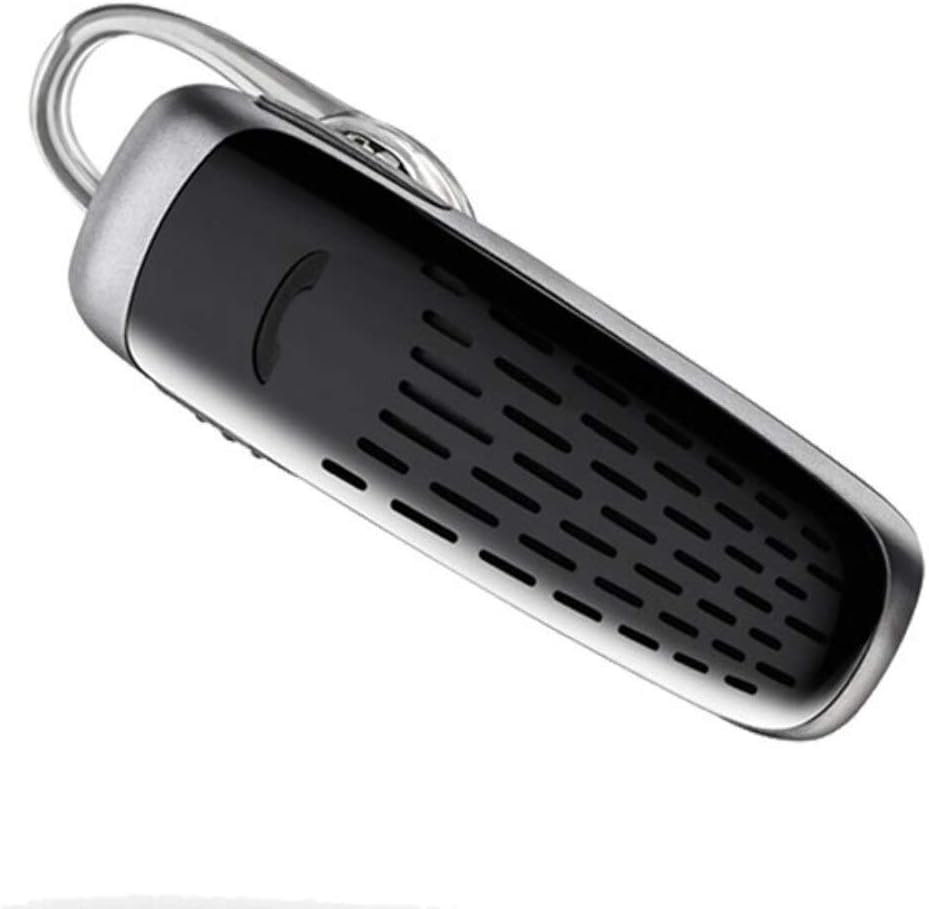
Image: The Plantronics M25 Bluetooth Headset, a compact black and silver device with an earloop, shown from an angled perspective. The call button is visible on the side.
Пайдалану нұсқаулары
Қуатты қосу/өшіру
- Қуат қосулы: Индикатор шамы көк түспен жыпылықтағанша Қуат түймесін басып тұрыңыз.
- Қуат көзін өшіру: Press and hold the Power button until the indicator light flashes red.
Қоңырау шалу және қабылдау
- Қоңырауға жауап беру: Қоңырау шалу түймесін басыңыз.
- Қоңырауды аяқтау: Қоңырау шалу түймесін басыңыз.
- Қоңырауды қабылдамау: Қоңырау шалу түймесін 2 секунд басып тұрыңыз.
- Соңғы нөмірді қайта теру: Қоңырау шалу түймесін екі рет басыңыз.
Аудио ойнату
The headset supports streaming audio from your device, including music, podcasts, and GPS directions.
- Ойнату/кідірту: Press the Call button during audio playback.
Терең ұйқы режимі
The headset enters DeepSleep power-saving mode if it is disconnected from your phone for over 90 minutes. To wake it up when it's back in range (within 33 feet), simply tap the Call button.
Техникалық қызмет көрсету
- Тазалау: Гарнитураны тазалау үшін жұмсақ, құрғақ шүберекті пайдаланыңыз. Сұйық тазартқыштарды немесе аэрозольдерді қолданбаңыз.
- Сақтау орны: Гарнитураны салқын, құрғақ жерде, жоғары температурадан алыс сақтаңыз.
- Батареяға күтім жасау: To preserve battery life, avoid fully discharging the battery frequently. Charge the headset regularly, even if not in use.
- Суға төзімділік: Бұл құрылғы Суға төзімді емесСуға немесе шамадан тыс ылғалға ұшыраудан аулақ болыңыз.
Ақаулықтарды жою
| Мәселе | Шешім |
|---|---|
| Гарнитура қосылмайды. | Ensure the headset is charged. Connect it to the AC charger and allow it to charge for at least 30 minutes before attempting to power on. |
| Cannot pair the headset with my device. |
|
| No audio or low audio volume. |
|
| Headset frequently disconnects. |
|
Техникалық сипаттамалар
| Ерекшелік | Мәлімет |
|---|---|
| Модель атауы | Plantronics M25 |
| Қосылу технологиясы | Блютез |
| Сымсыз байланыс технологиясы | Блютез |
| Үйлесімді құрылғылар | Smartphones, Laptops, Desktops, Tablets, Smart Speakers, Televisions |
| Басқару түрі | Қоңырауды басқару |
| Элемент салмағы | 0.3 унция (шамамен 8.5 грамм) |
| Суға төзімділік деңгейі | Суға төзімді емес |
| Жиілік диапазоны | 20 Гц - 20,000 Гц |
| Battery Life (DeepSleep) | 150 күнге дейін |
| Bluetooth диапазоны | 10 метрге дейін (33 фут) |
| Құлақтың орналасуы | Құлақта |
| Форма факторы | One Ear |
| Шуды бақылау | Белсенді шуды жою |
| Өнім өлшемдері | 1.85 x 0.59 x 0.35 дюйм |
| Түс | Қара |
| Өндіруші | Плантроника |
Кепілдік және қолдау
Кепілдік туралы ақпарат: Please note that this product is sold with No Warranty or Return as per the provided information. Users are advised to verify product condition upon receipt.
For further assistance or inquiries, please refer to the official POLY support channels or visit their website. Contact information may be available on the product packaging or the manufacturer's official webсайт.
Disclaimer: Product specifications and features are subject to change without notice. Always refer to the latest information provided by the manufacturer.
Ask a question about this manual
Ask about setup, troubleshooting, compatibility, parts, safety, or missing instructions. Manuals+ will review the question and use this page’s manual context to help answer it.