
1. Кіріспе
This manual provides essential information for the safe installation, operation, and maintenance of your Intermatic T12404R DPST Indoor/Outdoor Control Panel. This control panel is designed for managing pool/spa equipment and lighting systems. Please read these instructions thoroughly before installation and use to ensure proper function and safety.
2. Қауіпсіздік туралы ақпарат
МАҢЫЗДЫ: All electrical installations must comply with the National Electrical Code (NEC) and local electrical codes. For installations in Canada, refer to the Canadian Electrical Code (CEC). Installation should only be performed by a qualified electrician.
- Ensure proper grounding and bonding of the control panel.
- Use copper conductors only for all wiring connections.
- Do not exceed the specified current ratings for the conductors.
- An approved wiring device must be used inside the enclosure for bonding purposes.
- An approved rainproof cover must be installed over all wiring compartments to maintain the NEMA 3R rating.
- Ensure all knockouts are properly sealed after wiring.
- Always disconnect power at the circuit breaker before performing any installation, maintenance, or service.
3. Өнім аяқталдыview
The Intermatic T12404R is a robust control panel featuring two Double Pole Single Throw (DPST) time switches within a NEMA 3R rated enclosure, suitable for both indoor and outdoor applications. It is designed for direct connection to underwater lights and other pool/spa equipment, operating at 240/240 VAC at 60 Hz with a 30 Ampere current rating.
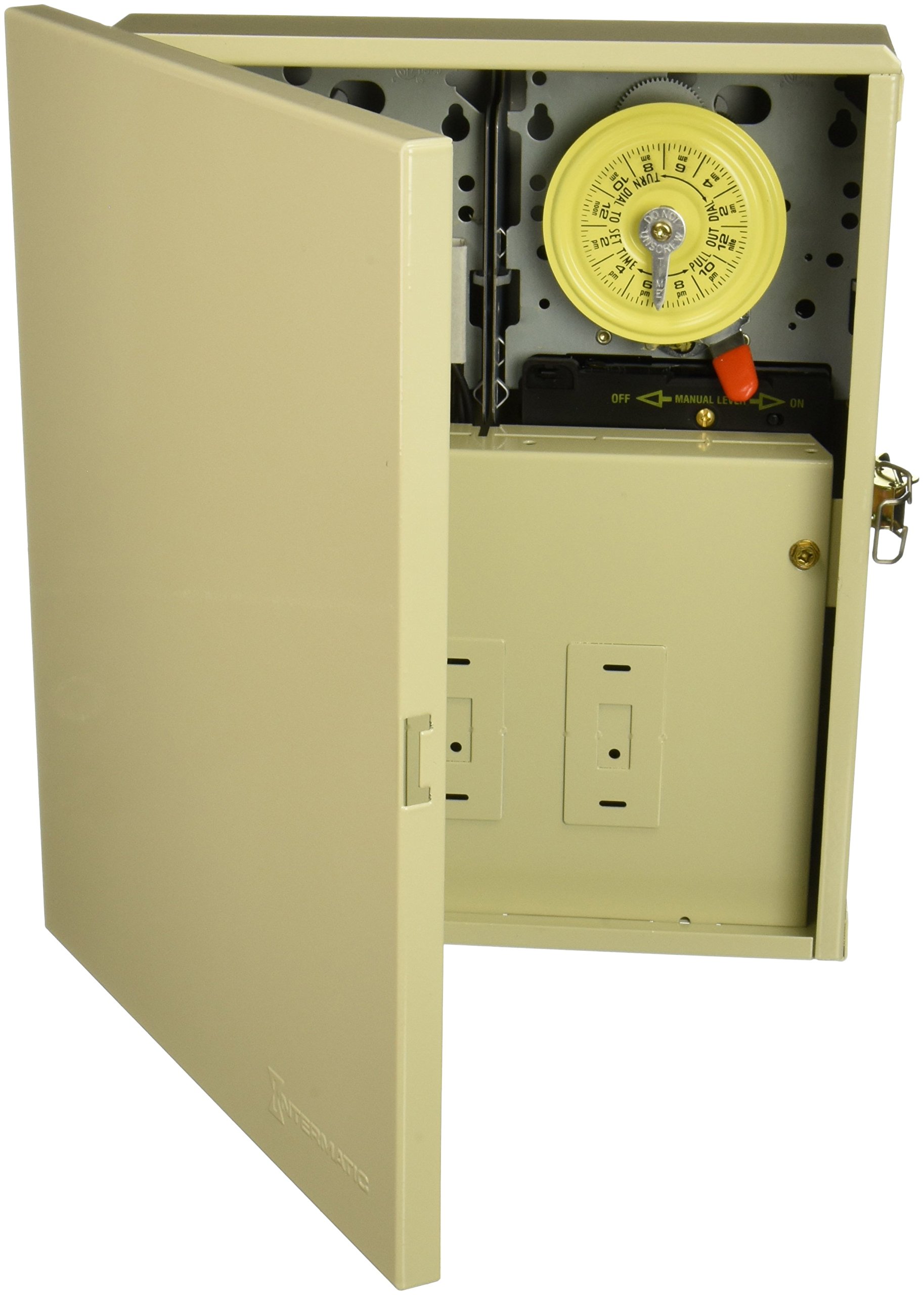
Figure 1: Intermatic T12404R Control Panel with the door open, revealing two yellow mechanical timer dials, manual override levers, and two blank switch plates below the timers. The inside of the door displays wiring diagrams and operating instructions.
4. Орнату және орнату
4.1 Монтаждау
The T12404R is designed for panel mounting. Secure the enclosure to a flat, stable surface using appropriate fasteners for the mounting type and location. Ensure the mounting location allows for easy access and proper ventilation.
4.2 Электр желілері
All wiring must be performed by a qualified electrician in accordance with all applicable electrical codes. Use copper conductors only. After wiring, ensure the front panel is properly installed over the wiring compartments and all knockouts are sealed to maintain the enclosure's NEMA 3R rating.
- Нәр беруші: Connect the incoming 240/240 VAC, 60 Hz power supply to the designated terminals.
- Қосылымдарды жүктеу: Connect the pool/spa equipment or lighting loads to the output terminals of the time switches.
- Жерге қосу және байланыстыру: Ensure all grounding and bonding connections are securely made as required by code.
5. Пайдалану нұсқаулары
The control panel features two independent time switches for automated control of connected devices.
5.1 Setting ON and OFF Times
- Locate the trippers on the clock dial.
- Hold the trippers firmly against the edge of the CLOCK-DIAL, pointing to the desired ON and OFF times (AM or PM).
- Tighten the tripper screws securely to fix their position.
5.2 Setting the Time-of-Day
- Gently push the CLOCK-DIAL outward.
- Turn the CLOCK-DIAL in either direction until the exact current time-of-day aligns with the POINTER.
- Do not move the POINTER itself.
5.3 Қолмен пайдалану
To manually override the timed operation, move the MANUAL LEVER located below the CLOCK-DIAL to the left or right as indicated by the arrows. This will temporarily switch the connected device ON or OFF, bypassing the set schedule.
5.4 Multiple ON-OFF Operations
For more than one daily ON-OFF operation, additional tripper pairs (Intermatic part number 15671878A) can be installed on the CLOCK-DIAL.
6. Техникалық қызмет көрсету
Regular maintenance ensures the longevity and reliable operation of your control panel.
- Тазалау: Keep the enclosure clean and free from dust and debris. Use a soft, dry cloth for cleaning. Do not use abrasive cleaners or solvents.
- Тексеру: Periodically inspect all wiring connections for tightness and signs of wear or damage. Ensure the enclosure door seals properly to maintain its weather resistance.
- Таймерді тексеру: Occasionally verify that the time switches are operating according to their set schedule.
7. Ақаулықтарды жою
- Қуат ақаулығы: Қуат болған жағдайда utage, the CLOCK-DIAL will stop. After power is restored, you must manually reset the time-of-day as described in Section 5.2.
- Құрылғы жұмыс істемейді: Check the circuit breaker for the control panel. Verify that the time switches are set correctly and that the manual lever is not in an override position. Inspect wiring connections for any loose or damaged wires.
- Таймер алға жылжымайды: Ensure the clock dial is not obstructed and that the power supply to the timer motor is active.
8. Техникалық сипаттамалар
| Үлгі нөмірі | T12404R |
| Өндіруші | Intermatic Incorporated |
| Қоршау түрі | NEMA 3R (Rainproof) |
| Қолданба | Indoor/Outdoor, Pool/Spa Equipment, Lights |
| Тtage Рейтинг | 240/240 VAC at 60 Hz |
| Ағымдағы рейтинг | 30 Ampere (Resistive/Inductive/Tungsten) |
| Heater Control Circuit | 10 Amp 240 ВАС |
| Мотор рейтингі | 2 HP (24 FLA) - 120 VAC, 5 HP (28 FLA) - 240 VAC |
| Мотор томtage | 208/277 Volts - 60 Hz |
| Өлшемдері (H x W x D) | 12.88 x 10.88 x 4.75 дюйм (шамамен) |
| Элемент салмағы | 11.3 фунт |
| Монтаждау түрі | Панельді бекіту |
| Сертификаттау | CSA (Canada and US) |
| Батареялар қажет | Жоқ |
9. Кепілдік және қолдау
Кепілдік: For detailed warranty information, please refer to the manufacturer's official warranty description provided with your product or visit the Intermatic webсайт.
Тұтынушыларды қолдау: If you encounter any issues or have questions not covered in this manual, please contact Intermatic customer support for assistance. Contact information can typically be found on the manufacturer's webсайт немесе өнімнің қаптамасы.