
Өнім аяқталдыview
The iSound Twist Portable Bluetooth Wireless Speaker offers a unique design combined with superior sound quality. Its compact form factor allows for portability, while its advanced features enable wireless music streaming and hands-free calling. The speaker features full stereo sound with 6 watts total output from two 40mm drivers and a passive radiator for enhanced bass.
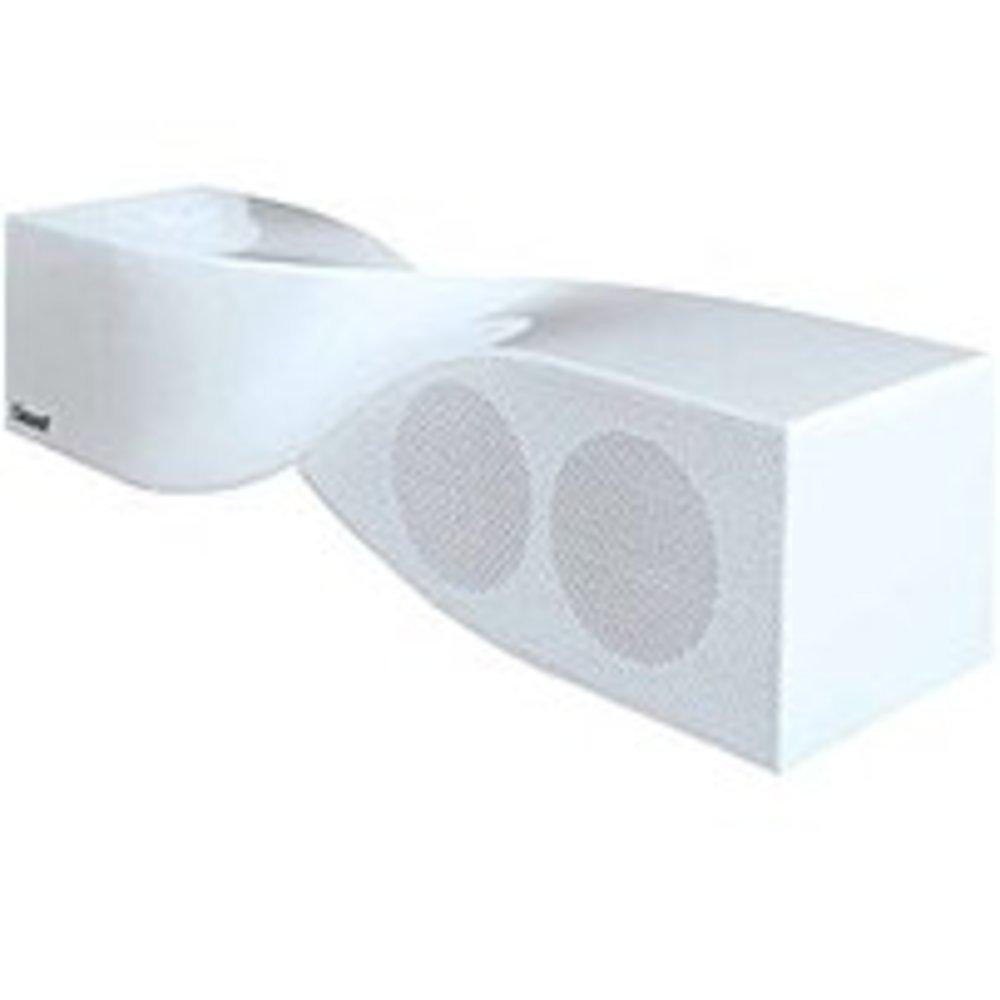
Image: The iSound Twist Portable Bluetooth Wireless Speaker in white, showcasing its unique twisted design.
Пакет мазмұны
- iSound Twist Portable Bluetooth Wireless Speaker
- USB зарядтау кабелі
- 3.5mm AUX Input Cable
- Пайдаланушы нұсқаулығы (бұл құжат)
Орнату
1. Динамикті зарядтау
Before initial use, fully charge the iSound Twist speaker. Connect the provided USB charging cable to the speaker's USB charging port and the other end to a powered USB source (e.g., computer, USB wall adapter). The charging indicator light will illuminate during charging and turn off when fully charged. A full charge provides up to 5 hours of continuous play.

Image: Rear panel of the speaker, highlighting the USB charging port, ON/OFF switch, and AUX IN port.
2. Қосу / Өшіру
Locate the ON/OFF switch on the rear panel of the speaker. Slide the switch to the "ON" position to power on the device. Slide it to the "OFF" position to power off.
3. Bluetooth жұптастыру
- Ensure the speaker is powered on and within close proximity to your Bluetooth-enabled device (e.g., smartphone, tablet, laptop).
- The speaker will automatically enter Bluetooth pairing mode. A blue indicator light will flash, indicating it is discoverable.
- On your device, navigate to the Bluetooth settings and enable Bluetooth.
- Іздеу available devices. The iSound Twist speaker should appear in the list, typically named "iSound Twist" or similar.
- Select the speaker from the list to initiate pairing. If prompted for a password, enter "0000".
- Once successfully paired, the blue indicator light on the speaker will stop flashing and remain solid. You will hear an audible confirmation.
- Your device is now connected, and you can stream audio wirelessly.
4. AUX кіріс қосылымы
For devices without Bluetooth capability, or if you prefer a wired connection, use the provided 3.5mm AUX cable.
- Connect one end of the 3.5mm AUX cable to the AUX IN port on the rear of the speaker.
- Кабельдің екінші ұшын аудио құрылғыңыздың құлаққап ұясына немесе аудио шығыс портына қосыңыз.
- Динамик автоматты түрде AUX кіріс режиміне ауысады.
Пайдалану нұсқаулары
Басқару тақтасының функциялары
The speaker features onboard controls located on its top surface for convenient operation.
- Қуат / режим түймесі: Press and hold to power on/off. Short press to switch between Bluetooth and AUX modes.
- Ойнату/Кідірту/Қоңырау шалу түймесі: Short press to play or pause music. During an incoming call, short press to answer or end the call. Press and hold to reject an incoming call.
- Дыбыс деңгейін көтеру/келесі трек түймесі: Short press to increase volume. Press and hold to skip to the next track.
- Дыбыс деңгейін төмендету/алдыңғы трек түймесі: Short press to decrease volume. Press and hold to go to the previous track.
Қолсыз қоңырау шалу
When connected via Bluetooth, the iSound Twist speaker's built-in microphone allows for hands-free phone calls.
- Қоңырауға жауап беру: When a call comes in, the music will pause. Press the Play/Pause/Call button once to answer.
- Қоңырауды аяқтау: Қоңырау шалу кезінде қоңырауды аяқтау үшін Ойнату/Үзіліс/Қоңырау шалу түймесін бір рет басыңыз.
- Қоңырауды қабылдамау: Кіріс қоңырауды қабылдамау үшін Ойнату/Үзіліс/Қоңырау шалу түймесін басып тұрыңыз.
Техникалық қызмет көрсету
- Динамикті судан, ылғалдан және төтенше температурадан алыс ұстаңыз.
- Динамикті жұмсақ, құрғақ шүберекпен тазалаңыз. Абразивті тазартқыштарды немесе еріткіштерді қолданбаңыз.
- Динамикті құлатудан немесе қатты әсер етуден аулақ болыңыз.
- Ұзақ уақыт бойы пайдаланылмаған кезде, динамикті салқын, құрғақ жерде сақтаңыз және батареяның қызмет ету мерзімін сақтау үшін оны мезгіл-мезгіл зарядтап отырыңыз.
Ақаулықтарды жою
| Мәселе | Шешім |
|---|---|
| Динамик қосылмайды. | Ensure the battery is charged. Connect the speaker to a power source using the USB cable and try again. |
| Bluetooth арқылы жұптау мүмкін емес. |
|
| Дыбыс жоқ немесе төмен дыбыс. |
|
| Қоңырау сапасы нашар. |
|
Техникалық сипаттамалар
| Ерекшелік | Мәлімет |
|---|---|
| Модель атауы | ISOUND-1691 |
| Бренд | iSound |
| Динамик түрі | Мұнара |
| Арнайы мүмкіндік | Кірістірілген микрофон |
| Ұсынылатын пайдаланулар | For Smartphones or Tablets, Music Players |
| Үйлесімді құрылғылар | Desktop, Laptop, MP3 Player, Projector, Smartphone, Tablet, Television |
| Көлемді дыбыс арнасының конфигурациясы | 2.0 |
| Түс | Ақ |
| Элемент салмағы | 13.6 унция |
| Су өткізбейтін | ЖАЛҒАН |
| Сымсыз байланыс технологиясы | Блютез |
| Динамик өлшемі | 0.75 дюйм |
| Қуат көзі | Батареядан қуат алады |
| Батареялар саны | 1 литий-иондық батареялар қажет. (қоса берілген) |
| Аудио драйвер түрі | Динамикалық драйвер |
| Аудио драйвер өлшемі | 40 миллиметр |
| Өнім өлшемдері | 5 x 4 x 11.75 дюйм |
| Динамиктің максималды шығыс қуаты | 6 Вт |
| Қосылу технологиясы | Сымсыз |
| Дыбысты шығару режимі | Стерео |
| Монтаждау түрі | Үстелге орнату |
Өнімнің ресми бейнесі
Video: Official product video for the iSound Twist Bluetooth Speaker, demonstrating its features and design. This video showcases the speaker's ability to stream audio from various devices and handle calls.
Кепілдік және қолдау
The iSound Twist Portable Bluetooth Wireless Speaker comes with a Шектеулі кепілдік. For specific warranty terms, conditions, and support inquiries, please refer to the warranty card included in your product packaging or visit the official iSound webсайт.
For further assistance, please contact iSound customer support.