
1. Кіріспе
Сатып алғаныңыз үшін рахметasing the Caliber RMD 068-2 Car Radio USB/SD Player. This manual provides detailed instructions for the installation, operation, and maintenance of your new car radio. Please read this manual thoroughly before using the product to ensure proper functionality and safety. Keep this manual for future reference.
2. Қауіпсіздік туралы ақпарат
- Орнату: Ensure the unit is installed by a qualified technician to prevent damage to the vehicle's electrical system. Incorrect wiring can cause fire or electrical shock.
- Нәр беруші: Құрылғыны тек теріс жерге тұйықталған 12 В тұрақты токты автомобиль аккумуляторына қосыңыз.
- Сақтандырғыштар: Always replace fuses with new ones of the specified rating. Using an incorrect fuse can cause damage to the unit or vehicle.
- Дыбыс деңгейі: Do not operate the unit at excessively high volume levels, as this may impair your ability to hear external traffic sounds and could be dangerous.
- Тазалау: Тазалау үшін жұмсақ, құрғақ матаны пайдаланыңыз. Абразивті тазартқыштарды немесе еріткіштерді қолданбаңыз.
- Ылғалдылық: Құрылғыны ылғалға немесе суға ұшыратпаңыз.
3. Пакет мазмұны
Барлық элементтердің бар екенін тексеріңіз:
- Caliber RMD 068-2 Car Radio Unit
- Алынатын алдыңғы панель
- ISO электр өткізгіш
- Жақтауды бекіту
- Disassembly Keys (2 pcs)
- Пайдаланушы нұсқаулығы (бұл құжат)
4. Өнім аяқталдыview
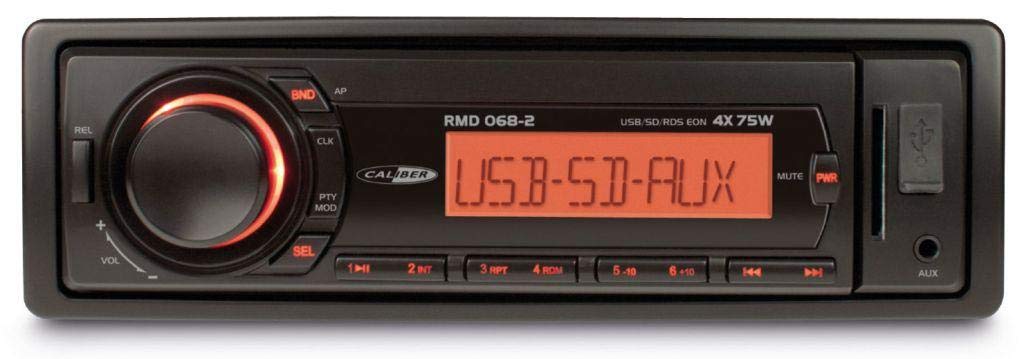
1-сурет: Алдыңғы view of the Caliber RMD 068-2 Car Radio. This image shows the main unit with its detachable front panel, including the display, control buttons, USB port, and SD card slot.
4.1 Алдыңғы панельді басқару элементтері
- POWER/MODE Button: Press to turn on/off. Short press to switch between Radio, USB, SD, AUX modes.
- VOLUME тұтқасы: Rotate to adjust volume. Press to access audio settings (Bass, Treble, Balance, Fader).
- DISPLAY: Shows current time, radio frequency, track information, etc.
- USB порты: Медиа ойнату үшін USB флэш-дискілерін қосыңыз.
- SD картасы ұясы: Медиа ойнату үшін SD карталарын салыңыз.
- AUX кірісі (3.5 мм ұяшық): Сыртқы дыбыс құрылғыларын қосыңыз.
- BAND/AMS түймесі: In radio mode, press to select radio band (FM1, FM2, FM3). Long press for Automatic Memory Store.
- АЛДЫН АЛА ОРНАТУ Түймелері (1-6): Store and recall radio stations. In USB/SD mode, use for direct track selection.
- ОЙНАТУ/ТОҚТАТА ТҰРУ түймесі: Play or pause media playback.
- FORWARD/BACKWARD Buttons: Skip tracks or tune radio frequency.
- EJECT Button: Release the detachable front panel.
4.2 Rear Connections
The rear of the unit features standard ISO connectors for power and speakers, along with an antenna input.
- ISO Power Connector: For connecting to the vehicle's power supply (constant 12V, ignition 12V, ground).
- ISO Speaker Connector: For connecting to the vehicle's speakers (Front Left, Front Right, Rear Left, Rear Right).
- Антенна кірісі: For connecting the car's radio antenna.
5. Орнату
5.1 Орнату
- Батареяны ажырату: Before starting, disconnect the negative terminal of your car battery to prevent short circuits.
- Ескі құрылғыны алып тастаңыз: Carefully remove your existing car radio from the dashboard.
- Install Mounting Frame: Insert the supplied mounting frame into the dashboard opening and bend the tabs to secure it.
- Сымдарды қосу: Refer to the wiring diagram in section 5.2. Connect the ISO wiring harness to the car's wiring and then to the Caliber RMD 068-2 unit. Connect the antenna cable.
- Slide Unit In: Carefully slide the Caliber RMD 068-2 unit into the mounting frame until it clicks into place.
- Батареяны қайта қосу: Көлік батареясының теріс терминалын қайта қосыңыз.
- Алдыңғы панельді бекіту: Attach the detachable front panel to the main unit.
5.2 Электр қосу схемасы
The Caliber RMD 068-2 uses standard ISO connectors. Ensure correct connections as shown below. If your vehicle does not have ISO connectors, an adapter may be required.
| № | Сымның түсі (әдеттегі) | Функция |
|---|---|---|
| 4 | Сары | Тұрақты 12 В (батарея) |
| 7 | Қызыл | Қосылған 12 В (тұтану) |
| 8 | Қара | Жер |
| 5 | Көк | Antenna Remote Out |
| № | Сымның түсі (әдеттегі) | Функция |
|---|---|---|
| 1 | Күлгін | Артқы оң (+) |
| 2 | Күлгін/Қара | Артқы оң (-) |
| 3 | Жасыл | Артқы сол (+) |
| 4 | Жасыл/қара | Артқы сол (-) |
| 5 | Сұр | Алдыңғы оң (+) |
| 6 | Сұр/Қара | Алдыңғы оң (-) |
| 7 | Ақ | Алдыңғы сол (+) |
| 8 | Ақ/Қара | Алдыңғы сол (-) |
Note: Wire colors may vary depending on vehicle manufacturer. Always consult your vehicle's wiring diagram.
6. Пайдалану нұсқаулары
6.1 Негізгі функциялар
- Қуатты қосу/өшіру: түймесін басыңыз ҚУАТ / РЕЖИМ құрылғыны қосу немесе өшіру үшін түймесін басыңыз.
- Дыбыс деңгейін басқару: айналдырыңыз DOLUM дыбыс деңгейін арттыру үшін тұтқаны сағат тілімен, азайту үшін сағат тіліне қарсы бағытта басыңыз.
- Режимді таңдау: түймесін қысқаша басыңыз ҚУАТ / РЕЖИМ button to cycle through available modes: Radio (FM), USB, SD, AUX.
- Аудио параметрлері: түймесін басыңыз DOLUM knob to enter audio settings. Rotate the knob to select settings like BASS, TREBLE, BALANCE, FADER. Press the knob again to confirm or move to the next setting.
6.2 Радиомен жұмыс
- Диапазонды таңдау: Радио режимінде түймесін басыңыз BAND/AMS FM1, FM2 және FM3 диапазондары арасында ауысу үшін түймені басыңыз.
- Қолмен баптау: түймесін қысқаша басыңыз АЛҒА/АРТҚА жиілікті дәл реттеу үшін түймелер.
- Автоматты іздеу: түймесін ұзақ басыңыз АЛҒА/АРТҚА келесі күшті станцияны автоматты түрде іздеу үшін түймелер.
- Алдын ала орнатуларды сақтау: Tune to your desired station. Long press one of the Алдын ала орнату (1-6) buttons until you hear a beep. The station is now stored.
- Алдын ала орнатуларды еске түсіру: Short press one of the Алдын ала орнату (1-6) buttons to recall a stored station.
- Automatic Memory Store (AMS): түймесін ұзақ басыңыз BAND/AMS button to automatically scan and store the strongest stations into the current band's presets.
6.3 USB/SD ойнату
- Тасымалдаушыны енгізу: Insert a USB flash drive into the USB port or an SD card into the SD card slot. The unit will automatically switch to USB/SD mode and begin playback.
- Ойнату/кідірту: түймесін басыңыз ОЙНАТУ/ТОҚТАТУ ойнатуды кідірту немесе жалғастыру үшін түймесін басыңыз.
- Өткізіп жіберу: түймесін қысқаша басыңыз АЛҒА/АРТҚА келесі немесе алдыңғы жолға өту үшін түймелерді басыңыз.
- Жылдам алға/артқа айналдыру: түймесін ұзақ басыңыз АЛҒА/АРТҚА трек ішінде алға немесе кері айналдыру түймелері.
- Қалтаны шарлау: пайдаланыңыз АЛДЫНДАҒЫ ОРНАТУ 5 және АЛДЫНДАҒЫ ОРНАТУ 6 buttons to navigate between folders on your USB/SD media.
6.4 AUX кірісі
- Құрылғыны қосу: Сыртқы аудио құрылғыңызды (мысалы, смартфон, MP3 ойнатқыш) аудио кабель арқылы алдыңғы панельдегі 3.5 мм AUX кіріс ұясына қосыңыз.
- AUX режимін таңдаңыз: түймесін басыңыз ҚУАТ / РЕЖИМ «AUX» хабары көрсетілгенше түймесін қайта-қайта басыңыз.
- Ойнатуды басқару: Control playback (play, pause, skip) directly from your connected external device. The car radio will control the volume.
7. Техникалық қызмет көрсету
- Құрылғыны тазалау: Use a soft, dry cloth to wipe the front panel and display. Do not use harsh chemicals, cleaning sprays, or abrasive cloths, as these can damage the surface.
- Алынбалы алдыңғы панель: When detaching the front panel, handle it carefully. Store it in a protective case (if supplied) to prevent scratches or damage.
- USB/SD порттары: Keep the USB port and SD card slot free from dust and debris.
8. Ақаулықтарды жою
| Мәселе | Ықтимал себебі | Шешім |
|---|---|---|
| Қуат жоқ | Сақтандырғыш жанып кеткен; Сым дұрыс емес; Қосылымның бос болуы | Check and replace fuse; Verify wiring connections (Yellow to constant 12V, Red to ignition 12V, Black to ground); Ensure front panel is securely attached. |
| Дыбыс жоқ | Volume too low; Mute activated; Incorrect speaker wiring; Damaged speakers | Increase volume; Check if mute is active; Verify speaker connections; Test with known good speakers. |
| Радио қабылдау нашар | Antenna not connected; Damaged antenna; Weak signal area | Ensure antenna is securely connected; Check antenna for damage; Try tuning to a stronger station or move to a different location. |
| USB/SD ойнатпайды | Қолдау көрсетілмейді file format; Corrupted media; Incorrectly inserted media; Max capacity exceeded | Қамтамасыз ету files are MP3/WMA format; Try a different USB/SD card; Reinsert media correctly; Check media capacity (max 32GB recommended). |
| Front panel cannot be detached | Eject button not fully pressed; Mechanism jammed | Press the EJECT button firmly; Do not force the panel. |
If the problem persists after trying these solutions, please contact your dealer or a qualified service center.
9. Техникалық сипаттамалар
- Үлгі: Caliber RMD 068-2
- Шығу қуаты: 4 x 75 Watts Max
- Нәр беруші: 12V DC (10.8V-15.6V), Negative Ground
- Сақтандырғыш: 10A
- Қолдау көрсетілетін аудио пішімдері: MP3, WMA (via USB/SD)
- USB/SD Compatibility: 32 ГБ дейін (FAT32 пішімі)
- FM тюнері: RDS, 18 Presets
- AUX кірісі: 3.5 мм стерео ұясы
- Алынбалы алдыңғы панель: Иә
- Салмағы: Шамамен 0.95 кг (2.09 фунт)
10. Кепілдік және қолдау
This Caliber product is covered by a warranty in accordance with applicable European laws. For detailed warranty terms and conditions, please refer to the warranty card included with your product or visit the official Caliber website. For technical support, troubleshooting assistance, or service inquiries, please contact your authorized Caliber dealer or the customer service department in your region. Please have your product model number (RMD 068-2) and proof of purchase ready when contacting support.
Note: Specifications and design are subject to change without notice for improvement.