
1. Кіріспе
This manual provides essential instructions for the safe and efficient operation of your Sharp CD-DH950P 240W Mini-Component System. This system features a 5-disc CD changer, a cassette deck, an iPod/iPhone docking station, a USB host for digital audio playback, and an AM/FM tuner. Please read this manual thoroughly before using the system and retain it for future reference.
2. Қауіпсіздік туралы ақпарат
- Қуат көзі: Құрылғыны тек көрсетілген көлемдегі айнымалы ток розеткасына қосыңызtage.
- Желдету: Жеткілікті желдетуді қамтамасыз етіңіз. Желдету саңылауларын жаппаңыз.
- Су және ылғал: Құрылғыны жаңбырға, ылғалға немесе тамшылаған/шашыраған сұйықтықтарға ұшыратпаңыз.
- Жылу: Құрылғыны радиаторлар, жылу регистрлері, пештер немесе жылу шығаратын басқа құрылғылар сияқты жылу көздерінен алыс ұстаңыз.
- Тазалау: Тазалау алдында құрылғыны розеткадан ажыратыңыз. Жұмсақ, құрғақ шүберекті пайдаланыңыз.
- Қызмет көрсету: Бұл өнімге өзіңіз қызмет көрсетуге тырыспаңыз. Барлық қызмет көрсетуді білікті қызмет көрсетуші қызметкерлерге тапсырыңыз.
3. Пакет мазмұны
Пакетте келесі элементтер бар екенін тексеріңіз:
- Main Unit (CD-DH950P)
- Сол жақ динамик
- Оң спикер
- Батареялары бар қашықтан басқару құралы
- AM цикл антеннасы
- FM сым антеннасы
- Қуат сымы
4. Орнату
4.1 Динамиктерді қосу
Connect the speaker wires from the main unit to the corresponding terminals on the back of each speaker. Ensure correct polarity (red to red, black to black) for optimal sound quality. The left speaker connects to the left speaker output, and the right speaker to the right speaker output.
4.2 Connecting the Antennas
- FM антеннасы: Connect the supplied FM wire antenna to the FM antenna terminal on the rear of the main unit. Extend the wire for better reception.
- AM антеннасы: Connect the supplied AM loop antenna to the AM antenna terminals on the rear of the main unit. Position the antenna for best reception.
4.3 Қуат қосылымы
Plug the power cord into the AC IN jack on the rear of the main unit, then plug the other end into a standard AC wall outlet.
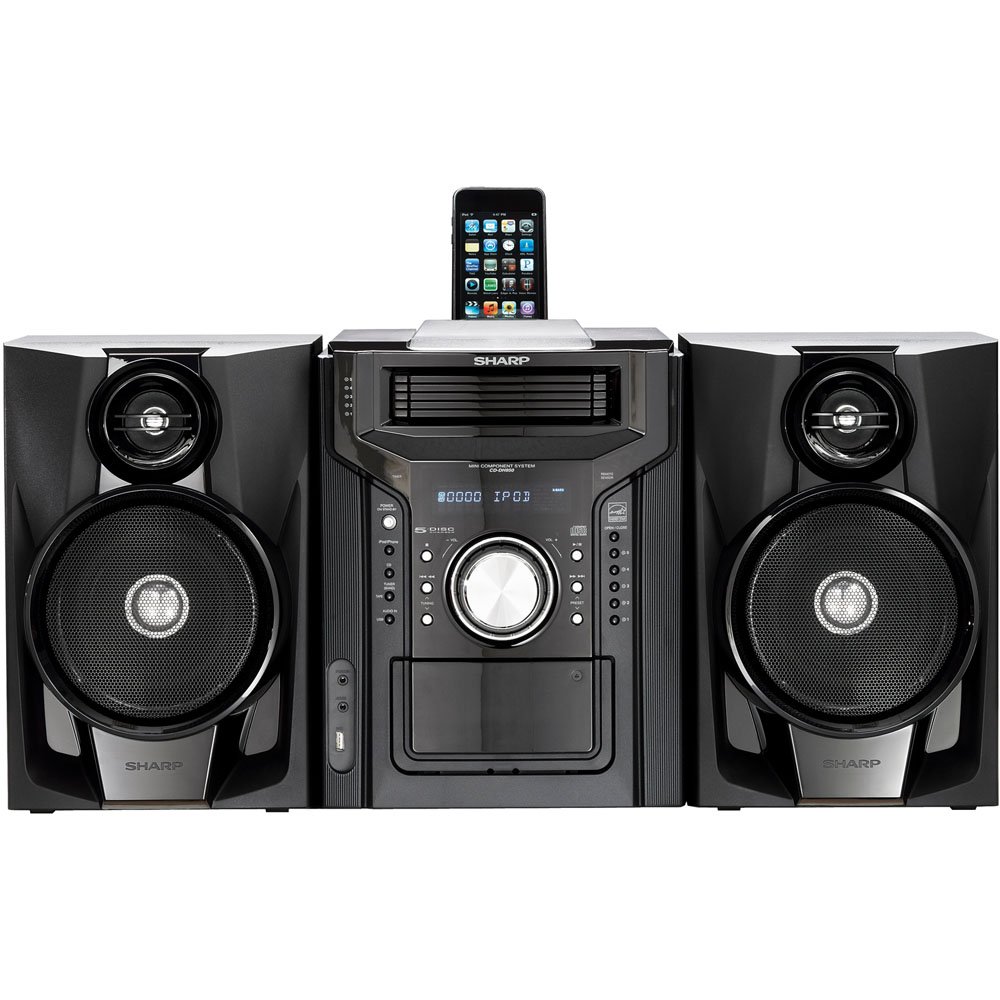
4.3.1-сурет: Жалпы view of the Sharp CD-DH950P Mini-Component System, showing the main unit flanked by two speakers, with an iPhone docked on top of the main unit.
5. Пайдалану нұсқаулары
5.1 Қуатты қосу/өшіру және дыбыс деңгейін басқару
- түймесін басыңыз ҚУАТ құрылғыны қосу немесе өшіру үшін алдыңғы панельдегі немесе қашықтан басқару пультіндегі түймені басыңыз.
- айналдырыңыз DOLUM алдыңғы панельдегі түймені басыңыз немесе пайдаланыңыз VOL +/- дыбыс деңгейін реттеу үшін қашықтан басқару пультіндегі түймелерді басыңыз.
5.2 CD ойнату
This system features a 5-disc CD changer.
- түймесін басыңыз АШУ/ЖАБУ CD науасын ашу үшін түймесін басыңыз.
- Place up to five CDs on the disc trays, label side up.
- түймесін басыңыз АШУ/ЖАБУ науаны жабу үшін қайтадан басыңыз.
- түймесін басыңыз CD CD функциясын таңдау үшін түймешігін басыңыз.
- түймесін басыңыз ОЙНАТУ/ТОҚТАТУ ойнатуды бастау үшін
- пайдаланыңыз ӨТКІЗУ buttons to navigate between tracks or discs.
5.3 Кассета палубасымен жұмыс істеу
- түймесін басыңыз TAPE OPEN/CLOSE button to open the cassette deck.
- Кассета таспасын салыңыз.
- түймесін басыңыз TAPE кассета функциясын таңдау үшін түймесін басыңыз.
- түймесін басыңыз ОЙНАУ ойнатуды бастау үшін.
- To record, ensure the source is selected (e.g., CD, Tuner) and press the ЖАЗУ кассета тақтасындағы түйме.
5.4 iPod/iPhone Docking
The system includes a top-mounted docking slot for compatible iPod and iPhone devices (30-pin connector).
- Carefully place your iPod or iPhone into the docking slot.
- The system will automatically switch to iPod/iPhone mode or you may need to press the iPod / iPhone түймесі.
- Use the system's controls or your device's controls to play music. The device will also charge while docked.
5.5 USB Host Playback
Connect a USB storage device containing MP3 or WMA audio files to the USB port on the front panel.
- USB құрылғысын USB портына салыңыз.
- түймесін басыңыз USB button to select the USB function.
- Шарлау және ойнату үшін ойнатуды басқару элементтерін пайдаланыңыз files.
5.6 AM/FM тюнері
- түймесін басыңыз ТУНЕР button to select AM or FM radio.
- пайдаланыңыз РЕТТЕУ +/- станцияны қолмен реттеу үшін түймелер.
- To auto-scan, press and hold the РЕТТЕУ +/- түймелері.
- To store a preset, tune to the desired station, then press ЖАД содан кейін алдын ала орнатылған нөмір.
5.7 Дыбыстық кіріс
Connect an external audio device (e.g., MP3 player, smartphone) to the AUDIO IN jack on the front panel using a 3.5mm stereo cable.
- Connect your device to the AUDIO IN jack.
- түймесін басыңыз AUDIO IN button to select this source.
- Жалғанған құрылғыдан ойнатуды басқарыңыз.
6. Техникалық қызмет көрсету
6.1 Құрылғыны тазалау
Wipe the exterior of the unit with a soft, dry cloth. Do not use abrasive cleaners, waxes, or solvents. Ensure the unit is unplugged before cleaning.
6.2 CD және кассетаға күтім жасау
- Handle CDs by their edges to avoid fingerprints and scratches. Clean discs with a soft, lint-free cloth from the center outwards.
- Store cassette tapes away from strong magnetic fields and direct sunlight.
7. Ақаулықтарды жою
| Мәселе | Ықтимал себебі | Шешім |
|---|---|---|
| Қуат жоқ | Қуат сымы қосылмаған; Розетка ақаулы | Қуат сымының мықтап жалғанғанына көз жеткізіңіз; Басқа розеткаға кіріп көріңіз |
| Дыбыс жоқ | Дыбыс деңгейі тым төмен; Динамиктер қосылмаған; Дұрыс емес көз таңдалған | Дыбыс деңгейін көтеру; Динамиктің қосылымдарын тексеру; Дұрыс кіріс көзін таңдау |
| CD ойнатылмайды | Disc inserted incorrectly; Disc is dirty or scratched | Insert disc correctly (label side up); Clean or replace disc |
| Нашар радио қабылдау | Antenna not positioned correctly; Weak signal | Adjust position of AM/FM antennas; Try auto-tuning or manual fine-tuning |
| iPod/iPhone not charging/playing | Device not properly docked; Device not compatible (e.g., newer connector) | Re-dock the device; Note that this system uses a 30-pin connector, newer devices may require an adapter (not included) |
8. Техникалық сипаттамалар
- Бренд: Өткір
- Үлгі: CD-DH950P
- Жалпы шығу қуаты: 240 Watts RMS (85W/ch FTC)
- Динамик конфигурациясы: 2.1 арна
- Қолдау көрсетілетін аудио пішімдері: CD, MP3, WMA
- Шу-шу арақатынасы: 100 дБ
- Үйлесімді құрылғылар: MP3 Player, Smartphone (via 30-pin dock or USB/Audio In)
- Өлшемдері (L x W x H): 27.6 x 13.6 x 13.5 дюйм
- Элемент салмағы: 24.4 фунт
- UPC: 074000369863, 074000369290
9. Кепілдік туралы ақпарат
This product is covered by a 1-year limited warranty from the date of purchase. Please refer to the warranty card included with your product for full terms and conditions, or contact Sharp customer service for details.
10. Қолдау
For further assistance, technical support, or service inquiries, please contact Sharp customer service. Contact information can typically be found on the Sharp official webсайтында немесе өніммен бірге берілген құжатта.