
1. Кіріспе
The BUFFALO Giga Switching Hub LSW3-GT-24NSR is a 24-port Gigabit Ethernet switch designed for high-speed network environments. It is ideal for small to medium-sized offices and workplaces requiring robust and reliable network connectivity. This device supports full Gigabit speeds across all ports, ensuring efficient data transfer.
Key features include a fanless design for silent operation and enhanced reliability, as well as a loop detection function to prevent network disruptions caused by accidental network loops.
2. Қауіпсіздік туралы ақпарат
Please read and understand the following safety precautions before using the device to prevent injury or damage.
- Нәр беруші: Use only the provided power adapter. Ensure the power outlet meets the specified voltage талаптар.
- Желдету: Желдету саңылауларын жаппаңыз. Қызып кетудің алдын алу үшін құрылғының айналасында тиісті ауа ағынын қамтамасыз етіңіз.
- Қоршаған орта: Avoid exposing the device to water, high humidity, extreme temperatures, or direct sunlight.
- Өңдеу: Do not drop or subject the device to strong impacts. Do not attempt to open or repair the device yourself. Refer all servicing to qualified personnel.
- Кабельдер: Ensure all network cables are properly connected and secured.
3. Пакет мазмұны
Барлық элементтер пакетте бар екенін тексеріңіз:
- BUFFALO Giga Switching Hub LSW3-GT-24NSR Unit
- Қуат кабелі
- Rack Mount Brackets (if included with your model)
- Резеңке аяқтар (жұмыс үстеліне орналастыру үшін)
4. Орнату
4.1 Физикалық орнату
The LSW3-GT-24NSR can be installed on a desktop or mounted in a 19-inch equipment rack.
Жұмыс үстелін орналастыру:
- Attach the included rubber feet to the bottom of the unit to prevent slipping and provide stability.
- Place the unit on a flat, stable surface with adequate ventilation.
Сөреге орнату:
- Attach the rack mount brackets to the sides of the unit using the provided screws.
- Secure the unit into a standard 19-inch equipment rack using appropriate rack screws (not included).
4.2 Желілік кабельдерді қосу
Connect your network devices (computers, servers, other switches) to any of the 24 RJ-45 ports on the front panel using standard Ethernet cables (Category 5e or higher recommended for Gigabit speeds).

1-сурет: Алдыңғы панель үстіндеview with 24 Ethernet Ports and Status LEDs.
4.3 Қуатты қосу
- Connect the power cable to the AC IN port on the rear of the device.
- Қуат кабелінің екінші ұшын сәйкес розеткаға қосыңыз.
- The device will power on automatically. The POWER LED on the front panel should illuminate.

2-сурет: Артқы панель үстіндеview with AC IN Power Port.
5. Пайдалану нұсқаулары
5.1 жарықдиодты индикаторлар
The front panel features several LED indicators to monitor the status of the switch and its ports.
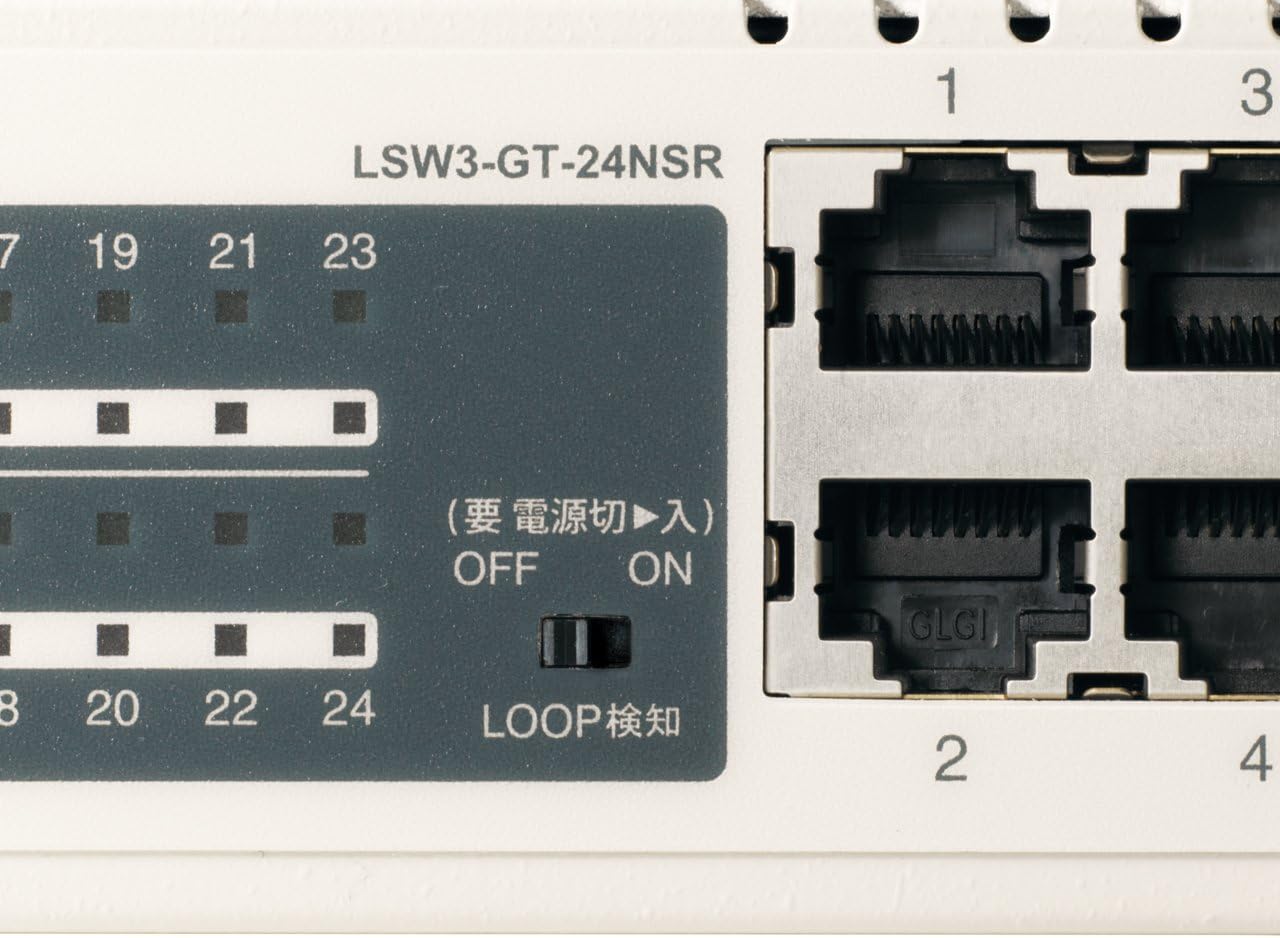
3-сурет: Егжей-тегжейлі view of LED Indicators and Loop Detection Switch.
| Жарық диодты атауы | Күй | Сипаттама |
|---|---|---|
| ҚУАТ | On | Құрылғы қосулы. |
| LINK / ACT (әр портқа) | On | A network device is connected and a link is established. |
| Жыпылықтау | Деректер порт арқылы жіберіледі немесе қабылданады. | |
| 1000/100/10М (әр портқа) | Жасыл | Port is operating at 1000 Mbps (Gigabit Ethernet). |
| Апельсин | Port is operating at 100 Mbps (Fast Ethernet). | |
| Өшірулі | Port is operating at 10 Mbps (Ethernet). | |
| LOOP DETECT | On | A network loop has been detected. |
5.2 Loop Detection Function
The LSW3-GT-24NSR features a hardware switch for enabling or disabling the loop detection function. This function helps prevent network instability caused by accidental network loops.
Figure 4: Loop Detection Switch (ON/OFF).
- ҚОСУЛЫ: Loop detection is active. If a loop is detected, the corresponding port will be automatically shut down to prevent network broadcast storms, and the LOOP DETECT LED will illuminate.
- ӨШІРУЛІ: Loop detection is disabled.
It is recommended to keep the loop detection function ON for network stability.
6. Техникалық қызмет көрсету
6.1 Құрылғыны тазалау
To maintain optimal performance, periodically clean the exterior of the switch.
- Тазалау алдында қуат кабелін ажыратыңыз.
- Бетін сүрту үшін жұмсақ, құрғақ шүберекті пайдаланыңыз.
- Do not use liquid cleaners, aerosols, or solvents, as these may damage the casing немесе ішкі компоненттер.
6.2 Қоршаған ортаны қорғау ережелері
Ensure the device is operated within its specified environmental conditions:
- Температура: 0°C - 40°C (32°F - 104°F)
- Ылғалдылық: 10% - 85% (конденсацияланбайтын)
7. Ақаулықтарды жою
If you encounter issues with your BUFFALO Giga Switching Hub, refer to the following common problems and solutions.
7.1 Қуат жоқ
- Симптом: POWER ЖШД өшірулі.
- Шешімі: Check if the power cable is securely connected to both the device and the power outlet. Ensure the power outlet is functional.
7.2 No Link or Slow Speed on a Port
- Симптом: The LINK/ACT LED for a connected port is off, or the 1000/100/10M LED indicates a lower speed than expected (e.g., 100M instead of 1000M).
- Шешімі:
- Ethernet кабелінің екі ұшына да сенімді жалғанғанын тексеріңіз.
- Try a different Ethernet cable. Ensure it is a Category 5e or higher cable for Gigabit speeds.
- Құрылғыны коммутатордағы басқа портқа қосыңыз.
- Check the network adapter settings on the connected device (computer, server) to ensure it is configured for auto-negotiation or the correct speed.
7.3 Network Instability / LOOP DETECT LED is On
- Симптом: The LOOP DETECT LED is illuminated, and network performance is degraded or unstable.
- Шешімі:
- A network loop has been detected. This typically occurs when two ports on the same switch (or different switches) are connected to each other, creating an infinite data path.
- Carefully inspect your network cabling to identify and remove any redundant connections that form a loop.
- If the loop detection switch is ON, the affected port will be automatically shut down. Once the loop is resolved, the port should resume normal operation.
8. Техникалық сипаттамалар
| Ерекшелік | Сипаттама |
|---|---|
| Бренд | БУФАЛО |
| Үлгі нөмірі | LSW3-GT-24NSR |
| Порт саны | 24 x 10/100/1000BASE-T RJ-45 порттары |
| Ауыстыру сыйымдылығы | 48 Gbps (Non-blocking) |
| Бағыттау бағамы | 35.7 Мп/с |
| MAC мекенжай кестесінің өлшемі | 8K жазбалар |
| Jumbo жақтауын қолдау | 9 КБ дейін |
| Ерекше өзгешеліктері | Auto-MDI/MDIX, Auto-Negotiation, Loop Detection Function, Fanless Design |
| Нәр беруші | Ішкі айнымалы ток қуат көзі |
| Өлшемдері (W x D x H) | (Specific dimensions not provided in source, typical for 1U rackmount) |
| Салмағы | (Specific weight not provided in source) |
| Жұмыс температурасы | 0°C - 40°C |
| Жұмыс ылғалдылығы | 10% - 85% (конденсацияланбайтын) |
9. Кепілдік және қолдау
This BUFFALO product is covered by a manufacturer's warranty. Please refer to the warranty card included with your product or visit the official BUFFALO webегжей-тегжейлі кепілдік талаптары мен шарттары үшін сайт.
For technical support, product registration, or further assistance, please visit the official BUFFALO support webсайтына өтіңіз немесе тұтынушыларға қызмет көрсету бөліміне хабарласыңыз. Байланыс ақпаратын әдетте өндірушіден табуға болады webсайтында немесе өнімнің қаптамасында.