
1. Кіріспе
This manual provides detailed instructions for the setup, operation, maintenance, and troubleshooting of your Inland Pro Bluetooth Optical Mouse (Model 07347). Please read this manual thoroughly before using the device to ensure proper functionality and to prevent damage.
The Inland Pro Bluetooth Optical Mouse offers wireless convenience and precise optical tracking for various computing tasks. Its ergonomic design aims to provide comfortable use.
2. Пакет мазмұны
Төменде тізімделген барлық заттардың өнім қаптамасында бар екенін тексеріңіз:
- Inland Pro Bluetooth Optical Mouse (Model 07347)
- Пайдаланушы нұсқаулығы (бұл құжат)
- Ескертпе: 2 AAA батареясы жұмыс істеу үшін қажет және жинаққа кірмейді.
3. Өнім аяқталдыview
The Inland Pro Bluetooth Optical Mouse is designed for ease of use and reliable performance. Key features include:
- Bluetooth Wireless Interface: Provides a cable-free connection to your compatible device.
- Optical Technology: Delivers accurate and responsive cursor control.
- Эргономикалық дизайн: Shaped for comfortable handling during extended use.
- Two Buttons and Scroll Wheel: Standard navigation controls for efficient interaction.
- 1000 DPI Sensor: Offers a fixed sensitivity for general computing tasks.
Тінтуірдің құрамдас бөліктері
Refer to the image below for an illustration of the mouse components.
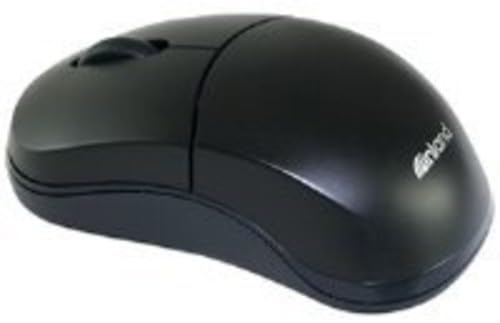
Figure 1: Inland Pro Bluetooth Optical Mouse (Model 07347). This image displays the top and side profile of the black optical mouse, highlighting its ergonomic shape and standard button layout.
- Сол жақ түймешікті басыңыз
- Оң жақ түймешікті басыңыз
- Айналдыру дөңгелегі
- Optical Sensor (located on the underside)
- Battery Compartment (located on the underside)
- Bluetooth Connection/Pairing Button (located on the underside)
- Power On/Off Switch (located on the underside)
4. Орнату
4.1. Батареяларды орнату
- Turn the mouse over to access the underside.
- Locate the battery compartment cover. Slide or lift the cover to open it.
- Екі (2) AAA батареясын оң (+) және теріс (-) терминалдарының бөлік ішіндегі белгілермен дұрыс сәйкестендірілуін қамтамасыз етіп салыңыз.
- Батарея бөлігінің қақпағын мықтап орнына салыңыз.
- Slide the Power On/Off switch to the 'On' position.
4.2. Bluetooth жұптастыру
Follow these steps to connect your mouse to a compatible device:
- Ensure the mouse has fresh batteries and is powered on.
- On your computer or device, enable Bluetooth and open the Bluetooth settings or device manager.
- түймесін басып тұрыңыз Bluetooth Connection/Pairing Button on the underside of the mouse for approximately 3-5 seconds. An indicator light on the mouse (if present) may flash to indicate pairing mode.
- On your device, search for new Bluetooth devices. The mouse should appear as "Inland Pro Mouse" or a similar identifier.
- Select the mouse from the list of available devices to initiate the connection.
- If prompted for a passkey, enter "0000" or consult your device's Bluetooth instructions. Some devices may not require a passkey.
- Once connected, the mouse indicator light may stop flashing or turn solid, and your device should confirm the successful pairing.
Үйлесімділік ескертпесі: This mouse is compatible with Windows 2000, Windows XP, Windows Vista, and Mac OS. Compatibility with other operating systems or specific Bluetooth adapters may vary.
5. Пайдалану нұсқаулары
After successful pairing, the mouse is ready for use.
- Moving the Cursor: Move the mouse across a flat, non-reflective surface to control the cursor on your screen.
- Сол жақ түймені басыңыз: Элементтерді таңдау, сілтемелерді ашу немесе функцияларды белсендіру үшін сол жақ түймені басыңыз.
- Тінтуірдің оң жақ түймешігі: Мәтінмәндік мәзірлерді ашу немесе қосымша опцияларға қол жеткізу үшін оң жақ түймені басыңыз.
- Айналдыру дөңгелегі: Құжаттар арасында жылжу үшін айналдыру дөңгелегін жоғары немесе төмен айналдырыңыз web pages. The scroll wheel can also be pressed as a middle click button for some functions.
6. Техникалық қызмет көрсету
6.1. Тінтуірді тазалау
Оңтайлы өнімділік пен сыртқы көріністі сақтау үшін:
- Тазалау алдында тінтуірдің өшірілгеніне көз жеткізіңіз.
- Аздап жұмсақ, түксіз матаны пайдаланыңыз dampсумен немесе жұмсақ тазалау ерітіндісімен толтырыңыз.
- Wipe the exterior surfaces of the mouse gently.
- Қатты химиялық заттарды, абразивті тазалағыштарды немесе шамадан тыс ылғалды пайдаланбаңыз, себебі олар тінтуірді зақымдауы мүмкін.
- Do not spray cleaners directly onto the mouse.
6.2. Батареяны ауыстыру
When the mouse's performance degrades or it stops responding, it may be time to replace the batteries. Follow the steps in Section 4.1 to replace the two (2) AAA batteries.
Note: Dispose of used batteries responsibly according to local regulations.
7. Ақаулықтарды жою
If you encounter issues with your Inland Pro Bluetooth Optical Mouse, refer to the following common problems and solutions:
- Mouse does not respond or cursor does not move:
- Ensure the mouse is powered on. Check the On/Off switch on the underside.
- Батареяларды жаңа AAA батареяларымен ауыстырыңыз.
- Ensure the mouse is within the effective range of your Bluetooth device (typically up to 10 meters).
- Verify that the mouse is properly paired with your device. If not, re-pair it following the steps in Section 4.2.
- Try connecting the mouse to a different Bluetooth-enabled device to rule out an issue with your primary device's Bluetooth adapter.
- Connection fails or mouse frequently disconnects:
- Ensure there are no other strong wireless signals or devices interfering with the Bluetooth connection.
- Turn the mouse off and then on again using the power switch on the underside. This can often re-establish the connection.
- Remove the mouse from your device's Bluetooth paired devices list and then re-pair it.
- Update your computer's Bluetooth drivers.
- If your device requests a code during pairing and none was provided, try common codes like "0000" or "1234". If issues persist, consult your device's operating system documentation.
- Курсордың қозғалысы тұрақсыз немесе дәл емес:
- Тінтуірдің астыңғы жағындағы оптикалық сенсорды жұмсақ, құрғақ шүберекпен тазалаңыз.
- Use the mouse on a clean, uniform, non-reflective surface. Avoid highly reflective or transparent surfaces.
8. Техникалық сипаттамалар
| Бренд | Ішкі |
| Үлгі нөмірі | 07347 |
| Қосылу технологиясы | Bluetooth, Wireless (2.4 GHz Radio Frequency, 802.11abg) |
| Қозғалысты анықтау технологиясы | Оптикалық |
| DPI (дюймдегі нүктелер) | 1000 нүкте/дюйм |
| Түймелердің саны | 2 (plus scroll wheel click) |
| Түс | Қара |
| Операциялық жүйенің үйлесімділігі | Windows 2000, Windows XP, Windows Vista, Mac OS |
| Батареялар қажет | 2 x AAA (қоспаған) |
| Элемент салмағы | 109 г |
| Өнім өлшемдері (L x W x H) | 20.32 x 6.35 x 18.29 cm (approximate packaging dimensions) |
9. Кепілдік және қолдау
For warranty information, please refer to the documentation provided at the time of purchase or contact your retailer. Inland typically offers a limited warranty against defects in materials and workmanship.
For technical support or further assistance, please visit the official Inland website or contact their customer service department. Contact details are usually available on the product packaging or the manufacturer's webсайт.