
1. Кіріспе
This instruction manual provides essential information for the safe and efficient use of your THOMSON CE-26 Cassette/SD/USB Audio System. Please read this manual thoroughly before operating the device and retain it for future reference. The CE-26 allows you to play audio from cassettes, USB drives, and SD/MMC cards, as well as record audio directly from cassettes or external sources to MP3 format on USB or SD/MMC media.
2. Өнім аяқталдыview
Familiarize yourself with the components and controls of your CE-26 audio system.

2.1-сурет: Алдыңғы панель View. This image displays the front of the THOMSON CE-26 unit, showing the cassette deck, control buttons, display screen, USB port, SD/MMC card slot, and volume knob.
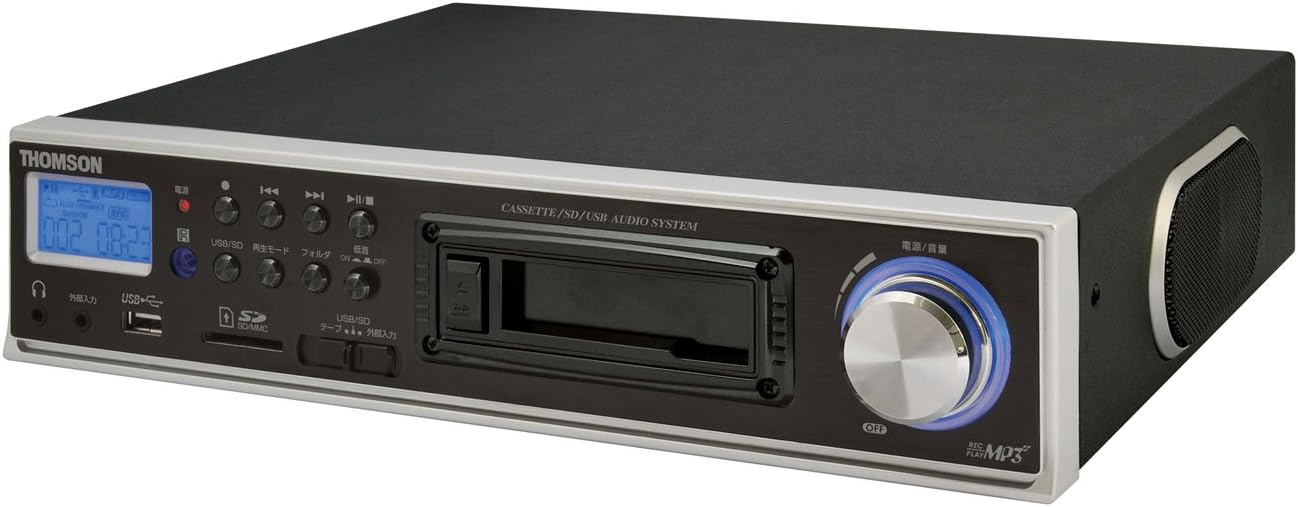
2.2-сурет: Бұрыштық View. This image shows the THOMSON CE-26 from an angled perspective, highlighting the integrated side speaker and the overall compact design.

Figure 2.3: Remote Control Unit. This image displays the included remote control for the THOMSON CE-26, featuring buttons for search, display, record, playback mode, program, folder navigation, and USB/SD selection.

Figure 2.4: Feature Overview Диаграмма. This diagram illustrates the key functionalities of the THOMSON CE-26, including direct recording from cassette to USB/SD, MP3/WMA playback, USB/SD memory copying, AUX input, built-in speaker, and remote control.
Алдыңғы панельді басқару элементтері:
- Қуат түймесі: Құрылғыны қосады немесе өшіреді.
- Дисплей экраны: Shows track information, mode, and time.
- Кассета палубасы: For inserting and playing audio cassettes.
- USB порты: Connect USB flash drives for playback or recording.
- SD/MMC картасы ұясы: Insert SD or MMC cards for playback or recording.
- Ойнатуды басқару элементтері: Play, Pause, Stop, Fast Forward, Rewind, Skip Track.
- Жазу түймесі: Жазуды бастайды.
- Режим түймесі: Switches between Cassette, USB, SD, and AUX input modes.
- Дыбыс қаттылығы: Дыбыс шығысының деңгейін реттейді.
- Құлаққап ұясы: Жеке тыңдау үшін.
- AUX кірісі: Сыртқы дыбыс құрылғыларын қосыңыз.
3. Орнату
- Қуат қосылымы: Айнымалы ток сымын құрылғының қуат кірісіне, содан кейін стандартты қабырға розеткасына қосыңыз.
- Бастапқы қуат қосулы: Press the Power button to turn on the unit. The display will illuminate.
- Тасымалдаушыны енгізу:
- Кассета: Open the cassette door and insert an audio cassette with the open edge facing upwards. Close the door securely.
- USB дискісі: Insert a USB flash drive into the USB port. Ensure it is formatted to FAT32.
- SD/MMC картасы: Insert an SD or MMC card into the card slot until it clicks into place. Ensure it is formatted to FAT32.
- External Audio Device (Optional): To use the AUX input, connect an external audio source (e.g., smartphone, CD player) to the AUX IN jack using a 3.5mm audio cable.
4. Пайдалану нұсқаулары
4.1. Кассетаны ойнату
- Кассета таспасын салыңыз.
- Press the "Mode" button until "Cassette" mode is selected (or the cassette deck automatically starts playing).
- Ойнату түймесін басыңыз (►) құрылғыда немесе қашықтан басқару құралында.
- Дыбыс деңгейі түймесін пайдаланып дыбыс деңгейін реттеңіз.
- Use Fast Forward (►►) or Rewind (..) buttons to navigate the tape.
- Press Stop (■) ойнатуды аяқтау үшін.
4.2. USB/SD ойнату
- Insert a USB drive or SD/MMC card containing MP3 or WMA audio files.
- Press the "Mode" button to select "USB" or "SD" mode. The unit will automatically scan and begin playing the first track.
- Ойнату/Үзіліс (►/∥), Тоқта (■), Next Track (►►|), and Previous Track (|◄◄) ойнатуды басқаруға арналған түймелер.
- The "Folder" buttons on the remote can be used to navigate between folders on the USB/SD media.
4.3. Recording Audio to MP3 (Cassette to USB/SD)
This feature allows you to convert your cassette tapes into digital MP3 files.
- Insert a blank or desired USB drive/SD card into the respective slot.
- Жазғыңыз келетін кассетаны салыңыз.
- Press the "Mode" button to select "Cassette" mode.
- Кассетаны ойната бастаңыз.
- Press the "Record" button on the unit or remote. The recording indicator will light up, and the unit will begin converting the cassette audio to MP3 format on the selected USB/SD media.
- To stop recording, press the "Stop" button. The recorded MP3 file will be saved on your USB drive or SD card.
- Ескерту: There might be a slight delay between pressing record and the actual start of recording. It is recommended to start recording slightly before the desired audio begins to avoid cutting off the start of a track.
4.4. Recording Audio to MP3 (AUX Input to USB/SD)
Record audio from an external device connected via the AUX input.
- Connect your external audio device to the AUX IN jack.
- Insert a blank or desired USB drive/SD card.
- «AUX» режимін таңдау үшін «Режим» түймесін басыңыз.
- Сыртқы дыбыс құрылғысында ойнатуды бастаңыз.
- Press the "Record" button on the unit or remote. The recording indicator will light up, and the unit will begin converting the AUX audio to MP3 format on the selected USB/SD media.
- To stop recording, press the "Stop" button.
4.5. Көшіру Files Between USB and SD/MMC
The CE-26 allows direct copying of MP3/WMA files between a USB drive and an SD/MMC card.
- Ensure both a USB drive and an SD/MMC card are inserted into their respective slots.
- Select either "USB" or "SD" mode using the "Mode" button, depending on which source you want to copy бастап.
- тармағына өтіңіз file or folder you wish to copy.
- Press and hold the "Copy" button (often labeled "USB/SD Copy" or similar) on the unit or remote. Follow any on-screen prompts to confirm the copy operation.
- The display will indicate when the copying process is complete.
5. Техникалық қызмет көрсету
- Тазалау: Құрылғының сыртын тазалау үшін жұмсақ, құрғақ шүберекті пайдаланыңыз. Сұйық тазалағыштарды немесе абразивті материалдарды пайдаланбаңыз.
- Кассета палубасы күтімі: Periodically clean the cassette head and pinch rollers with a specialized cassette head cleaner to ensure optimal audio quality and prevent tape damage.
- Сақтау орны: When not in use for extended periods, disconnect the power cord and store the unit in a cool, dry place away from direct sunlight and extreme temperatures.
6. Ақаулықтарды жою
| Мәселе | Ықтимал себебі | Шешім |
|---|---|---|
| Қуат жоқ | Қуат сымы қосылмаған; Розетка қосылмаған. | Қуат сымының сенімді жалғанғанына көз жеткізіңіз. Қуат розеткасының жұмыс істеп тұрғанын тексеріңіз. |
| Ойнату кезінде дыбыс жоқ | Дыбыс деңгейі тым төмен; Дұрыс емес режим таңдалған; Құлаққаптар қосылған. | Increase volume. Select the correct input mode (Cassette, USB, SD, AUX). Disconnect headphones if using speakers. |
| Cassette tape not playing or recording correctly | Tape tangled or damaged; Cassette heads dirty; Incorrect tape direction. | Check tape condition. Clean cassette heads and pinch rollers. Ensure tape is inserted correctly. |
| Recording stops prematurely or has gaps | USB drive/SD card full; Media format issue; Intermittent power. | Ensure sufficient storage space. Use FAT32 formatted media. Check power connection stability. |
| Poor audio quality from USB/SD | Бұзылған files; Low bitrate MP3/WMA files. | Try different audio fileс. Қамтамасыз ету fileлар бүлінбеген. |
| Қашықтан басқару пульті жұмыс істемейді | Batteries depleted; Obstruction between remote and unit; Incorrect angle. | Replace remote control batteries. Ensure clear line of sight to the unit's IR receiver. |
7. Техникалық сипаттамалар
| Ерекшелік | Мәлімет |
|---|---|
| Бренд | ТОМСОН |
| Үлгі нөмірі | CE-26 |
| Қолдау көрсетілетін медиа | Cassette Tape, USB Memory, SD/MMC Card |
| Қолдау көрсетілетін аудио пішімдері | MP3, WMA (playback); MP3 (recording) |
| Жазу функциясы | Direct digital recording from Cassette to MP3, AUX to MP3 |
| Қосылу мүмкіндігі | USB Port, SD/MMC Card Slot, AUX Input (3.5mm), Headphone Output (3.5mm) |
| Кірістірілген динамик | Иә |
| Қашықтан басқару құралы | енгізілген |
| Өлшемдері (шамамен) | 35.4 x 33.2 x 12 см |
| Салмағы (шамамен) | 3.02 кг |
8. Кепілдік және қолдау
For warranty information and technical support, please refer to the warranty card included with your product or contact THOMSON customer service directly. Keep your purchase receipt as proof of purchase.
For further assistance, please visit the official THOMSON webсайтына кіріңіз немесе олардың уәкілетті қызмет көрсету орталықтарына хабарласыңыз.