
Кіріспе
The OXO Good Grips Chef's Digital Leave-In Thermometer is designed to assist in cooking roasts, fish, and poultry to precise temperatures. This device features a clear digital display that functions as both a thermometer and a 24-hour timer. Its angled design allows for optimal viewing on your countertop, and the stainless steel housing ensures durability. The thermometer includes a probe that can be inserted into food, with a narrow cable designed to pass through an oven door, allowing continuous temperature monitoring without opening the oven.
This manual provides detailed instructions for the proper setup, operation, and care of your thermometer to ensure accurate and reliable performance.
Орнату
1. Батареяны орнату
The thermometer requires two AAA batteries (included). To install:
- Құрылғының артқы жағындағы батарея бөлімін табыңыз.
- Бөлменің қақпағын ашыңыз.
- Дұрыс полярлықты (+/-) қамтамасыз етіп, екі AAA батареясын салыңыз.
- Батарея бөлігінің қақпағын мықтап жабыңыз.
2. Зонд қосылымы
Connect the stainless steel probe to the thermometer unit. The probe cable plugs into the designated port on the side of the main unit.

Image: The OXO Digital Leave-In Thermometer display unit with its stainless steel probe connected via a cable. The display shows a temperature reading and settings.
Пайдалану нұсқаулары
1. Қуатты қосу/өшіру
Press the power button (usually marked with an 'On/Off' symbol or a circle with a line) to turn the thermometer on or off.
2. Температураны орнату
The thermometer offers pre-set USDA and chef-recommended temperatures for various types of meat, poultry, and fish, as well as a manual setting option.
- түймесін басыңыз Температура button (often indicated by a thermometer icon) to cycle through meat types (e.g., Beef, Chicken, Fish, Ground Meat, Ham, Turkey).
- Once a meat type is selected, use the Жоғары/төмен arrows to choose the desired doneness level (e.g., Rare, Medium, Well Done) or to adjust the target temperature manually.
- түймесін басыңыз OK таңдауыңызды растау үшін түймесін басыңыз.
3. Таймерді пайдалану
The unit also functions as a 24-hour timer.
- түймесін басыңыз Таймер button (often indicated by an hourglass icon) to switch to timer mode.
- пайдаланыңыз Жоғары/төмен arrows to set the desired time.
- түймесін басыңыз OK to start the timer. Press again to pause/resume, and hold to reset.
4. Probe Placement
Insert the probe into the thickest part of the meat, avoiding bone. Ensure the probe tip is fully embedded in the center of the meat for an accurate reading.

Image: The OXO Digital Leave-In Thermometer display unit positioned on a countertop next to an oven. Its probe is inserted into a large roasted turkey, with the cable extending from the oven to the unit.
Route the narrow cable through the oven door. The cable is designed to withstand oven temperatures, allowing the main unit to remain outside the oven for easy monitoring.

Сурет: жақыннан түсірілген view of the OXO Digital Leave-In Thermometer's probe inserted into a turkey roasting inside an oven. The thermometer's cable is visible, leading out of the oven door to the main unit.
5. Температура ескертулері
The thermometer will signal when the desired temperature is reached. An additional 10-degree warning alert will sound before the target temperature, allowing you to anticipate completion and prevent overcooking.
Өнімнің ресми бейнесі
Video: An official product video demonstrating the features and use of the OXO Chef's Digital Leave-In Thermometer. It shows how to set temperatures, use the timer, and store the probe and cord.
Техникалық қызмет көрсету
Тазалау
The thermometer probe is oven safe and designed for easy cleaning. The main unit is Тек қолмен жуу. Do not immerse the main unit in water.
- Негізгі құрылғыны жарнамамен сүртіңізamp мата.
- Hand wash the probe and cable with warm, soapy water. Rinse thoroughly and dry completely before storing.
Сақтау
For compact storage, the thermometer probe fits easily into the display unit, and the cord wraps neatly around the base.
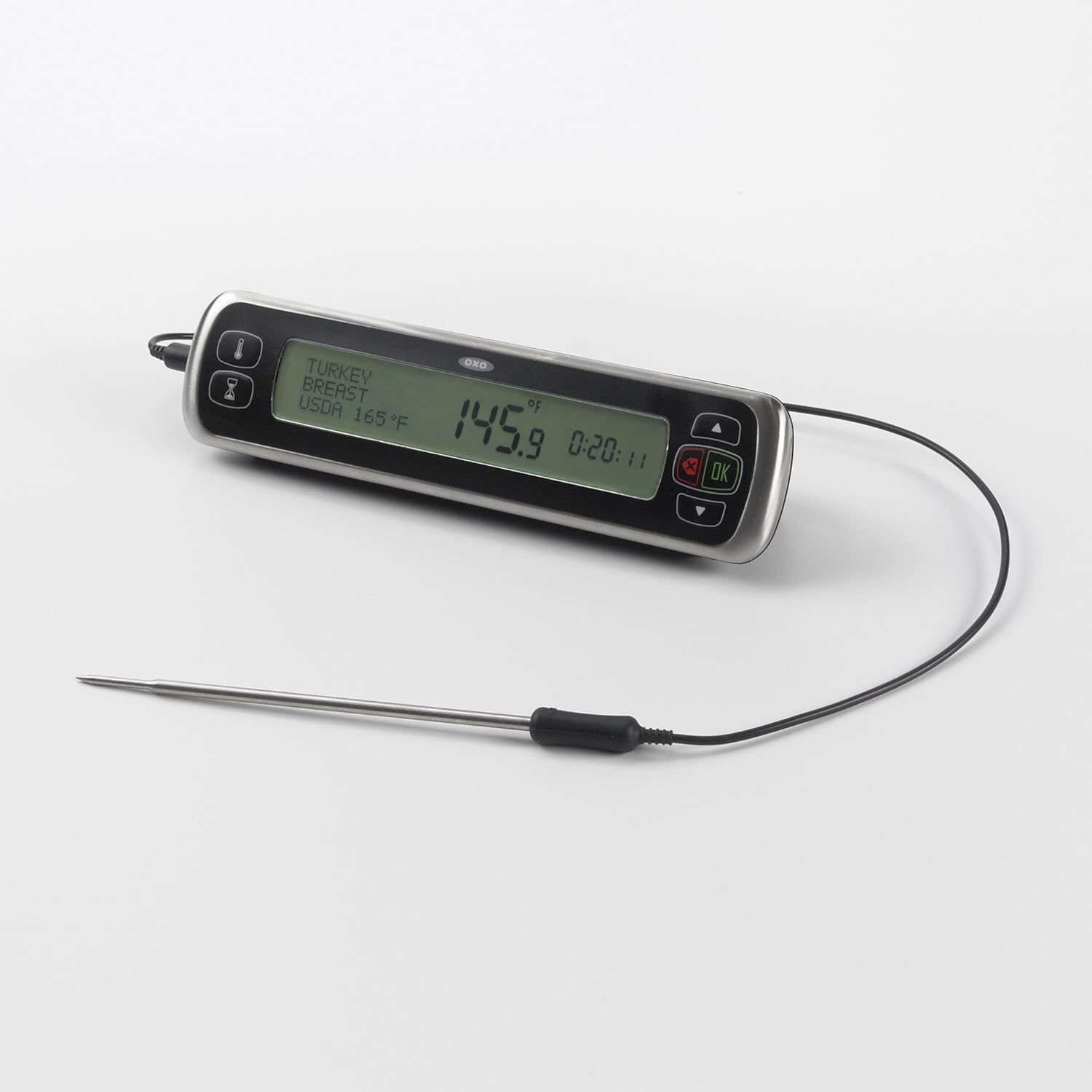
Image: The OXO Digital Leave-In Thermometer showing how the probe and its cable can be neatly stored by wrapping the cord around the base and inserting the probe into a designated slot on the unit.
Ақаулықтарды жою
- Display shows 'LO' or no reading: This typically indicates low battery power. Replace the two AAA batteries with fresh ones.
- Дұрыс емес температура көрсеткіштері: Ensure the probe is inserted correctly into the thickest part of the meat, avoiding bone. Verify that the probe cable is securely connected to the main unit. If issues persist, the probe may need replacement.
- Alert volume is too low: Some users have noted that the alert volume may be subtle. Ensure you are within reasonable proximity to the unit to hear the alert. There is no adjustable volume setting.
- Құрылғы қосылмайды: Check battery installation and ensure batteries are fresh. If the unit still does not power on, contact customer support.
Техникалық сипаттамалар
| Бренд | OXO |
| Модель атауы | Chef's Precision Digital Leave-In Thermometer |
| Үлгі нөмірі | 1158800 |
| Дисплей түрі | Сандық |
| Қосылу технологиясы | Сымды |
| Сыртқы материал | Stainless Steel (Probe), Plastic (Case) |
| Қуат көзі | Батареямен жұмыс істейді (2 AAA батареясы қажет) |
| Өнімді күту нұсқаулары | Hand Wash Only (Main Unit), Oven Safe (Probe) |
| Элемент салмағы | 0.5 фунт |
| Элемент ұзындығы | 7.75 дюйм |
| Upper Temperature Range | 212 градус Фаренгейт |
Кепілдік және қолдау
Кепілдік туралы ақпарат
OXO offers a satisfaction guarantee. If for any reason you are not satisfied with an OXO product, you may return it for replacement or refund.
Тұтынушыларды қолдау
For further assistance, product inquiries, or to claim your warranty, please visit the official OXO website or contact their customer service department. Refer to the product packaging or the OXO webең соңғы байланыс ақпаратына арналған сайт.