
1. Кіріспе
The Sigma SD14 is a 14-megapixel Digital Single-Lens Reflex (DSLR) camera designed for advanced photographers. It features the Foveon X3 direct-image sensor, which captures full RGB color information at each pixel layer, aiming for high-definition images with rich gradation. This manual provides essential information for setting up, operating, and maintaining your SD14 camera.
Key features include a 2.5-inch LCD monitor, a durable shutter mechanism rated for over 100,000 cycles, a 5-point autofocus system, and continuous shooting capabilities. The camera supports both RAW and JPEG image recording formats and includes Sigma Photo Pro 3.0 software for RAW image processing.

1.1-сурет: Алдыңғы view of the Sigma SD14 Digital SLR Camera, showing the lens mount and body design.
2. Қорапта не бар
Verify that all the following items are included in your Sigma SD14 package:
- Sigma SD14 Digital SLR Camera Body
- Lithium-ion Power Battery BP-21
- Battery Charger BC-21
- USB кабелі
- Бейне кабелі
- Мойын бауы
- Eye Cap
- Дене қақпағы
- Окулярлық қақпақ
- SIGMA Photo Pro 3.0 CD-ROM
- SD14 Instruction Manual (this document)
3. Орнату
3.1. Батареяны зарядтау және орнату
- Insert the Lithium-ion Battery BP-21 into the Battery Charger BC-21.
- Зарядтағышты розеткаға қосыңыз. Зарядтау индикаторы жанады.
- Charging typically takes approximately 120 minutes for a full charge.
- Толық зарядталғаннан кейін батареяны зарядтағыштан алыңыз.
- Open the battery compartment cover on the camera body.
- Insert the charged battery into the compartment, ensuring correct orientation.
- Батарея бөлігінің қақпағын мықтап жабыңыз.
A fully charged BP-21 battery can capture approximately 500 images.
3.2. Жад картасын салу
The SD14 uses CompactFlash (CF) Type I/II cards. Ensure the card is formatted in the camera before first use.
- Open the CF card slot cover on the side of the camera.
- Insert the CF card with the correct orientation until it clicks into place.
- Close the CF card slot cover securely.
3.3. Объективті бекіту
The Sigma SD14 uses the Sigma SA Bayonet mount. Only Sigma SA mount lenses are directly compatible.
- Фотокамерадан корпус қақпағын және объективтен артқы объектив қақпағын алыңыз.
- Align the red index mark on the lens with the red index mark on the camera body's lens mount.
- Объективті шерту арқылы орнына бекітілгенше сағат тілімен бұру арқылы бекітіңіз.
- Объективті алу үшін камера корпусындағы линзаны босату түймесін басып, объективті сағат тіліне қарсы бұраңыз.
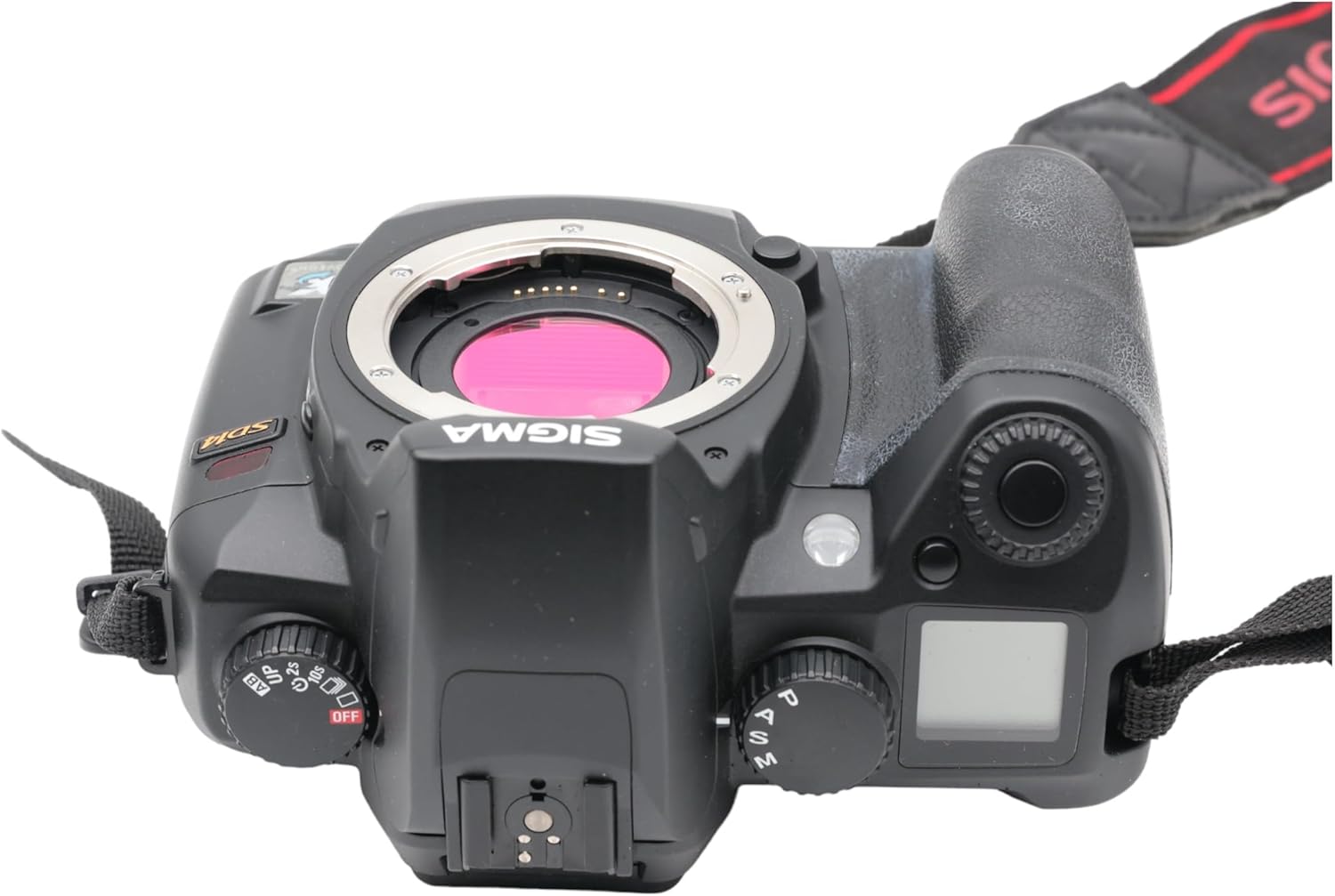
3.1-сурет: Жоғарғы view of the Sigma SD14, illustrating the lens mount and mode dials.
4. Операция
4.1. Қосу / Өшіру
Rotate the power switch to the ON position to turn on the camera. Rotate it to OFF to power down.
4.2. Негізгі басқару элементтері және дисплей
The SD14 features a 2.5-inch LCD monitor for reviewing images and navigating menus, and a pentaprism viewfinder for composing shots. The top LCD panel displays key settings such as resolution, metering mode, battery status, and remaining shots.

4.1-сурет: Артқы view of the Sigma SD14, showing the LCD monitor, viewіздеу құралы және басқару түймелері.
Key buttons include MENU, ISO, WB (White Balance), and a 4-way controller with an OK button for navigation. The INFO button displays shutter speed, aperture, and other settings on the LCD.
4.3. Фокустау
The camera utilizes a 5-point autofocus (AF) system (center, left, right, up, and down). The center AF point features a cross-type sensor for enhanced precision. AF point selection can be automatic or manual.
4.4. Өлшеу режимдері
The SD14 offers three metering modes:
- 8-segment Evaluative Metering: Analyzes the entire scene for balanced exposure.
- Center Area Metering: Prioritizes the central area of the frame.
- Center Weighted Average Metering: Measures the entire frame but gives more weight to the central area.
Exposure compensation and auto bracketing functions are available for fine-tuning exposure.
4.5. Суретті жазу
The camera supports both RAW (X3F) and JPEG formats. JPEG recording offers four sizes (Super High, High, Medium, Low) and three quality settings (Fine, Normal, Basic).
- Super High (4608 x 3072 pixels): Suitable for A3 or larger prints.
- High (2640 x 1760 pixels): Suitable for A4 prints.
- Medium (1776 x 1184 pixels): Suitable for regular size prints.
- Low (1296 x 864 pixels): үшін қолайлы web pages and email.
4.6. Үздіксіз түсіру
The SD14 can shoot continuously at 3 frames per second. The number of frames captured in a burst depends on the resolution setting:
- Жоғары: 6 кадр
- Орташа: 12 кадр
- Төмен: 24 кадр
These figures apply to both RAW and JPEG modes.
4.7. Built-in Flash
The built-in flash has a guide number of 11 (ISO 100) and covers a 17mm lens angle (28mm equivalent on 35mm format). It supports S-TTL automatic flash metering and can synchronize with shutter speeds up to 1/180 second.
4.8. Mirror Lock-up
Activate the mirror lock-up mechanism to prevent camera shake caused by mirror movement during exposure. This is particularly useful for macro photography, long telephoto shots, or scientific applications. For best results, use with a remote controller or cable release (sold separately).
4.9. Sigma Photo Pro 3.0 Software
The included Sigma Photo Pro 3.0 software is a RAW image developer. It allows for quick conversion of RAW data and offers three adjustment modes: X3F Mode (original settings), Auto Adjustment Mode, and Custom Mode for manual adjustments (exposure, contrast, shadow, highlight, saturation, sharpness, fill-light). The software supports 8-bit TIFF, 16-bit TIFF, and JPEG file formats, and sRGB, Apple RGB, Adobe RGB, and ColorMatch RGB color spaces.
5. Техникалық қызмет көрсету
5.1. Image Sensor Dust Protector
The SD14 features a dust protector positioned in front of the image sensor. This design prevents dust from adhering directly to the sensor, minimizing its impact on image quality. If dust accumulates on the protector, it will be out of focus and generally not visible in images.
5.2. Фотокамераның корпусы мен объективін тазалау
- Камера корпусын сүрту үшін жұмсақ, мамықсыз шүберекті пайдаланыңыз. Қиын кірді аздап сүртіңіз.ampшүберекті сумен немесе жұмсақ тазалау ерітіндісімен жағыңыз.
- For lenses, use a lens brush to remove loose dust, then a lens cleaning solution and a microfiber cloth. Avoid touching the lens surface with your fingers.
- Камераны немесе линзаны тазалау үшін бояу сұйылтқышы немесе бензол сияқты органикалық еріткіштерді ешқашан пайдаланбаңыз.
5.3. Батареяны күту
- Батареяларды пайдаланбаған кезде салқын, құрғақ жерде сақтаңыз.
- Батареяның қызмет ету мерзімін ұзарту үшін оны жиі толық зарядсыздандырудан аулақ болыңыз.
- Егер камера ұзақ уақыт бойы пайдаланылмаса, батареяны шығарып алыңыз.
6. Ақаулықтарды жою
| Мәселе | Ықтимал себебі | Шешім |
|---|---|---|
| Камера қосылмайды. | Батарея таусылған немесе дұрыс салынбаған. | Батареяны толығымен зарядтаңыз және оның дұрыс салынғанын тексеріңіз. |
| Суреттер бұлыңғыр. | Дұрыс емес фокус, камераның шайқалуы немесе лас линза. | Дұрыс назар аударуды қамтамасыз етіңіз. Жылдамырақ ысырма жылдамдығын немесе штативті пайдаланыңыз. Линзаны тазалаңыз. |
| Images are too dark or too bright. | Incorrect exposure settings or metering mode. | Adjust exposure compensation. Select an appropriate metering mode for the scene. |
| Color blotching in underexposed areas. | Characteristic of the Foveon sensor when severely underexposed. | Aim to slightly overexpose images (e.g., +.7 EV) to retain shadow detail and avoid this effect. |
| Cannot record images. | Жад картасы толы, құлыпталған немесе дұрыс салынбаған. | Insert an empty card, unlock the card, or reinsert it correctly. Format the card if necessary (this will erase all data). |
| Камера қатып қалады немесе жауап бермей қалады. | Уақытша бағдарламалық құрал ақауы. | Камераны қалпына келтіру үшін батареяны шығарып, қайта салыңыз. |
For more detailed troubleshooting or error codes, please refer to the comprehensive instruction manual included with your camera or visit the Sigma support webсайт.
7. Техникалық сипаттамалар
| Ерекшелік | Мәлімет |
|---|---|
| Модель атауы | SD14 |
| Фото сенсор ажыратымдылығы | 14 MP (Foveon X3 direct-image sensor) |
| Фото сенсор өлшемі | APS-C |
| Үйлесімді орнатулар | Sigma SA Bayonet |
| Қолдау көрсетіледі File Форматтар | JPEG, RAW (X3F), TIFF |
| Экран өлшемі | 2.5 Inches (150,000 pixels) |
| Viewтабушы | Optical Pentaprism (98% coverage, 0.9x magnification) |
| Автофокус нүктелері | 5-point (Phase Detection) |
| Үздіксіз түсіру жылдамдығы | Секундына 3 кадр |
| Максималды ысырма жылдамдығы | 1/4000 секунд |
| Ең аз ысырма жылдамдығы | 30 секунд |
| Кеңейтілген ISO ауқымы | 100 - 1600 |
| Өлшеу режимдері | 8-segment Evaluative, Center Area, Center Weighted Average |
| Built-in Flash Guide Number | 11 (ISO 100) |
| Сақтау құралы | Compact Flash (CF) Type I/II |
| Қуат көзі | Lithium-ion Battery BP-21 |
| Қосылу мүмкіндігі | USB, бейне шығысы |
| Элемент салмағы | 1.65 фунт (шамамен 748 г) |
| Үлгі нөмірі | C23900 |
| UPC | 085126924416 |
7.1. Optional Accessories (Sold Separately)
- Sigma Lenses (over 40 compatible models)
- Flashguns: EF-500 DG SUPER, EF-500 DG ST, EM-140 DG
- Power Grip PG-21
- Cable Release CR-21
- Remote Controller RS-31
- AC Adapter SAC-21
8. Кепілдік және қолдау
8.1. Кепілдік туралы ақпарат
For detailed warranty terms and conditions, please refer to the warranty card included with your product or visit the official Sigma webсайт. Кепілдік әдетте сатып алынған күннен бастап белгілі бір кезең ішінде материалдар мен өңдеудегі ақауларды қамтиды.
8.2. Тұтынушыларға қолдау көрсету
If you encounter any issues or have questions not covered in this manual, please contact Sigma customer support. Contact information can usually be found on the official Sigma webсайтында немесе кепілдік құжаттамасында.
Онлайн ресурстар: Visit the official Sigma website for product registration, firmware updates, FAQs, and additional support resources.