
1. Кіріспе
This manual provides comprehensive instructions for the safe and efficient use of your Logisys PS480D 480W ATX Power Supply. Please read this manual thoroughly before installation and operation to ensure proper functionality and to prevent damage to the unit or other components.

Figure 1: Logisys PS480D 480W ATX Power Supply, front view with cables bundled.
2. Қауіпсіздік туралы ақпарат
ЕСКЕРТУ: Қуат көздері жоғары вольттыtage компоненттері. Қуат көзін ашпаңыз casing. Ішінде пайдаланушы жөндеуге болатын бөліктер жоқ.
- Орнату немесе техникалық қызмет көрсету алдында қуат көзінің айнымалы ток розеткасынан ажыратылғанына көз жеткізіңіз.
- Always ground yourself to prevent electrostatic discharge (ESD) when handling internal computer components.
- Қуат көзін ылғалды немесе құрғақ күйде пайдаланбаңызamp шарттар.
- Қызып кетудің алдын алу үшін қуат көзінің айналасында дұрыс желдетуді қамтамасыз етіңіз.
- Use only the provided power cables and connectors.
3. Өнімнің ерекшеліктері
The Logisys PS480D is a 480W ATX power supply designed for personal computers. Key features include:
- Жоғары тиімділік
- Low Noise & Ripple
- Көлемінен жоғарыtage Қорғау
- Қысқа тұйықталудан қорғау
- Built-in EMI Filter
- Insulation Resistance 100MΩ min.
- Complies with FCC part 15J class B 115VAC operation and CISPR 22 230 VAC operation.
- Meets UL 1950, CSA 22.2 LEVEL 3 Requirement.
- 100% Burn-in test / Vibration test / Hi-pot test / Leakage current test.
- MTBF above 100,000 hours at 25 °C.

Figure 2: Rear panel of the power supply with fan, AC inlet, and power switch.
4. Орнату және орнату
Follow these steps to install the Logisys PS480D power supply into your computer system.
- Дайындық: Ensure your computer is completely powered off and unplugged from the wall outlet. Open your computer case according to its manufacturer's instructions.
- Ескі қуат көзін алып тастаңыз (егер бар болса): Disconnect all cables from the old power supply to the motherboard, drives, and other components. Unscrew and remove the old power supply from the case.
- Жаңа қуат көзін орнату: Carefully place the Logisys PS480D into the power supply bay of your computer case. Secure it with screws.
- Негізгі қуатты қосу: Connect the 20+4 pin ATX mainboard connector to your motherboard. If your motherboard uses a 20-pin connector, detach the 4-pin section. If it uses a 24-pin connector, connect both sections.
- CPU қуатын қосу: Connect the 4-pin +12V power connector to the corresponding port on your motherboard.
- Перифериялық қуатты қосу:
- Use the 4-pin standard drive connectors for HDDs and CD/DVD-ROM drives.
- Use the 4-pin 3.5" FDD or ZIP connectors for floppy disk drives or similar devices.
- Use the Serial ATA (SATA) connectors for SATA hard drives and SSDs.
- Кабельдерді басқару: Корпустың ішінде ауа ағынының дұрыс болуын қамтамасыз ету үшін кабельдерді ұқыпты орналастырыңыз.
- Істі жабу: Барлық қосылымдар қауіпсіз болғаннан кейін, компьютер корпусын жабыңыз.
- Айнымалы ток қуатын қосу: Plug the AC power cord into the power supply's AC inlet and then into a wall outlet.
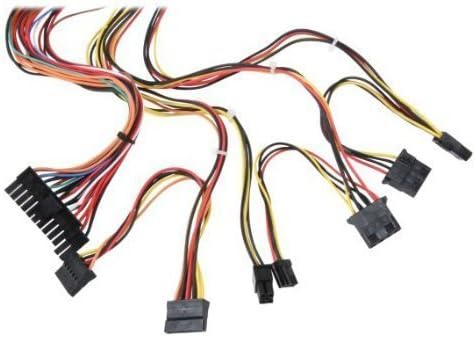
3 -сурет: Аяқталдыview of power supply connectors.

Figure 4: Power supply dimensions and included AC power cord.
5. Пайдалану нұсқаулары
After successful installation, you can power on your computer.
- Ensure the power switch on the rear of the power supply (Figure 2) is in the "ON" (I) position.
- Компьютер корпусындағы қуат түймесін басыңыз.
- The power supply will provide stable power to your system components.
- To power off, shut down your operating system normally. For complete power disconnection, switch the power supply to the "OFF" (O) position and unplug the AC cord.
6. Техникалық қызмет көрсету
Тұрақты техникалық қызмет көрсету қуат көзінің ұзақ қызмет етуі мен оңтайлы өнімділігін қамтамасыз етуге көмектеседі.
- Тазалау: Periodically clean dust from the power supply's fan and vents using compressed air. Ensure the power supply is unplugged before cleaning.
- Ауа шығыны: Ensure that the computer case has adequate airflow and that the power supply's fan is not obstructed.
- Кабельдің тұтастығы: Periodically check all power cables for secure connections and signs of wear or damage.
7. Ақаулықтарды жою
Қуат көзіне қатысты мәселелерге тап болсаңыз, келесі жалпы ақауларды жою қадамдарын қараңыз:
- Қуат жоқ:
- Айнымалы ток қуат сымының қуат көзіне де, қабырға розеткасына да мықтап қосылғанын тексеріңіз.
- Ensure the power switch on the rear of the power supply is in the "ON" (I) position.
- Басқа құрылғыны қосу арқылы қабырға розеткасының жұмыс істеп тұрғанын тексеріңіз.
- Check all internal power connections (20/24-pin ATX, 4-pin +12V, peripheral connectors) are firmly seated.
- Жүйе тұрақсыздығы/кездейсоқ өшірулер:
- This could indicate an overloaded or failing power supply. Ensure your system's power requirements do not exceed the PS480D's 480W capacity.
- Check for proper ventilation and ensure the power supply fan is spinning. Overheating can cause instability.
- Ерекше шу:
- A loud fan noise might indicate dust buildup or a failing fan bearing. Clean the fan as described in the Maintenance section.
If problems persist after attempting these steps, contact Logisys customer support or a qualified technician.
8. Техникалық сипаттамалар
| Ерекшелік | Техникалық сипаттама |
|---|---|
| Бренд | Logisys |
| Үлгі нөмірі | PS480D |
| Шығу Wattage | 480 Вт |
| Форма факторы | ATX |
| Өлшемдері (LxWxH) | 6" L x 5.5" Е x 3.25" H (15.24 x 13.97 x 8.25 см) |
| Элемент салмағы | 2.06 фунт (0.93 кг) |
| Негізгі тақта қосқышы | 1x 20+4 Pin ATX |
| CPU қуат коннекторы | 1x 4 Pin +12V |
| Standard Drive Connectors | 4x 4 Pin (Molex) |
| FDD/ZIP Connectors | 1x 4 Pin 3.5" |
| Сериялық ATA қосқыштары | 1x SATA |
| Салқындату әдісі | Ауа |
| Қорғаныстар | Көлемінен жоғарыtage Қорғау, Қысқа тұйықталудан қорғау |
| Сертификаттар | FCC part 15J class B, CISPR 22, UL 1950, CSA 22.2 LEVEL 3 |
9. Кепілдік және қолдау
For warranty information, technical support, or service inquiries, please refer to the official Logisys webсайтына өтіңіз немесе тұтынушыларға қызмет көрсету бөліміне хабарласыңыз. Сатып алуды растау ретінде сатып алу түбіртегіңізді сақтаңыз.