
1. Кіріспе
This manual provides essential instructions for the safe and efficient operation, setup, and maintenance of your Ohaus ES50R ES Industrial Bench Scale. The Ohaus ES50R is designed for industrial weighing applications, offering a capacity of 50 kg (110 lb) with a readability of 20 g (0.05 lb). Please read this manual thoroughly before using the scale to ensure proper functionality and to prevent damage.
2. Қауіпсіздік туралы ақпарат
Әрқашан келесі қауіпсіздік шараларын сақтаңыз:
- Таразыны оның ең жоғары сыйымдылығы 50 кг (110 фунт) артық жүктемеңіз.
- Ensure the scale is placed on a stable, level surface to achieve accurate readings.
- Operate the scale only with the specified 120 V power supply.
- Таразыны шектен тыс температураға, ылғалдылыққа немесе тікелей күн сәулесінің әсеріне ұшыратпаңыз.
- Таразыны суға немесе басқа сұйықтықтарға батырмаңыз.
- Keep the scale clean and free from dust and debris.
- Only qualified personnel should perform repairs or maintenance beyond routine cleaning.
3. Пакет мазмұны
Орамнан шығарған кезде барлық компоненттердің бар екенін тексеріңіз:
- Ohaus ES50R ES Industrial Bench Scale unit
- Power Adapter (for 120 V operation)
- Пайдаланушы нұсқаулығы (бұл құжат)
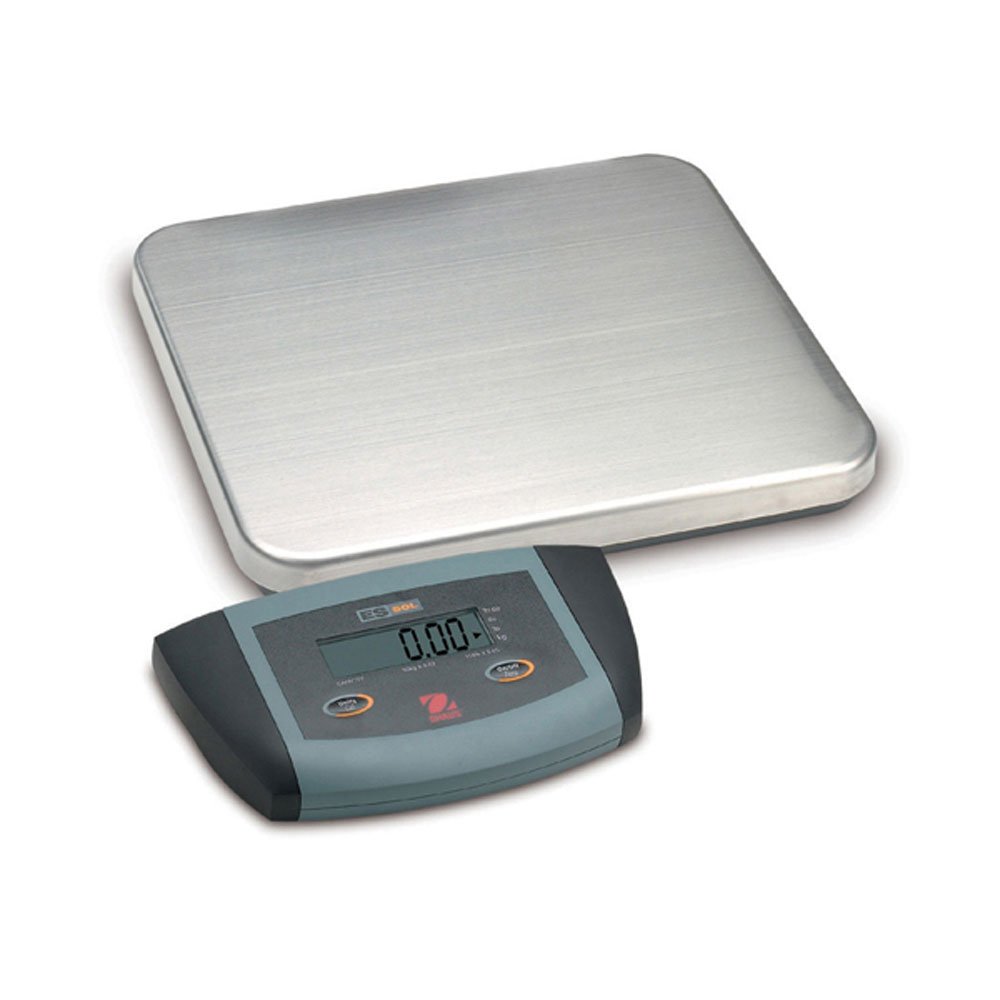
1-сурет: Ohaus ES50R ES Industrial Bench Scale. This image shows the complete bench scale unit, including the weighing platform and the display unit.
4. Орнату
- Қаптаманы ашу: Қаптамадан барлық компоненттерді мұқият алып тастаңыз. Болашақта тасымалдау немесе сақтау үшін қаптаманы сақтаңыз.
- Орналастыру: Place the scale on a firm, level, and stable surface, free from vibrations, drafts, and rapid temperature changes. Ensure adequate space around the scale for safe operation.
- Қуат қосылымы: Connect the power adapter to the scale's power input port. Plug the adapter into a standard 120 V AC power outlet.
- Бастапқы қуат қосулы: түймесін басыңыз ҚОСУ/ӨШІРУ button to power on the scale. The display will perform a self-test and then show "0.00" or "0.0".
- Нивелирлеу: If your scale includes adjustable feet, rotate them until the bubble in the spirit level (if present) is centered.
5. Пайдалану нұсқаулары
5.1 Негізгі салмақ өлшеу
- Ensure the scale is powered on and the display shows "0.00" or "0.0".
- Place the item to be weighed gently in the center of the weighing platform.
- Wait for the display to stabilize. The stable weight reading will be shown on the large LCD display.
- Remove the item from the platform. The display should return to zero.
5.2 Шарап функциясы
Ыдыс функциясы контейнердің салмағын алып тастауға мүмкіндік береді, сондықтан тек ішіндегісінің таза салмағы көрсетіледі.
- Таразы платформасына бос ыдысты салыңыз.
- түймесін басыңыз ТАРА button. The display will reset to "0.00" or "0.0", indicating the container's weight has been tared.
- Add the material to be weighed into the container. The display will show the net weight of the material.
- To clear the tare, remove the container from the platform and press the ТАРА түймесін қайтадан басыңыз.
5.3 Арнайы мүмкіндіктер
- Автоматты өшіру: The scale is equipped with an auto shut-off feature to conserve power. If no activity is detected for a set period, the scale will automatically turn off.
- Үлкен дисплей: The LCD display provides clear and easy-to-read weight indications.
- Қолмен өшіру: To manually turn off the scale, press and hold the ҚОСУ/ӨШІРУ түймесін дисплей сөнгенше басыңыз.
6. Техникалық қызмет көрсету
6.1 Тазалау
To maintain accuracy and prolong the life of your scale:
- Disconnect the scale from the power supply before cleaning.
- Wipe the scale surfaces with a damp шүберек пен жұмсақ жуғыш зат.
- Абразивті тазартқыштарды, еріткіштерді немесе қатты химиялық заттарды қолданбаңыз.
- Ensure no liquid enters the scale's internal components.
- Dry the scale thoroughly after cleaning.
6.2 Калибрлеу
Regular calibration ensures the accuracy of your scale. Refer to the full technical manual or contact Ohaus customer support for detailed calibration procedures. Calibration typically requires certified weights.
7. Ақаулықтарды жою
| Мәселе | Ықтимал себебі | Шешім |
|---|---|---|
| Масштаб қосылмайды. | Қуат көзі жоқ; ақаулы қуат адаптері. | Check power connection and outlet. Ensure power adapter is functioning correctly. |
| Дәл емес оқулар. | Scale not level; unstable surface; overload; calibration required. | Ensure scale is level and on a stable surface. Do not exceed capacity. Perform calibration if necessary. |
| Display shows "Err" or error code. | Overload; internal malfunction. | Remove weight from platform. If error persists, power cycle the scale. If still present, contact customer support. |
| Auto shut-off too soon/not at all. | Auto shut-off settings. | Refer to the full technical manual for adjusting auto shut-off settings, if available. |
8. Техникалық сипаттамалар
| Ерекшелік | Мәлімет |
|---|---|
| Үлгі | ES50R |
| Бренд | Охаус |
| Сыйымдылығы | 50 кг / 110 фунт |
| Оқуға қабілеттілік | 20 г / 0.05 фунт |
| Дисплей түрі | LCD (Large Display) |
| Арнайы мүмкіндіктер | Auto Shut Off, Manual Shutdown |
| Форма факторы | Орындық шкаласы |
| Нәр беруші | 120 V AC (via adapter) |
| Өнім өлшемдері | 15 x 13 x 5.5 дюйм |
| Элемент салмағы | 9.64 фунт |
| Өндіруші | COLE-PARMER |
9. Кепілдік
The Ohaus ES50R ES Industrial Bench Scale comes with a 1 жылдық кепілдік from the date of purchase. This warranty covers defects in materials and workmanship under normal use. It does not cover damage resulting from misuse, accident, unauthorized modification, or operation outside the specified environmental and electrical limits. For warranty claims, please retain your proof of purchase and contact Ohaus customer support.
10. Тұтынушыларға қолдау көрсету
For technical assistance, service, or to inquire about replacement parts, please contact Ohaus customer support. Visit the official Ohaus website for the most up-to-date contact information and additional resources.
Ескерту: Always provide your product model number (ES50R) and serial number (if applicable) when contacting support.