
Кіріспе
This manual provides essential instructions for the setup, operation, maintenance, and troubleshooting of your Lowrance iFinder Expedition C Plus Waterproof Hiking GPS. Designed for outdoor navigation, this 16-channel handheld GPS unit features a color display, electronic compass, barometric altimeter, and MP3 player capabilities. Please read this manual thoroughly to ensure proper use and to maximize the performance of your device.
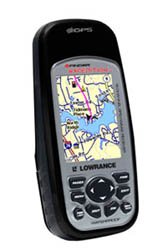
Image of the Lowrance iFinder Expedition C Plus handheld GPS unit, showcasing its color display and button layout.
Орнату
- Батареяны орнату: Open the battery compartment cover on the back of the unit. Insert the required batteries (not included) according to the polarity indicators. Close the cover securely to maintain the waterproof seal.
- Memory Card (MMC/SD) Installation: Locate the memory card slot. Insert the provided MMC/SD memory card, ensuring it is correctly oriented. This card is essential for storing additional maps and data.
- Бастапқы қосу: Press and hold the power button until the device screen illuminates. Follow any on-screen prompts for initial setup, such as language selection and time zone.
- MapCreate USA Topo Software Installation: For custom, high-detail mapmaking, install the exclusive MapCreate USA Topo mapping software on your personal computer. Use the provided MMC/SD card reader with a USB connector to transfer maps to your device.
Пайдалану нұсқаулары
Негізгі навигация
- GPS сигналын алу: For optimal performance, use the device outdoors with a clear view of the sky. The 16-channel GPS receiver will automatically acquire satellite signals.
- Карта Viewing: Use the directional pad to pan across the map. Zoom in and out using the dedicated zoom buttons. The 2.83-inch diagonal color TFT display with 320 x 240 resolution provides clear map details.
- Waypoint Creation: Mark your current location as a waypoint by pressing the 'Mark' button. You can name and save these points for future reference.
Қосымша мүмкіндіктер
- Scout Mode: Activate 'Scout Mode' to mark area perimeters and create custom borders on your map. This is useful for defining hunting grounds, property lines, or exploration areas.
- Электрондық компас: The built-in electronic compass provides accurate heading information even when stationary. Calibrate the compass periodically as instructed on-screen.
- Барометрлік биіктік өлшегіш: The integrated barometric altimeter provides precise altitude readings and can track changes in atmospheric pressure, useful for weather forecasting.
- MP3 ойнатқышы: The device includes MP3 player capabilities. Load your favorite audio files onto the MMC/SD card to enjoy music during your expeditions.
- Микрофон: Utilize the built-in microphone for voice notes or other audio recordings.
Техникалық қызмет көрсету
- Тазалау: Құрылғыны жұмсақ шүберекпен тазалаңыз, damp cloth. Avoid abrasive cleaners or solvents that could damage the screen or casing.
- Су өткізбейтін күтім: While the iFinder Expedition C Plus is waterproof, ensure all port covers and the battery compartment are securely closed before exposure to water. Do not submerge the device beyond its rated depth or for extended periods.
- Сақтау орны: Ұзақ уақыт бойы пайдаланбаған кезде, ағып кетпеу үшін батареяларды алып тастаңыз. Құрылғыны салқын, құрғақ жерде, тікелей күн сәулесінен және төтенше температурадан алыс жерде сақтаңыз.
- Бағдарламалық құрал жаңартулары: Lowrance-ті мезгіл-мезгіл тексеріп отырыңыз webоңтайлы өнімділікті және жаңа мүмкіндіктерге қол жеткізуді қамтамасыз ету үшін микробағдарлама жаңартуларына арналған сайт.
Ақаулықтарды жою
- Құрылғы қосылмаған:
- Check battery orientation and ensure they are fresh.
- Ensure the battery compartment cover is fully closed.
- GPS сигнал қабылдамайды:
- Ашық жерге көшіңіз view аспанның.
- Құрылғыға жерсеріктерді алу үшін бірнеше минут беріңіз.
- Screen Issues (Dim/Unresponsive):
- Артқы жарық параметрлерін реттеңіз.
- Perform a soft reset (refer to the device's on-screen menu for instructions).
- Map Data Not Displaying:
- Ensure the MMC/SD card is properly inserted.
- Verify that map files are correctly loaded onto the memory card using MapCreate USA Topo software.
Техникалық сипаттамалар
| Ерекшелік | Мәлімет |
|---|---|
| Үлгі нөмірі | 112-87 |
| Бренд | Лоуренс |
| GPS арналары | 16-арна |
| Дисплей түрі | Color TFT with white LED backlight |
| Экран өлшемі | 2.83 дюйм (диагональды) |
| Дисплей ажыратымдылығы | 320 x 240 пиксель |
| Өлшемдері (ені x Y x D) | 5.6 x 2.5 x 1.2 дюйм (14.2 x 6.35 x 3.05 см) |
| Салмағы | 8.7 ounces (0.25 kg) / 1.11 kg (shipping weight) |
| Адам интерфейсін енгізу | Микрофон |
| Жад картасын қолдау | MMC/SD |
| UPC | 042194528304 |
Кепілдік туралы ақпарат
Warranty details for the Lowrance iFinder Expedition C Plus are typically included with the product packaging or available on the official Lowrance website. Please refer to these resources for specific terms, conditions, and registration procedures.
Қолдау
For further assistance, technical support, or to download the latest software updates, please visit the official Lowrance website. You may also find FAQs and additional resources there to help you with your iFinder Expedition C Plus GPS unit.