
1. Қаттыview
The Canon PowerShot SD450 Digital ELPH camera is a compact digital camera designed for ease of use and high-quality imaging. It features a 5.0-megapixel sensor, a 3x optical zoom lens, and a 2.5-inch LCD display. The camera incorporates Canon's DIGIC II processor for efficient image processing and offers various shooting modes to suit different photographic situations.

1.1-сурет: Алдыңғы view of the Canon PowerShot SD450 Digital ELPH camera with its lens retracted.
2. Қорапта не бар
Пакетте келесі элементтердің барлығы бар екенін тексеріңіз:
- PowerShot SD450 body
- Lithium battery pack NB-4L
- Battery charger CB-2LV
- 16 MB SD memory card SDC-16M
- Wrist strap WS-600
- Сандық камера шешімі CD-ROM
- USB interface cable IFC-400PCU
- Audio-video cable AVC-DC300
3. Орнату
3.1. Батареяны зарядтау
- Insert the Lithium battery pack NB-4L into the battery charger CB-2LV.
- Зарядтағышты розеткаға қосыңыз. Зарядтау индикатор шамы жанады.
- Once charging is complete, the indicator light will change or turn off. Remove the battery.
3.2. Батарея мен SD картасын салу
- Камераның төменгі жағында орналасқан батарея/карта бөлімінің қақпағын ашыңыз.
- Insert the charged battery pack into the compartment, ensuring correct orientation.
- Insert the SD memory card into the card slot until it clicks into place.
- Бөлменің қақпағын мықтап жабыңыз.
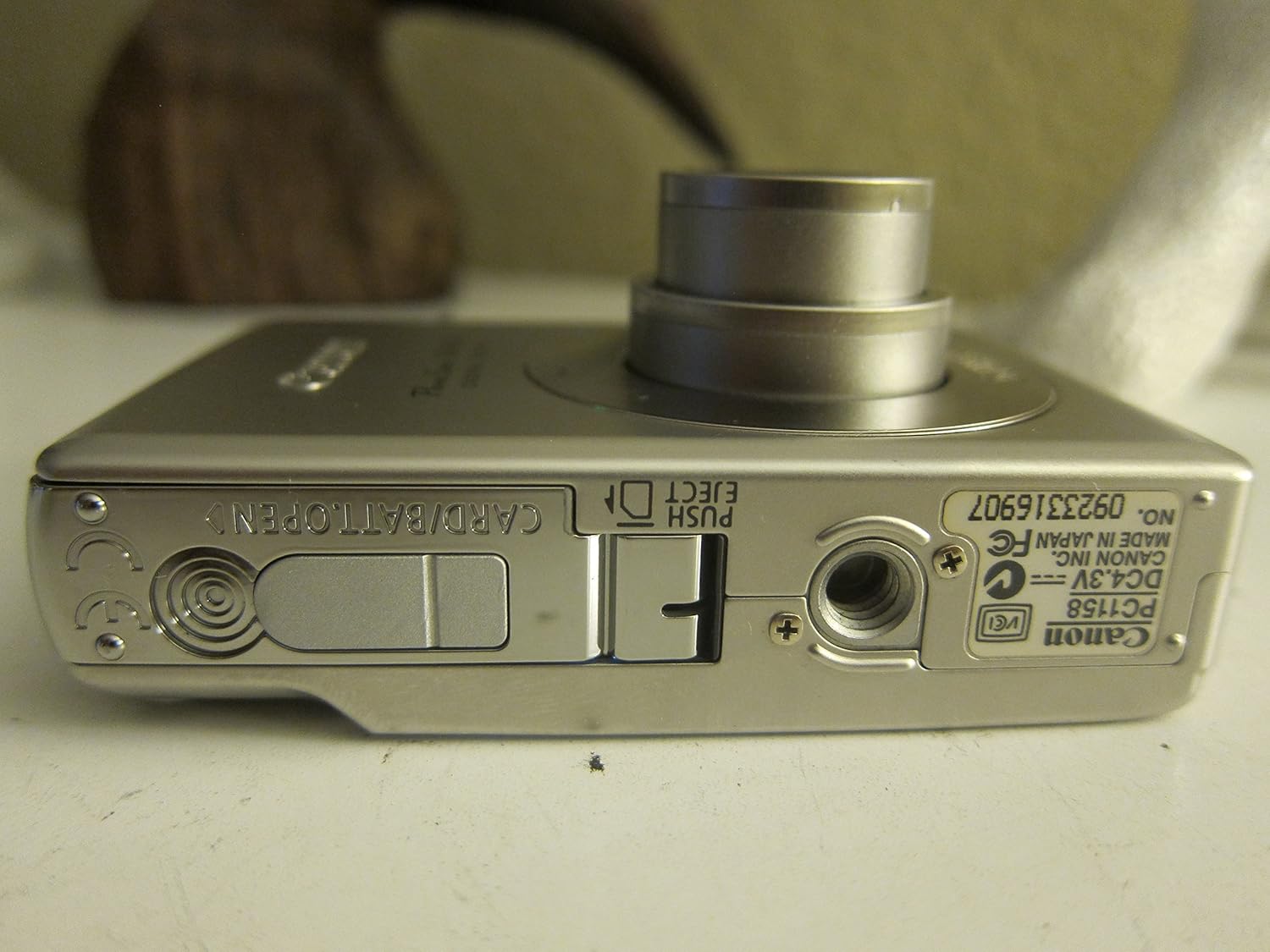
3.1-сурет: Төменгі view of the camera, illustrating the battery and SD card compartment.
3.3. Бастапқы қуат қосу және негізгі параметрлер
- түймесін басыңыз ҚОСУ/ӨШІРУ камераны қосу үшін түймешік.
- Күнді, уақытты және тілді орнату үшін экрандағы нұсқауларды орындаңыз.

3.2-сурет: Жоғарғы view камераның қуат түймесін және ысырманы босатуды бөлектеп көрсетеді.
4. Камераны пайдалану
4.1. Негізгі фотосурет
- Қуатты қосу/өшіру: түймесін басыңыз ҚОСУ/ӨШІРУ түймесі.
- Суретке түсіру: Фокустау үшін ысырма түймесін жартылай басыңыз, содан кейін суретке түсіру үшін толығымен басыңыз.
- Масштабтау: 3x оптикалық масштабтауды реттеу үшін ысырма түймесінің айналасындағы масштабтау тұтқасын пайдаланыңыз.

4.1-сурет: Алдыңғы view of the camera with the optical zoom lens extended.
4.2. Түсіру режимдері
The PowerShot SD450 offers various shooting modes to optimize settings for different scenes. Rotate the mode dial to select:
- Автоматты: Camera automatically sets optimal exposure and focus.
- Нұсқаулық: Allows for more control over settings like white balance and color tones (black and white, sepia, vivid, neutral).
- Портрет: Blurs the background to emphasize the subject.
- Пейзаж: Ensures sharp focus on distant subjects.
- Night Snapshot: For shooting in low light conditions.
- Көрініс режимдері: Includes specific settings for Kids & Pets, Foliage, Fireworks, Snow, Underwater, Beach, and Indoor.
- Менің түстерім: Түсті ауыстыру немесе теңшелетін түс сияқты арнайы эффектілерді тікелей камерада қолданыңыз.
4.3. Focusing and Exposure
- AiAF: The 9-point Artificial Intelligence Auto Focus system automatically focuses on subjects, even if off-center.
- Экспозицияны бақылау: Select from Evaluative, Center-weighted, or Spot metering.
- ISO сезімталдығы: Adjustable to Auto, 50, 100, 200, or 400 to control light sensitivity.
4.4. Бейне жазу
The camera can record high-quality movies:
- Шешімдер: VGA (640x480) or QVGA (320x240) at 30 or 15 frames per second.
- Fast Frame Rate Movie Mode: Records at 60 frames per second for slow-motion playback.
- Compact Movie Mode (QQVGA): 160x120 at 15 frames per second, suitable for email sharing.
- Continuous filming is available until the file size reaches 1 GB or 60 minutes.
4.5. Ойнату және қайталауview
Қайтаview your photos and videos:
- түймесін басыңыз Ойнату түймесі.
- Use the directional pad to navigate through images and videos.
- Intelligent Orientation Sensor: Automatically rotates stored images for correct playback when the camera is rotated.
- Slideshow Functions: Create impressive slideshows with transition effects directly on the camera.

4.2-сурет: Артқы view of the camera, showing the LCD display during image playback.
4.6. Printing Images
The PowerShot SD450 supports direct printing:
- ПиктБридж: Connect directly to PictBridge-compatible printers (e.g., Canon PIXMA printers) for printing without a PC.
- Басып шығару/Бөлісу түймесі: Simplifies direct printing and image uploading to Windows XP or Mac OS X.
5. Техникалық қызмет көрсету
5.1. Камераны тазалау
- Камера корпусын тазалау үшін жұмсақ, құрғақ шүберекті пайдаланыңыз.
- For the lens and LCD screen, use a lens cleaning cloth and specialized cleaning solution if necessary. Avoid harsh chemicals.
5.2. Батареяны күту
- Батареяларды пайдаланбаған кезде салқын, құрғақ жерде сақтаңыз.
- Батареяның қызмет ету мерзімін ұзарту үшін оны жиі толық зарядсыздандырудан аулақ болыңыз.
- Recharge the battery using only the provided Canon charger.
5.3. Сақтау
- Камераны ұзақ уақыт сақтаған кезде батареяны шығарып алыңыз.
- Store the camera in a protective case to prevent dust and scratches.
6. Ақаулықтарды жою
| Мәселе | Шешім |
|---|---|
| "Memory Error" message appears. |
|
| Суреттер бұлыңғыр. |
|
| Flash is too strong or washes out subjects. |
|
| Батарея тез бітеді. |
|
| Камера қосылмайды. |
|
7. Техникалық сипаттамалар
| Бренд | Canon |
| Модель атауы | Canon PowerShot SD450 |
| Тиімді тұрақты ажыратымдылық | 5 мегапиксель |
| Оптикалық масштабтау | 3x |
| Экран өлшемі | 2.5 дюйм |
| Кескінді тұрақтандыру | Сандық, оптикалық |
| ISO диапазоны | Автоматты, 50, 100, 200, 400 |
| Минималды ысырма жылдамдығы | 15 секунд |
| Максималды ысырма жылдамдығы | 1/1500 секунд |
| Бейне түсіру рұқсаты | SD VGA 480p |
| Бейне түсіру пішімі | AVI |
| File Формат | JPEG, RAW |
| Өлшемдері (L x W x H) | 3.39 x 0.87 x 2.13 дюйм |
| Элемент салмағы | 5.44 унция |
| Түс | Күміс |
| Автоматты таймер бар | Иә |
| Суға төзімділік деңгейі | Суға төзімді емес |
8. Кепілдік және қолдау
Кепілдік туралы толық ақпарат алу үшін өніммен бірге берілген кепілдік картасын қараңыз немесе Canon ресми веб-сайтына кіріңіз website. The camera comes bundled with Canon software (ZoomBrowser EX 5.5, PhotoRecord 2.2, ImageBrowser 5.5, PhotoStitch 3.1, Movie Edit Task) for image management and editing. Purchasers are also eligible for membership to Canon iMAGE Gateway for additional support and services.
For technical support, driver downloads, or service inquiries, please visit the official Canon support webсайтына немесе Canon тұтынушыларға қызмет көрсетуге хабарласыңыз.