
1. Кіріспе
This manual provides essential information for the proper setup, operation, and maintenance of your Coby DVD-527 5.1 Channel Progressive Scan DVD Player. Please read this manual thoroughly before using the device to ensure optimal performance and safety. The Coby DVD-527 features a super-slim design, 5.1 channel audio output, and progressive scan video output for enhanced picture quality on compatible televisions.
2. Қауіпсіздік туралы ақпарат
- Қуат көзі: Қуат көзінің дыбыс деңгейіне сәйкес келетініне көз жеткізіңізtagқұрылғыда көрсетілген талаптар.
- Желдету: Желдету саңылауларын жаппаңыз. Қызып кетудің алдын алу үшін дұрыс ауа ағыны үшін құрылғының айналасында жеткілікті орын қалдырыңыз.
- Ылғалдылық: Құрылғыны жаңбырға, ылғалға немесе шамадан тыс ылғалдылыққа ұшыратпаңыз.
- Тазалау: Unplug the unit from the power outlet before cleaning. Use a soft, dry cloth.
- Қызмет көрсету: Бұл өнімге өзіңіз қызмет көрсетуге тырыспаңыз. Барлық қызмет көрсетуді білікті қызмет көрсетуші қызметкерлерге тапсырыңыз.
3. Пакет мазмұны
Барлық элементтер пакетте бар екенін тексеріңіз:
- Coby DVD-527 DVD ойнатқышы
- Толық функцияны қашықтан басқару
- АВ кабелі
- Пайдаланушы нұсқаулығы (бұл құжат)
- Кепілдік туралы ақпарат
4. Өнім аяқталдыview
The Coby DVD-527 DVD Player and its accompanying remote control are designed for ease of use and integration into your home entertainment system.
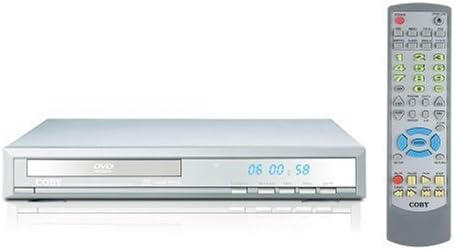
1-сурет: Coby DVD-527 DVD Player (left) and its full-function remote control (right). The DVD player features a slim profile with a disc tray, display screen, and control buttons on the front panel. The remote control includes various buttons for playback, navigation, and special features.
Алдыңғы панельді басқару элементтері
The front panel typically includes the disc tray, power button, play/pause, stop, and eject buttons, along with a digital display showing playback time or status.
Артқы панель қосылымдары
The rear panel houses various audio and video output ports for connecting to your television and audio system.
Қашықтан басқару құралы
The included remote control provides full functionality for operating the DVD player from a distance, including power, playback controls, menu navigation, volume, and special features.
5. Орнату
5.1 Теледидарға қосылу
Келесі бейне қосылу әдістерінің бірін таңдаңыз:
- Component Video Output (Progressive Scan): For the highest quality picture on HD-capable televisions, connect the Y, Pb, and Pr component video outputs from the DVD player to the corresponding inputs on your TV using component video cables.
- RCA бейне шығысы: Connect the yellow RCA video output from the DVD player to the video input on your TV using an RCA video cable.
- S-Video шығысы: Connect the S-Video output from the DVD player to the S-Video input on your TV using an S-Video cable.
5.2 Аудио жүйеге қосылу
Келесі аудио қосылым әдістерінің бірін таңдаңыз:
- 5.1 Dolby Digital Output: For surround sound, connect the 5.1 channel audio outputs (Front Left, Front Right, Center, Surround Left, Surround Right, Subwoofer) from the DVD player to the corresponding inputs on your 5.1 channel receiver or ampқұтқарушы.
- Коаксиалды сандық аудио шығысы: Connect the coaxial digital audio output from the DVD player to the coaxial digital audio input on your receiver or amplifier using a coaxial digital audio cable.
- Оптикалық сандық аудио шығысы: Connect the optical digital audio output from the DVD player to the optical digital audio input on your receiver or amplifier using an optical digital audio cable.
- Аналогтық дыбыс шығысы: Connect the red and white RCA analog audio outputs from the DVD player to the corresponding audio inputs on your TV or stereo system using an RCA audio cable.
5.3 Қуат қосылымы
After all audio and video connections are made, plug the DVD player's power cord into a standard AC power outlet.
6. Пайдалану нұсқаулары
6.1 Негізгі дискіні ойнату
- Теледидарды қосыңыз және DVD ойнатқышы үшін дұрыс кіріс көзін таңдаңыз.
- Press the Power button on the DVD player or remote control to turn on the unit.
- Press the Eject button (▲) on the front panel or remote to open the disc tray.
- Place a compatible disc (DVD, CD, CD-R/RW, MP3) gently into the disc tray with the label side facing up.
- Press the Eject button (▲) again to close the disc tray. The player will begin reading the disc.
- Playback should start automatically. If a disc menu appears, use the navigation buttons on the remote to select your desired option and press Enter.
- Use the Play (▶), Pause (▐▐), Stop (■), Fast Forward (►►), and Rewind (◄◄) buttons on the remote for playback control.
6.2 Арнайы мүмкіндіктер
- Экрандық дисплей: Press the OSD button on the remote to view playback information on your screen.
- Zoom Operation: Use the Zoom button to magnify a portion of the picture.
- Бірнеше Viewбұрыштар: For discs that support it, press the Angle button to switch between different camera angles.
- Субтитрлер: Press the Subtitle button to select available subtitle languages.
- Parental Lock Control: Access the setup menu to configure parental control settings, restricting playback of certain content based on rating.
6.3 Жүйе параметрлері
Press the Setup button on the remote to access the system menu. Here you can adjust video settings (e.g., aspect ratio, progressive scan mode), audio settings, language preferences, and parental control options. Refer to the on-screen menu for detailed navigation.
7. Техникалық қызмет көрсету
7.1 Құрылғыны тазалау
Wipe the exterior of the DVD player with a soft, dry cloth. Do not use liquid cleaners or aerosol sprays, as they may damage the finish or internal components.
7.2 Диск күтімі
Handle discs by their edges. Keep discs clean and free of scratches. Store discs in their cases when not in use to prevent dust and damage.
8. Ақаулықтарды жою
DVD ойнатқышында ақауларға тап болсаңыз, келесі жалпы мәселелер мен шешімдерді қараңыз:
- Қуат жоқ:
• Ensure the power cord is securely plugged into both the DVD player and a working electrical outlet.
• Check if the power outlet is functional by plugging in another device. - Сурет жоқ:
• Verify that the video cables are correctly connected between the DVD player and the TV.
• Ensure your TV is set to the correct input source (e.g., AV1, Component, HDMI).
• Check the TV's picture settings. - Дыбыс жоқ:
• Confirm that audio cables are properly connected to your TV or audio system.
• Check the volume level on both the DVD player and your TV/audio system.
• Ensure your TV/audio system is set to the correct audio input.
• If using digital audio, verify the audio settings in the DVD player's setup menu. - Disc Not Playing / Disc Error:
• Ensure the disc is clean and free of scratches or smudges.
• Make sure the disc is inserted correctly with the label side facing up.
• Verify that the disc format is compatible with the player (DVD, CD, CD-R/RW, MP3). - Қашықтан басқару пульті жұмыс істемейді:
• Check and replace the batteries in the remote control.
• Ensure there are no obstructions between the remote and the DVD player's sensor.
• Point the remote directly at the DVD player.
9. Техникалық сипаттамалар
| Үлгі | DVD-527 |
| Бренд | Коби |
| Өлшемдері (W x D x H) | 11 x 10 x 2 дюйм (шамамен) |
| Салмағы | 7 фунт (шамамен) |
| Тасымалдаушы түрінің үйлесімділігі | DVD, CD, CD-R/RW, MP3 |
| Бейне шығысы | Component Video (Y, Pb, Pr), RCA Video, S-Video |
| Аудио шығысы | 5.1 Channel Dolby Digital, Coaxial Digital, Optical Digital, Analog RCA (L/R) |
| Арнайы мүмкіндіктер | Progressive Scan, Multiple Subtitles, Multiple Viewing Angles, On-Screen Display, Zoom Operation, Parental Lock Control |
| Бейне үйлесімділігі | NTSC/PAL жүйесі |
10. Кепілдік және қолдау
This product is covered by a limited manufacturer's warranty. Please refer to the warranty information card included in your package for specific terms and conditions, including the warranty period and coverage details. Keep your purchase receipt as proof of purchase.
For technical assistance or customer support, please refer to the contact information provided in your warranty documentation or visit the official Coby webең соңғы қолдау ресурстарына арналған сайт.