
Кіріспе
The Melnor 3060 Digital Water Timer Plus is designed to automate your watering schedule, providing convenience and efficient water management for your lawn or garden. This timer allows you to set precise watering times and durations, ensuring your plants receive the right amount of water without constant manual intervention. It features an easy-to-read LCD menu for programming and supports multiple independent watering cycles.
This manual provides detailed instructions for setting up, operating, and maintaining your Melnor 3060 Digital Water Timer Plus. Please read it thoroughly before use to ensure optimal performance and longevity of your device.
Негізгі мүмкіндіктер
- Автоматтандырылған суару: Set and forget, program to automatically start and shut off.
- Оңай бағдарламалау: Features an intuitive LCD menu for straightforward setup.
- Жан-жақты үйлесімділік: Works effectively with low-pressure drip systems and soaker hoses.
- Flexible Scheduling: Program up to 6 independently programmable cycles, allowing watering while away or at night.
- Қолмен жұмыс істеу: Includes an on/off function to use like a standard faucet.
- Additional Outlet: Equipped with a second manual outlet for convenient watering.
Қауіпсіздік туралы ақпарат
ЕСКЕРТУ: Бұл өнім Калифорния штатына қатерлі ісік ауруына шалдығатын стиролды қоса алғанда химиялық заттардың әсерін тигізуі мүмкін. Қосымша ақпарат алу үшін мына сайтқа өтіңіз www.P65Warnings.ca.gov.
For outdoor use only. Do not use this timer indoors or for purposes other than watering.
Орнату
1. Батареяларды орнатыңыз
The Melnor 3060 Digital Water Timer Plus requires two (2) AA batteries (not included) for operation. Ensure batteries are inserted with correct polarity.
- Таймердің артқы жағындағы батарея бөлімін табыңыз.
- Батарея бөлігінің қақпағын ашыңыз.
- Insert two fresh AA alkaline batteries, matching the (+) and (-) terminals correctly.
- Securely close the battery compartment cover to prevent water intrusion.
2. Attach to Faucet
Connect the timer to a standard outdoor hose faucet.
- Кранның өшірілгеніне көз жеткізіңіз.
- Thread the timer's inlet connector onto the faucet. Hand-tighten only to prevent damage.
- Attach your garden hose or watering system to the timer's outlet.
- Slowly turn on the faucet completely. The timer is designed to operate with full water pressure.
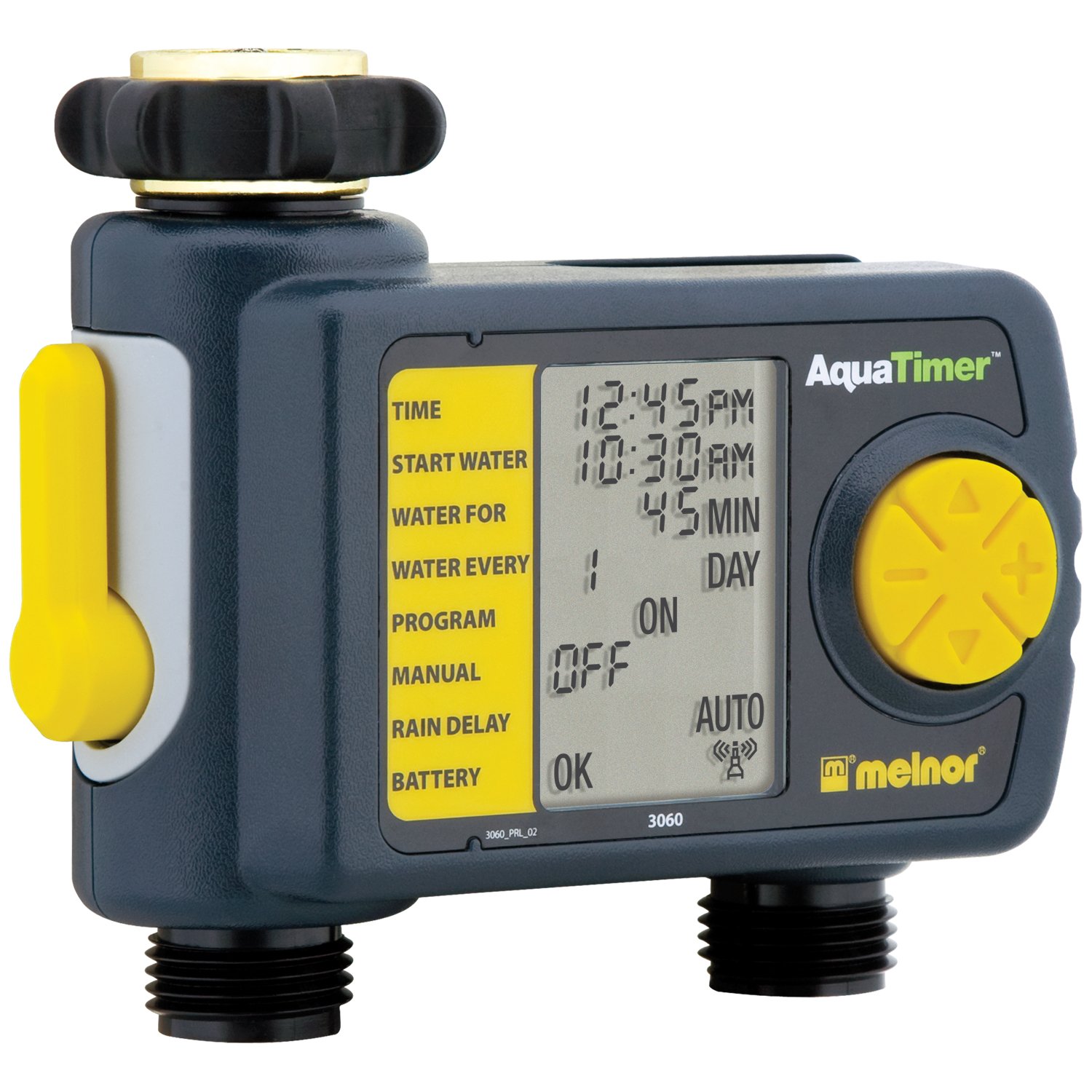
Image: The Melnor 3060 Digital Water Timer Plus, showing its connection points for a faucet and a garden hose.
Пайдалану нұсқаулары
The Melnor 3060 features an LCD display and several buttons for programming. Refer to the on-screen prompts for guidance.
1. Ағымдағы уақытты орнату
- түймесін басыңыз САҒАТТЫ ОРНАТУ түймесі.
- пайдаланыңыз + және - сағат пен минутты реттеу үшін түймелер.
- түймесін басыңыз OK or САҒАТТЫ ОРНАТУ растау үшін қайтадан басыңыз.
2. Program Watering Schedule
The timer allows for up to six independent watering cycles per day. You can also choose from five preset programs.
- түймесін басыңыз БАҒДАРЛАМА бағдарламалау режиміне өту үшін түймесін басыңыз.
- пайдаланыңыз + және - buttons to select a program number (1-6) or a preset option.
- түймесін басыңыз OK таңдауыңызды растау үшін.
- Follow the on-screen prompts to set the:
- Басталу уақыты: When watering begins.
- Ұзақтығы: How long watering will last.
- Жиілік: How often watering occurs (e.g., every day, every other day, specific days of the week).
- Repeat for additional watering cycles as needed.
- Once all programs are set, ensure the timer is in АВТО mode for automatic operation.
3. Қолмен суару
Бағдарламаланған кестеңізге әсер етпестен қолмен суару үшін:
- түймесін басыңыз ҚОСУ/ӨШІРУ түймесі.
- The water will begin to flow.
- Қолмен суаруды тоқтату үшін түймесін басыңыз ҚОСУ/ӨШІРУ button again. The timer will return to its programmed schedule.
4. Using the Second Manual Outlet
The timer includes a second, un-timed manual outlet. This outlet functions like a standard faucet and is not controlled by the timer's programming. Simply attach a hose and open the valve on the timer to use it.
Техникалық қызмет көрсету
- Батареяны ауыстыру: Replace batteries annually or when the low battery indicator appears on the LCD. Always use fresh AA alkaline batteries.
- Қыстау: To prevent damage from freezing, remove the timer from the faucet before the first frost. Store it indoors in a dry, protected area.
- Тазалау: Periodically check the inlet screen for debris and clean if necessary to maintain proper water flow.
Ақаулықтарды жою
| Мәселе | Ықтимал себебі | Шешім |
|---|---|---|
| Таймер суармайды. |
|
|
| Қосылымдардан су ағып жатыр. |
|
|
| Дисплей бос немесе күңгірт. |
|
|
Техникалық сипаттамалар
- Модель нөмірі: 3060 (also referred to as 3100 in some documentation)
- Қуат көзі: 2 x AA сілтілі батареялар (жинаққа кірмейді)
- Өнім өлшемдері: 4.5 x 5.2 x 4.5 дюйм
- Элемент салмағы: 12.8 унция
- Өндіруші: Мелнор
- Суару циклдары: Up to 6 independently programmable cycles
- Алдын ала орнатылған бағдарламалар: 5
Кепілдік туралы ақпарат
The Melnor 3060 Digital Water Timer Plus comes with a Екі жылдық шектеулі кепілдік. This warranty covers defects in materials and workmanship under normal use. For specific terms and conditions, or to make a warranty claim, please refer to the warranty card included with your product or contact Melnor customer service.
Тұтынушыларды қолдау
If you have any questions, require assistance with setup or programming, or encounter any issues not covered in this manual, please contact Melnor Customer Service. Contact information can typically be found on the product packaging or on the official Melnor webсайт.