
1. Кіріспе
This manual provides detailed instructions for the setup, operation, and maintenance of your Koss HG857 Portable CD System. The HG857 is a versatile audio system featuring a CD player, digital AM/FM tuner, and dual cassette decks, designed for both portable use and as a compact stereo system. Please read this manual thoroughly before using your unit to ensure proper operation and to maximize its performance.

1-сурет: Алдыңғы view of the Koss HG857 Portable CD System with the CD compartment open, showing the main unit and detachable speakers.
2. Орнату
2.1 Қаптаманы ашу
Carefully remove all components from the packaging. Ensure you have the main unit, two detachable speakers, the remote control, and this instruction manual. Retain the packaging for future transport or storage.
2.2 Үндеткіштерді қосу
The Koss HG857 features detachable speakers. Connect the speaker wires from each speaker to the corresponding speaker terminals on the rear of the main unit. Ensure correct polarity (red to red, black to black) for optimal sound.

2-сурет: Артқы view of the Koss HG857 system, showing the main unit with detachable speakers connected, highlighting the speaker terminals and power input.
2.3 Құрылғыны қуаттандыру
Айнымалы ток қуаты
Connect the AC power cord to the AC inlet on the rear of the unit and then plug it into a standard AC 120V, 60Hz wall outlet.
Батарея қуаты
For portable use, the unit requires 8 D-size batteries. Open the battery compartment on the bottom of the unit and insert the batteries, observing the correct polarity (+/-) as indicated.
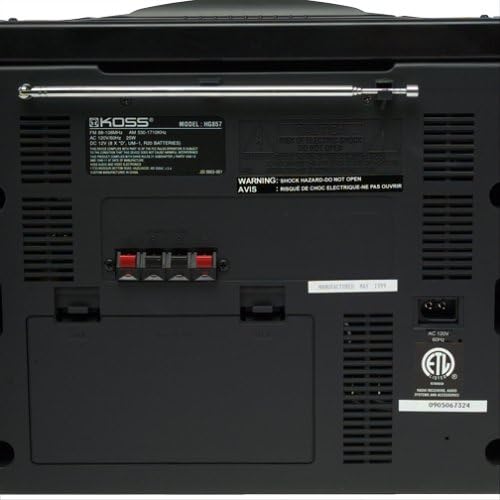
3-сурет: Егжей-тегжейлі view of the Koss HG857 rear panel, showing the AC power input, speaker terminals, and the extendable FM antenna.
2.4 Антеннаны орнату
For FM reception, extend the telescopic antenna fully. For AM reception, the unit uses a built-in ferrite bar antenna; rotate the unit for best reception.
3. Операция
3.1 Негізгі басқару элементтері
- ҚУАТ түймесі: Құрылғыны ҚОСУ немесе ӨШІРУ үшін басыңыз.
- ДЫБЫС ДЕҢГЕЙІ: Rotate to adjust the overall sound level.
- BALANCE бақылауы: Adjusts the balance between the left and right speakers.
- DYNAMIC BASS BOOST (DBB): Activates or deactivates enhanced bass response.
3.2 CD ойнатқышының жұмысы
- CD бөлігінің қақпағын ашыңыз.
- Ықшам дискіні жапсырма бетін жоғары қаратып қойыңыз.
- CD бөлігінің қақпағын жабыңыз.
- түймесін басыңыз CD/AUX CD режимін таңдау үшін түймесін басыңыз.
- түймесін басыңыз ОЙНАТУ/ТОҚТАТУ ойнатуды бастау үшін
- Қолдану ӨТКІЗУ / ІЗДЕУ buttons to navigate tracks or fast forward/rewind.
- КЕСТЕСІ: Allows programming up to 20 tracks in a desired order.
3.3 Радио тюнердің жұмысы
- түймесін басыңыз ТУНЕР button to select AM or FM band.
- пайдаланыңыз РЕТТЕУ станцияны қолмен реттеу үшін түймелер.
- басып тұрыңыз РЕТТЕУ buttons for automatic station search.
- АЛДЫН АЛА ОРНАТУ: Store and recall up to 20 AM/FM stations.
3.4 Кассета палубасымен жұмыс істеу
The unit features dual cassette decks (Deck A and Deck B).
Ойнату
- Кассета есігін ашып, кассета таспасын салыңыз.
- түймесін басыңыз TAPE button to select tape mode.
- түймесін басыңыз ОЙНАУ on either Deck A or Deck B to start playback.
- Қолдану КЕРІ ОРНАТУ, ТЕЗ АЛҒА, және ТОҚТАТУ/ШЫҒАРУ түймелерді қажетінше басыңыз.
Жазылу
You can record from CD, Radio, or Tape A to Tape B.
- Insert a blank, recordable cassette into Deck B.
- Select the desired source (CD, TUNER, or TAPE A).
- түймесін басыңыз ЖАЗУ button on Deck B. Playback from the source will begin automatically.
- түймесін басыңыз ТОҚТАТУ on Deck B to end recording.
3.5 Қашықтан басқару құралы
The included remote control allows convenient operation of most functions from a distance. Ensure the remote has working batteries and is pointed towards the main unit's sensor.
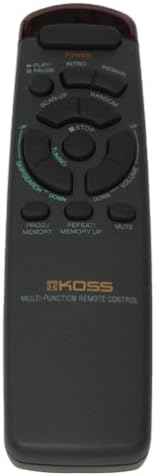
Figure 4: The multi-function remote control for the Koss HG857, showing various buttons for CD, tuner, and tape operations.
3.6 Құлаққап ұясы
A stereo headphone jack is provided for private listening. Plugging in headphones will mute the speakers.
4. Техникалық қызмет көрсету
4.1 Тазалау
Wipe the unit with a soft, dry cloth. Do not use abrasive cleaners or solvents. For the CD lens, use a specialized CD lens cleaner.
4.2 Батареяны ауыстыру
If using battery power, replace all 8 D-size batteries when the unit's performance degrades. Ensure proper polarity.
4.3 CD және кассетаға күтім жасау
- Саусақ іздері мен сызаттардың алдын алу үшін компакт-дискілерді шеттерінен ұстаңыз.
- Store cassettes away from direct sunlight and heat.
- Periodically clean cassette heads with a head cleaner.
5. Ақаулықтарды жою
| Мәселе | Ықтимал себебі | Шешім |
|---|---|---|
| Қуат жоқ | AC cord not plugged in; Batteries depleted or incorrectly inserted. | Check AC connection; Replace batteries, ensuring correct polarity. |
| Дыбыс жоқ | Volume too low; Headphones connected; Speakers not connected properly. | Increase volume; Disconnect headphones; Check speaker connections. |
| CD өткізіп жібереді немесе ойнатылмайды | CD dirty or scratched; CD inserted incorrectly; Unit in wrong mode. | Clean CD; Reinsert CD label side up; Select CD mode. |
| Нашар радио қабылдау | Антенна ұзартылмаған/орналаспаған; Сигнал әлсіз. | Extend and adjust FM antenna; Rotate unit for AM; Try a different location. |
| Кассетаны ойнату мәселелері | Tape tangled or damaged; Heads dirty. | Check tape condition; Clean cassette heads. |
| Қашықтан басқару пульті жұмыс істемейді | Batteries depleted or incorrectly inserted; Obstruction between remote and unit. | Replace remote batteries; Ensure clear line of sight to unit's sensor. |
6. Техникалық сипаттамалар
- Үлгі: HG857
- Қуат көзі: AC 120V, 60Hz; 8 x D-size batteries
- Cd ойнатқышы: Top-loading, 20-track programmable
- Радио тюнер: Digital AM/FM, 20 station presets
- Cassette Decks: Dual cassette, recordable
- Спикерлер: Detachable 3-way speakers with Dynamic Bass Boost
- Қосылу мүмкіндігі: Құлаққаптың стерео ұясы
- Өлшемдері (шамамен): 27.8 x 12.5 x 11.6 дюйм (пакет өлшемдері)
- Салмағы (шамамен): 16.7 фунт (элемент салмағы)
- Өндіруші: Koss Audio & Video
- Бірінші қол жетімді: 4 жылғы 1999 қыркүйек
7. Кепілдік және қолдау
For warranty information and customer support, please refer to the warranty card included with your product or visit the official Koss webсайт. Сатып алуды растау ретінде сатып алу түбіртегіңізді сақтаңыз.
Koss ресми Webсайт: www.koss.com